
August 31, 2025
Question

Temperature sensor not working

  • August 31, 2025
  • 3 replies
  • 755 views

To get my first sensor project done and after selecting my board, I enabled I2C1 which triggered pins PB6 and PB7 as shown below: 
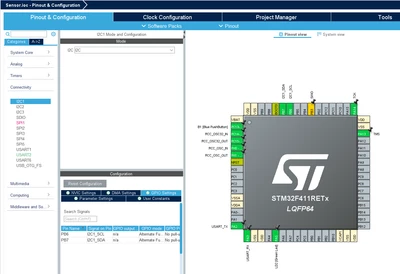
Capture.PNG

Then used code below (in main.c) with the purpose that the LED is on when the temperature is higher than 40 degrees and off otherwise. 
 

#include "main.h"

extern I2C_HandleTypeDef hi2c1; // I2C handle from CubeMX
#define HTU21D_ADDR (0x40 << 1) // 7-bit address shifted for HAL
#define TRIGGER_TEMP_MEASURE_HOLD 0xE3

I2C_HandleTypeDef hi2c1;

UART_HandleTypeDef huart2;

void SystemClock_Config(void);
static void MX_GPIO_Init(void);
static void MX_USART2_UART_Init(void);
static void MX_I2C1_Init(void);

float HTU21D_ReadTemperature(void)
{
	uint8_t cmd = TRIGGER_TEMP_MEASURE_HOLD;
	uint8_t data[2];

	// Send temperature measurement command
	HAL_I2C_Master_Transmit(&hi2c1, HTU21D_ADDR, &cmd, 1, HAL_MAX_DELAY);

	// Receive 2 bytes (temperature)
	HAL_I2C_Master_Receive(&hi2c1, HTU21D_ADDR, data, 2, HAL_MAX_DELAY);

	// Combine and mask status bits
	uint16_t rawTemp = (data[0] << 8) | data[1];
	rawTemp &= 0xFFFC;

	// Convert to Celsius 
	float temp = -46.85 + 175.72 * ((float)rawTemp / 65536.0);

	return temp;
}

int main(void)
{

	HAL_Init();
	SystemClock_Config();
	MX_GPIO_Init();
	MX_USART2_UART_Init();
	MX_I2C1_Init();
	while (1)
	{
		if ( HTU21D_ReadTemperature() > 40.0f)
			HAL_GPIO_WritePin(GPIOA, GPIO_PIN_5, GPIO_PIN_SET); // LED ON
		else
			HAL_GPIO_WritePin(GPIOA, GPIO_PIN_5, GPIO_PIN_RESET); // LED OFF

		HAL_Delay(1000); // check every 1s
	}
}

The wiring is also this way:
PB6 -> Sensor's SCL (there's also a 220 Ohm resister between SCL and MCU 3.3V)
PB7 -> Sensor's SDL (there's also another 220 Ohm resister between SDL and MCU 3.3V)
sensor's GND -> MCU GND
sensor's VCC -> MCU 3.3V

The issue is that the LED is on while the room's temperature is obviously less than 40 degrees!

Any idea where the problem is, please? 

3 replies

Associate II
August 31, 2025

220 ohm is a very small resistor value to act as an I2C-pullup, that could be the issue. However check the return values of HAL_I2C_Transmit and Receive to see if there are any errors and step through the sensor read-function with a debugger to see if the problem is the I2C-communication, data-conversion or something else

August 31, 2025

Are two resistors with the values 1KΩ or 2KΩ fine for that?

Declared globals int res_trans, res_recev; then used: 

res_trans = HAL_I2C_Master_Transmit(...);

res_recev = HAL_I2C_Master_Receive(...);

 and ran through the debugger. Both res_trans, res_recev are 1. So there's an error, yeah?

Do you mean the HTU21D_ReadTemperature by the read-function?


My sensor's mark is HUT2X

Associate II
August 31, 2025

Yes, if the return value is 1 there's an error; you can step inside the I2C-functions in the debugger and will probably see a timeout due to the low pullup value. It's good practice to always check return values of functions (and print them in case of errors) because it makes troubleshooting much easier. For the recommended pullup value look into the datasheet of the temperature sensor, there will probably be a schematic-recommendation; normally 4,7k is ok for I2C. Also an easy way to test the connection between an STM32 and an I2C-device is the function HAL_I2C_IsDeviceReady

AScha.3
Super User
August 31, 2025

1. your pullups 220r are way to low value, try 4k7  .

2. whats the value, the sensor is giving ?

"If you feel a post has answered your question, please click ""Accept as Solution""."
August 31, 2025

1- Wdym by 4k7?

2- Do you mean the return values of HAL_I2C_Master_Transmit/HAL_I2C_Master_Receive functions? 

AScha.3
Super User
August 31, 2025

1.  4k7 = 4.7 kohm ( 2 k maybe also ok, but still little bit low value; depends on sensor, what is allowed)

2. just the value, the sensor is telling;  receive -> data = ?

to see, whats the value from sensor (valid, or just error, nothing useful received...everything is possible.)


"If you feel a post has answered your question, please click ""Accept as Solution""."
Technical Moderator
September 2, 2025

Hello @unknown 

Could you please share the device datasheet?

"To give better visibility on the answered topics, please click on ""Accept as Solution"" on the reply which solved your issue or answered your question.Saket_Om"