

WebSocket Server on STM32H7xx with Azure RTOS and NetXDuo — A Practical Guide
Hello everyone,
If you've ever tried running Azure RTOS with an HTTP server, an FTP server, multiple TCP sockets, and a handful of threads on a standard NUCLEO-144 board, you know exactly where this is going.
You hit the memory wall.
1 MB of internal RAM sounds like a lot — until ThreadX, NetXDuo, and FileX each want their own byte pools, packet pools, and thread stacks. Add an HTTP server for a web interface, an FTP server for remote file access, and you're fighting for every kilobyte before your actual application even starts. And storage? The NUCLEO boards don't have any. If you want to serve a web dashboard or datalog sensor readings, you're out of luck.
Then there's the documentation gap. ST provides excellent examples for HTTP servers with NetXDuo. FTP gets reasonable coverage. But WebSockets? Real-time bidirectional communication between a browser and your STM32? Good luck finding an ST example for that. And it's the one thing that turns a static web page into a live control interface.
This post covers how I solved both problems — the memory wall and the WebSocket gap — with a custom memory expansion shield and a from-scratch RFC 6455 WebSocket server running on ThreadX and NetXDuo. After some time tinkering, I would like to let
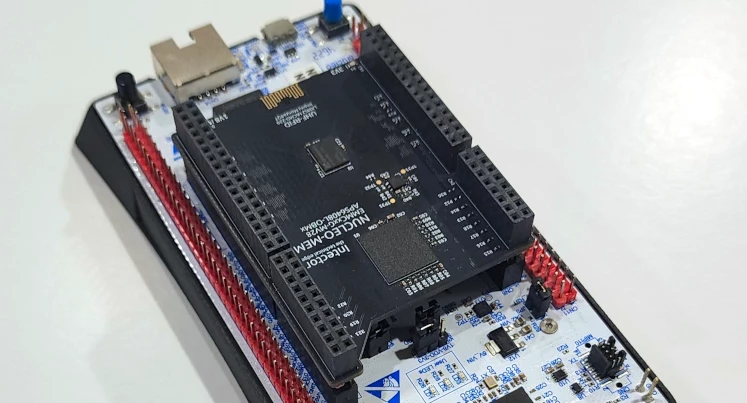
The Hardware: NUCLEO-MEM
Rather than keep working around the NUCLEO-144 limitations, I designed a purpose-built memory expansion shield that plugs directly into the Morpho headers.
[INSERT IMAGE: pic_01.png — PCB front and back]
The NUCLEO-MEM carries:
- 8 GB eMMC (Kingston EMMCxxG-MV28) — connected via SDMMC1 (8-bit). Stores the web interface files (HTML, CSS, JavaScript) and provides gigabytes of datalogging capacity.
- 8 MB Octal SPI PSRAM (AP Memory APS6408L-OBM) — connected via OCTOSPI1. This is the memory that Azure RTOS actually needs to breathe.
- UHF RFID (Impinj Monza4QT) — unique device identification at up to 10 meters.
In the photos you'll also see an SSD1306 OLED display (128×32, I2C) — that's a separate module plugged into the NUCLEO-MEM headers, not part of the shield itself. It shows network status, IP address, and runtime information.
The NUCLEO-MEM requires an MCU with an OCTOSPI peripheral for the PSRAM interface. It has been validated on the NUCLEO-H723ZG (STM32H723, Cortex-M7, 550 MHz). MCUs without OCTOSPI — like the STM32H753 with its single QUADSPI limited to flash memory — can't use the PSRAM portion. For those boards, I have an earlier EMMCxxG-MV28 shield that carries only the eMMC storage — no PSRAM, but it gives any MCU with an SDMMC peripheral access to 8 GB of FAT-based file storage for datalogging, web hosting, or automated data offload via FTP.
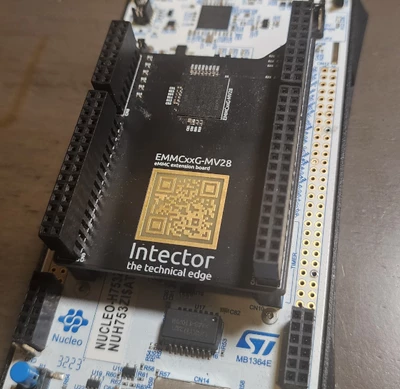
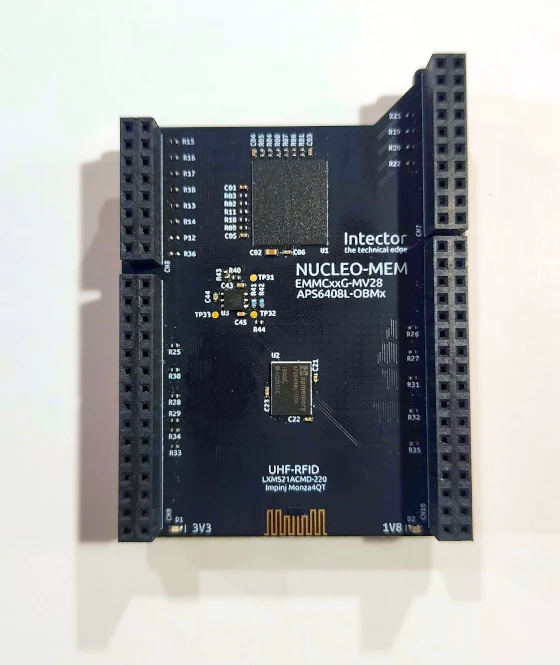
Designed in Altium Designer, four-layer PCB, all 0402 passives, impedance-controlled memory traces.
Architecture: Three Servers Working Together
The firmware runs three network servers simultaneously on ThreadX, each with a specific role:
- HTTP Server (port 80) — Serves the web dashboard from eMMC via FileX. Static files — HTML, CSS, JavaScript, fonts. This is NetXDuo's built-in nx_web_http_server, well-documented by ST.
- FTP Server (port 21) — Remote file access to the eMMC filesystem. Upload updated web files, download logged data, all without reflashing the MCU. Also built into NetXDuo.
- WebSocket Server (port 8080) — Real-time bidirectional JSON communication. This is the piece ST doesn't provide. Built from scratch on top of NetXDuo's TCP socket API using RFC 6455.
HTTP delivers the user interface. FTP maintains it. WebSocket makes it live.
When a user opens the dashboard in a browser, the HTTP server delivers the HTML, CSS, and JavaScript from eMMC. The JavaScript immediately opens a WebSocket connection back to the board on port 8080. From that point on, the browser and the MCU are talking directly — telemetry flows from the board to the browser (configurable rate, ~1 Hz in the demo), and commands flow from the browser to the board instantly. No polling, no page refreshes.
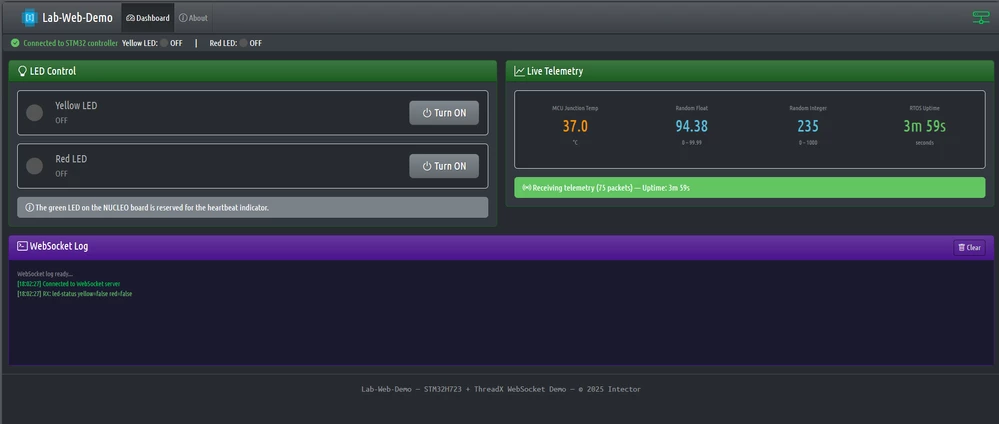
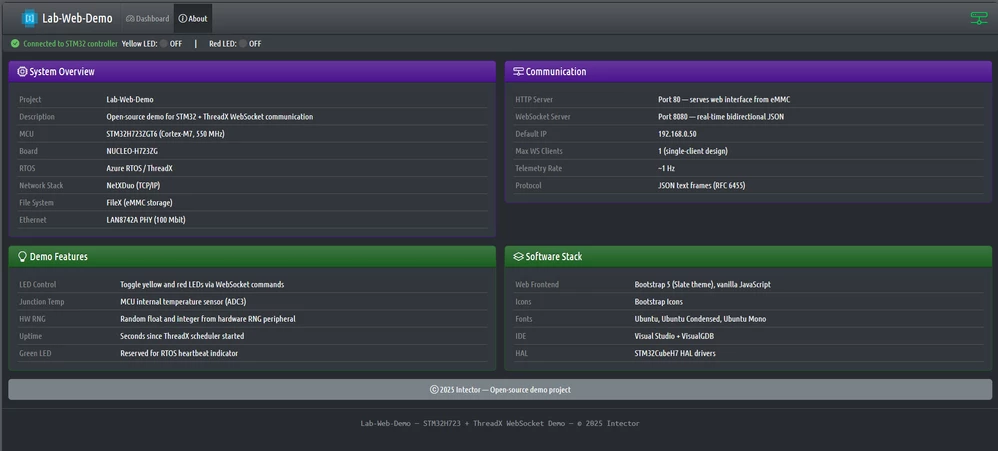
This same WebSocket architecture scales from simple demos to real hardware testing. The screenshots above show the demo project (LED control + telemetry). The screenshot below shows the same platform driving a wireless power transfer test bench — a 24-40V boost converter with a full H-bridge generating 900VAC at 160kHz for magnetic field power transfer.
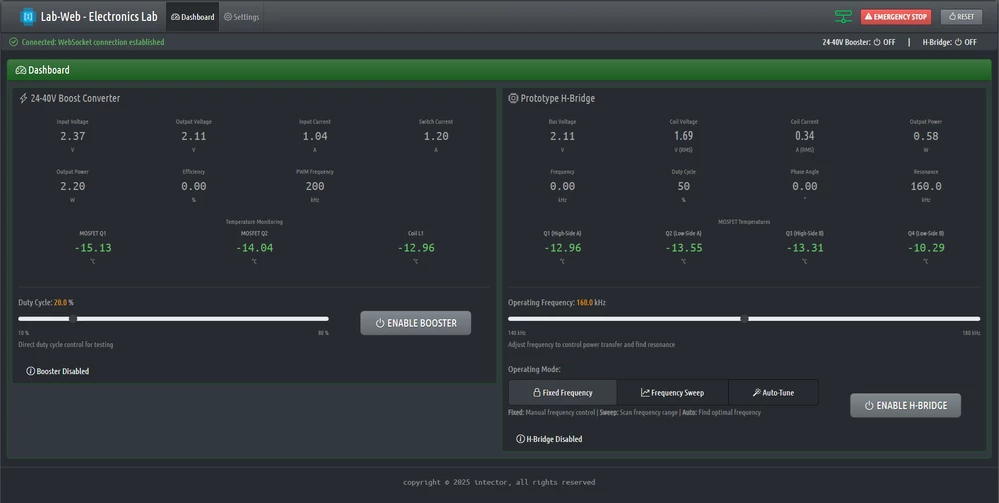
The demo project in the GitHub repo is intentionally simple, so the WebSocket implementation is easy to follow. Your application replaces the LED commands and telemetry values with whatever your hardware actually does.
Memory Layout: Why External PSRAM Matters
Here's where the memory wall becomes concrete. This is the linker script's MEMORY block for the NUCLEO-H723ZG:
MEMORY
{
 FLASH (rx) : ORIGIN = 0x08000000, LENGTH = 896K
 DTCMRAM (xrw) : ORIGIN = 0x20000000, LENGTH = 128K
 RAM (xrw) : ORIGIN = 0x24000A00, LENGTH = 325120

 /* PSRAM — ThreadX heap */
 Mem_TxPool (xrw) : ORIGIN = 0x90000000, LENGTH = 500K
 Mem_FxPool (xrw) : ORIGIN = 0x9007D000, LENGTH = 500K
 Mem_NxPool (xrw) : ORIGIN = 0x900FA000, LENGTH = 500K
 Mem_FTP_Server (xrw) : ORIGIN = 0x90177000, LENGTH = 100K
 ...
}
The AXI SRAM (RAM) is only ~317 KB. The three RTOS byte pools alone need 1.5 MB:
#define TX_APP_MEM_POOL_SIZE 1024 * 500 // 500 KB — ThreadX threads & stacks
#define FX_APP_MEM_POOL_SIZE 1024 * 500 // 500 KB — FileX media buffers
#define NX_APP_MEM_POOL_SIZE 1024 * 500 // 500 KB — NetXDuo IP, ARP, server stacks
That's already more than the H723's total internal RAM. These pools are placed in external PSRAM via linker section attributes:
static UCHAR __attribute__((section(".TxPoolSection"))) tx_byte_pool_buffer[TX_APP_MEM_POOL_SIZE];
static UCHAR __attribute__((section(".FxPoolSection"))) fx_byte_pool_buffer[FX_APP_MEM_POOL_SIZE];
static UCHAR __attribute__((section(".NxPoolSection"))) nx_byte_pool_buffer[NX_APP_MEM_POOL_SIZE];
Without external PSRAM, you simply cannot run HTTP + FTP + WebSocket simultaneously on a NUCLEO-144 board. The internal RAM runs out before your application even starts.
The DMA Problem — A Hard Lesson
The natural first approach is to put everything in PSRAM — there's 8 MB, plenty of room. And that's what I did initially: all three server packet pools lived in PSRAM linker sections. The byte pools worked fine. The FTP server worked perfectly.
Then the HTTP server started misbehaving. Pages would load partially, CSS files arrived corrupted, requests would silently time out. Same memory region as FTP, same bus, completely different behavior.
The answer is in the NetXDuo Ethernet driver. When NetXDuo transmits a packet, the driver hands the packet buffer pointer directly to the Ethernet DMA hardware:
// nx_stm32_eth_driver.c — _nx_driver_hardware_packet_send()
Txbuffer[i].buffer = pktIdx->nx_packet_prepend_ptr; // this pointer goes to ETH DMA
HAL_ETH_Transmit_IT(ð_handle, &TxPacketCfg); // DMA reads from that pointerIf that packet pool is in PSRAM (behind the OCTOSPI controller at 0x90000000), the Ethernet DMA must read through OCTOSPI. For sequential transfers like FTP, this works fine. But a browser opening a dashboard fires 10–15 concurrent requests — HTML, CSS, JS, images, fonts — generating bursts of small packets from different thread contexts, all competing for the OCTOSPI bus. Under that interleaved access pattern, packets get corrupted or the DMA stalls.
FTP works from PSRAM — sequential file transfers, clean access pattern.
HTTP fails from PSRAM — concurrent small packets, interleaved OCTOSPI access.
WebSocket has the same problem — frequent small JSON frames through the TCP stack.
The solution has two parts.
Part 1 — Move packet pools to AXI SRAM. The high-throughput packet pools go into AXI SRAM (.dma_buffer linker section) where the Ethernet DMA can access them directly. The FTP pool stays in PSRAM since its sequential access pattern works fine there:
// AXI SRAM — ETH DMA can access directly, no OCTOSPI latency
static uint8_t __attribute__((section(".dma_buffer"))) eth_packet_pool_buffer[NX_ETH_PACKET_POOL_SIZE];
static uint8_t __attribute__((section(".dma_buffer"))) nx_http_server_pool[HTTP_SRV_PACKET_POOL_SIZE];
static uint8_t __attribute__((section(".dma_buffer"))) nx_ws_server_pool[WS_SRV_PACKET_POOL_SIZE];

// PSRAM — FTP's sequential transfers work fine through OCTOSPI
static uint8_t __attribute__((section(".Nx_FTP_ServerPoolSection"))) nx_ftp_server_pool[FTP_SRV_PACKET_POOL_SIZE];
Part 2 — Restrict HTTP to single-session. Moving the pools to AXI SRAM solves the corruption, but AXI SRAM is only ~317 KB. The default NetXDuo HTTP server configuration allows 2 concurrent sessions — meaning more TCP sockets, more packets in flight, and a larger pool needed in that precious AXI SRAM.
The fix: set NX_WEB_HTTP_SERVER_SESSION_MAX to 1 in nx_user.h:
/* nx_user.h — override to minimize AXI SRAM packet pool usage.
 Browser requests are serialized over a single connection. */
#define NX_WEB_HTTP_SERVER_SESSION_MAX 1
This overrides the NetXDuo middleware default:
// nx_web_http_server.h — default
#ifndef NX_WEB_HTTP_SERVER_SESSION_MAX
#define NX_WEB_HTTP_SERVER_SESSION_MAX 2
#endif

#define NX_WEB_HTTP_SERVER_MAX_PENDING (NX_WEB_HTTP_SERVER_SESSION_MAX << 1)
Each session allocates a TCP socket and internal buffers, and the pending connection queue scales with it. Cutting from 2 to 1 significantly reduces the HTTP server's memory footprint. Modern browsers handle this gracefully — they pipeline requests over one connection.
With both changes applied, AXI SRAM dropped from ~94% to 46.78% — comfortable headroom instead of a knife's edge. External PSRAM gives you room for the byte pools and FTP packet pool, while AXI SRAM handles the DMA-critical paths.
WebSocket Protocol: What You Need to Know
If you haven't implemented WebSockets before, here's a brief primer. RFC 6455 upgrades an HTTP connection to a persistent, full-duplex TCP channel. Unlike HTTP request-response, a WebSocket connection stays open — both sides can send data at any time.
The Handshake
Every WebSocket connection starts with an HTTP upgrade request. The browser sends a standard HTTP GET with special headers:
GET / HTTP/1.1
Upgrade: websocket
Connection: Upgrade
Sec-WebSocket-Key: dGhlIHNhbXBsZSBub25jZQ==
The server must:
- Extract the Sec-WebSocket-Key from the request
- Concatenate it with the magic GUID 258EAFA5-E914-47DA-95CA-C5AB0DC85B11
- Compute the SHA-1 hash of the result
- Base64-encode the hash
- Send back an HTTP 101 response with the computed accept key
If the accept key doesn't match what the browser expects, the connection is rejected. This is the part that trips up most embedded implementations — you need a working SHA-1 and base64 on your MCU.
Frame Format
After the handshake, communication switches to WebSocket frames. Each frame has a compact binary header:
- Byte 0: FIN bit (is this the last fragment?) + opcode (0x01 = text, 0x02 = binary, 0x08 = close, 0x09 = ping, 0x0A = pong)
- Byte 1: Mask bit + payload length (7 bits for lengths < 126, extended to 16 or 64 bits for larger payloads)
- Bytes 2–5 (if masked): 4-byte masking key
Client-to-server frames are always masked — the payload bytes are XOR'd with a rotating 4-byte key. Server-to-client frames are never masked. This asymmetry is part of the spec.
Implementation: WebSocket Server on NetXDuo
The WebSocket server runs as a dedicated ThreadX thread with its own TCP socket on port 8080, completely separate from the HTTP server. Here's how the pieces fit together.
Server Creation and Startup
All three servers are created in MX_NetXDuo_Init() — the NetXDuo byte pool provides the thread stacks, and each server gets its own packet pool:
// WebSocket Server (port 8080) — packet pool in AXI SRAM, stack in PSRAM byte pool
nx_packet_pool_create(&WS_ServerPacketPool, "WS Server Packet Pool",
 WS_SERVER_PACKET_SIZE, nx_ws_server_pool,
 WS_SRV_PACKET_POOL_SIZE);

tx_byte_allocate(byte_pool, (VOID **)&pointer, WS_SRV_STACK_SIZE, TX_NO_WAIT);

WS_Server_Create(&WebSocket_Server, &IpInstance,
 &WS_ServerPacketPool, pointer);
The servers start in sequence after all prerequisites (ThreadX, FileX, eMMC) are ready, synchronized through ThreadX event flags:
// Wait for all subsystems
tx_event_flags_get(&TAGID_status_event_group, _EventFlags,
 TX_AND, &tmp_actual_events, TX_WAIT_FOREVER);

// Start servers in order
nx_web_http_server_start(&HTTP_Server); // port 80
nx_ftp_server_start(&FTP_Server); // port 21
WS_Server_Start(&WebSocket_Server); // port 8080
The Accept Thread — Connection Lifecycle
The WebSocket server runs a single accept thread that listens for incoming TCP connections. When a client connects, it performs the handshake, enters a receive loop, and cleans up when the client disconnects:
void WS_Server_AcceptThread_Entry(ULONG thread_input)
{
 WS_Server_t *server = (WS_Server_t *)thread_input;

 while (1) {
 // Block until a client connects
 status = nx_tcp_server_socket_accept(&server->listen_socket, TX_WAIT_FOREVER);

 if (status == NX_SUCCESS) {
 // Perform WebSocket handshake (HTTP upgrade)
 status = ws_perform_handshake(&server->listen_socket, server->packet_pool);

 if (status == NX_SUCCESS) {
 // Send initial state to the new client
 WS_SendLedStatus();

 // Receive loop — runs until client disconnects
 while (socket->nx_tcp_socket_state == NX_TCP_ESTABLISHED) {
 WS_ReceiveFrame(&server->listen_socket, server->packet_pool);
 tx_thread_sleep(1); // yield to other threads
 }

 // Client gone — clean up and relisten
 nx_tcp_server_socket_unaccept(&server->listen_socket);
 nx_tcp_server_socket_relisten(server->ip_instance,
 WS_SERVER_PORT,
 &server->listen_socket);
 }
 }
 }
}
This is a single-client design — one WebSocket connection at a time. For a lab test bench or development dashboard, that's the right trade-off: simpler code, lower memory footprint, and no need to manage concurrent client state. The server structure supports up to WS_MAX_CLIENTS (4) slots for future expansion.
The Handshake — SHA-1 on a Microcontroller
The handshake function receives the raw HTTP upgrade request from the TCP socket, extracts the client's WebSocket key, computes the accept key, and sends back the 101 response:
static UINT ws_perform_handshake(NX_TCP_SOCKET *socket_ptr, NX_PACKET_POOL *pool_ptr)
{
 // Receive and validate the HTTP upgrade request
 status = nx_tcp_socket_receive(socket_ptr, &request_packet, 5 * NX_IP_PERIODIC_RATE);

 // Verify it's a GET request with Upgrade: websocket
 if (ws_strnstr(msg, "GET ", len) == NULL) return NX_NOT_SUCCESSFUL;

 upgrade_ptr = ws_strnstr(msg, "Upgrade:", len);
 if (upgrade_ptr == NULL || ws_strnstr(upgrade_ptr, "websocket", 50) == NULL)
 return NX_NOT_SUCCESSFUL;

 // Extract Sec-WebSocket-Key
 key_ptr = ws_strnstr(msg, "Sec-WebSocket-Key:", len);
 // ... trim whitespace, copy key ...

 // Compute accept key: SHA-1(client_key + GUID), then base64
 ws_compute_accept_key(accept_key, client_key);

 // Send HTTP 101 Switching Protocols
 snprintf(response_header, sizeof(response_header),
 "HTTP/1.1 101 Switching Protocols\r\n"
 "Upgrade: websocket\r\n"
 "Connection: Upgrade\r\n"
 "Sec-WebSocket-Accept: %s\r\n\r\n",
 accept_key);

 // Allocate packet, append response, send
 nx_packet_allocate(pool_ptr, &response_packet, NX_TCP_PACKET, TX_WAIT_FOREVER);
 nx_packet_data_append(response_packet, response_header, strlen(response_header), ...);
 nx_tcp_socket_send(socket_ptr, response_packet, TX_WAIT_FOREVER);

 return NX_SUCCESS;
}
The SHA-1 computation (ws_compute_accept_key) and base64 encoding are implemented from scratch in ws_server.c. No external crypto library required — the SHA-1 implementation is a compact, self-contained function that operates on 512-bit blocks. The full implementation is in the GitHub repo; I won't reproduce the entire SHA-1 here, but the key point is that you concatenate the client's key with the WebSocket magic GUID (258EAFA5-E914-47DA-95CA-C5AB0DC85B11), hash it, and base64-encode the result.
Frame Parsing — Unmasking Client Data
When the browser sends a message (like an LED command), it arrives as a masked WebSocket frame. The server must parse the header and unmask the payload:
static UINT WS_ReceiveFrame(NX_TCP_SOCKET *socket_ptr, NX_PACKET_POOL *pool_ptr)
{
 status = nx_tcp_socket_receive(socket_ptr, &packet_ptr, NX_NO_WAIT);
 if (status != NX_SUCCESS) return status;

 // Parse frame header
 unsigned char opcode = data[0] & 0x0F;
 unsigned char masked = (data[1] & 0x80) != 0;
 uint64_t payload_len = data[1] & 0x7F;

 // Extended payload length (126 = 16-bit, 127 = 64-bit)
 if (payload_len == 126) {
 payload_len = (data[2] << 8) | data[3];
 header_len = 4;
 }

 // Extract masking key (4 bytes, always present from browser)
 if (masked) {
 memcpy(mask, &data[header_len], 4);
 header_len += 4;
 }

 // Unmask payload — XOR each byte with rotating mask
 unsigned char *payload = &data[header_len];
 for (uint32_t i = 0; i < payload_len; i++) {
 payload[i] ^= mask[i % 4];
 }

 // Route by opcode
 if (opcode == WS_OPCODE_TEXT) {
 // JSON command — parse and handle
 WS_HandleJSONCommand(json_buffer);
 }
 else if (opcode == WS_OPCODE_CLOSE) {
 return NX_NOT_CONNECTED;
 }
}
Sending Frames — Server to Client
Sending is simpler than receiving because server-to-client frames are never masked. The WS_Server_SendJSON function builds the WebSocket frame header and appends the JSON payload:
UINT WS_Server_SendJSON(WS_Server_t *server, const char *json_string)
{
 uint32_t json_len = strlen(json_string);

 // Build WebSocket TEXT frame header
 frame_header[0] = WS_FIN_FLAG | WS_OPCODE_TEXT; // 0x81 — final frame, text

 if (json_len < 126) {
 frame_header[1] = (unsigned char)json_len;
 header_len = 2;
 } else if (json_len < 65536) {
 frame_header[1] = 126;
 frame_header[2] = (json_len >> 8) & 0xFF;
 frame_header[3] = json_len & 0xFF;
 header_len = 4;
 }

 // Allocate packet, append header + JSON, send
 nx_packet_allocate(server->packet_pool, &packet_ptr, NX_TCP_PACKET, NX_NO_WAIT);
 nx_packet_data_append(packet_ptr, frame_header, header_len, ...);
 nx_packet_data_append(packet_ptr, (void *)json_string, json_len, ...);
 nx_tcp_socket_send(socket_ptr, packet_ptr, NX_NO_WAIT);
}
Command Handling — cJSON on the MCU
Incoming JSON commands are parsed with the lightweight cJSON library. The command dispatcher checks the type field and routes to the appropriate handler:
void WS_HandleJSONCommand(const char *json_string)
{
 cJSON *root = cJSON_Parse(json_string);
 cJSON *type = cJSON_GetObjectItemCaseSensitive(root, "type");

 if (strcmp(type->valuestring, "led-command") == 0) {
 handle_led_command(root);
 }

 cJSON_Delete(root);
}

static void handle_led_command(cJSON *root)
{
 cJSON *led = cJSON_GetObjectItemCaseSensitive(root, "led");
 cJSON *state = cJSON_GetObjectItemCaseSensitive(root, "state");

 GPIO_PinState pin_state = cJSON_IsTrue(state) ? GPIO_PIN_SET : GPIO_PIN_RESET;

 if (strcmp(led->valuestring, "yellow") == 0) {
 HAL_GPIO_WritePin(LED_Yellow_GPIO_Port, LED_Yellow_Pin, pin_state);
 }
 // ... red LED handling ...

 WS_SendLedStatus(); // confirm state back to client
}
The JSON message format is straightforward. Browser sends:
{"type": "led-command", "led": "yellow", "state": true}Server responds with the current state:
{"type": "led-status", "data": {"yellowLed": true, "redLed": false}}Telemetry — Streaming Data to the Browser
A dedicated telemetry thread reads sensor data and broadcasts it to the connected client. The update rate is configurable — set to ~1 Hz in the demo, but adjustable via TELEMETRY_UPDATE_RATE_MS in ws_telemetry.h:
void tx_telemetry_thread_entry(ULONG thread_input)
{
 // Wait for HTTP server to be ready (event flag synchronization)
 tx_event_flags_get(&TAGID_status_event_group, TAGID_SE_HTTP_SERVER_OK,
 TX_AND, &tmp_actual_events, TX_WAIT_FOREVER);

 while (1) {
 float junction_temp = DTS_ReadTemperature();

 // Build JSON with cJSON
 cJSON *msg = cJSON_CreateObject();
 cJSON *data = cJSON_CreateObject();
 cJSON_AddNumberToObject(data, "junctionTemp", junction_temp);
 cJSON_AddNumberToObject(data, "uptime", (double)uptime);
 // ... random float and int for demo ...
 cJSON_AddStringToObject(msg, "type", "telemetry");
 cJSON_AddItemToObject(msg, "data", data);

 char *json_string = cJSON_PrintUnformatted(msg);
 WS_Server_SendJSON(&WebSocket_Server, json_string);

 cJSON_free(json_string);
 cJSON_Delete(msg);

 tx_thread_sleep(TELEMETRY_UPDATE_TICKS); // ~1 second
 }
}
The browser receives:
{"type": "telemetry", "data": {"junctionTemp": 42.0, "randomFloat": 73.21, "randomInt": 456, "uptime": 12345}}This is where the WebSocket advantage becomes obvious. With HTTP polling, you'd be hammering the server with GET requests at whatever rate you need updates. With WebSocket, the server pushes data when it's ready — no request overhead, no wasted bandwidth, sub-millisecond latency.
The Result
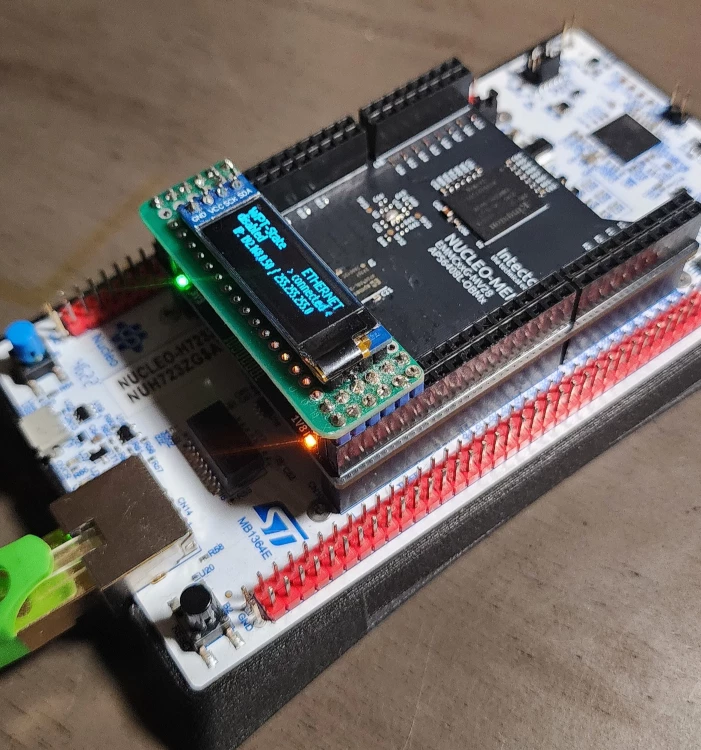
The demo project gives you a self-contained reference implementation:
- A browser-based dashboard served from eMMC over HTTP
- Real-time LED control over WebSocket — toggle LEDs from the browser, see state confirmed instantly
- Live telemetry streaming — MCU junction temperature, hardware RNG values, RTOS uptime, all updating in real time at a configurable rate
- FTP access to the eMMC filesystem for updating web files remotely
- Full RFC 6455 WebSocket implementation with handshake, frame encoding/decoding, and connection management
The web interface uses Bootstrap 5 with a dark theme, vanilla JavaScript, and connects to the WebSocket server automatically on page load. The WebSocket log panel shows every message in real time for debugging.
Replace the LED commands with your motor controller, sensor array, or power converter, and replace the telemetry values with your actual measurements. The WebSocket plumbing stays the same.
Getting Started
The complete source code is available on GitHub:
https://github.com/intector/NUCLEO-MEM
License: MIT — use it however you need.
What You Need
- NUCLEO-H723ZG development board (or another NUCLEO-144 with OCTOSPI peripheral)
- NUCLEO-MEM shield (provides the eMMC and PSRAM)
- Ethernet connection (board defaults to 192.168.0.50 static IP)
- Visual Studio + VisualGDB (primary development environment) — or adaptable to STM32CubeIDE with some effort
Key Dependencies
- Azure RTOS / ThreadX — RTOS kernel, thread management, event flags
- NetXDuo — TCP/IP stack, HTTP server, FTP server
- FileX — FAT filesystem on eMMC
- cJSON — lightweight JSON parser (included in the repo)
- STM32CubeH7 HAL drivers
Quick Test
Once the board is running and connected to your network, open a browser to http://192.168.0.50 for the web dashboard. The WebSocket connection establishes automatically. You can also test the WebSocket directly from a browser console:
const ws = new WebSocket('ws://192.168.0.50:8080');
ws.onmessage = (e) => console.log(JSON.parse(e.data));
ws.send(JSON.stringify({type: 'led-command', led: 'yellow', state: true}));
Summary — Memory Budget
For reference, here's what the full system looks like in terms of memory allocation:
Resource Size Location
| ThreadX byte pool | 500 KB | PSRAM |
| FileX byte pool | 500 KB | PSRAM |
| NetXDuo byte pool | 500 KB | PSRAM |
| ETH packet pool | ~93 KB | AXI SRAM |
| HTTP server packet pool | 30 KB | AXI SRAM |
| WebSocket server packet pool | 20 KB | AXI SRAM |
| FTP server packet pool | 100 KB | PSRAM |
| AXI SRAM total | 148 KB / 317 KB (46.78%) | After single-session HTTP |
The three byte pools alone (1.5 MB) exceed the H723's total internal RAM. Without external PSRAM, this configuration is impossible. And even with PSRAM, the DMA-accessible packet pools still need AXI SRAM — which is why you end up carefully placing buffers across two memory regions. The single-session HTTP optimization (NX_WEB_HTTP_SERVER_SESSION_MAX = 1) is what brought AXI SRAM from a dangerous 94% down to a comfortable 47%.
I hope this helps someone struggling with the same problems. WebSocket support on STM32 is one of those things that feels like it should be straightforward but turns into a multi-week project when you realize there are no examples, no middleware, and no documentation.
The GitHub repo has the complete source code. If you have questions, suggestions, or find bugs — post them here or open an issue on GitHub. Contributions are welcome.
Thank you, and to everyone else out there:
"The secret is to keep banging the rocks together, guys."
Kai Jensen — Intector Inc.