
Visitor II
December 19, 2025
Solved

STM32F411 USB device not working with windows custom PCB

  • December 19, 2025
  • 5 replies
  • 57 views

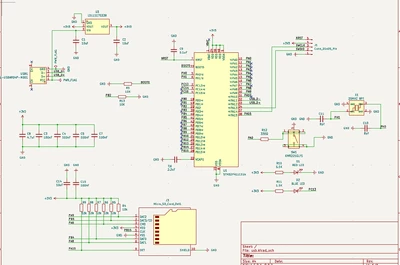
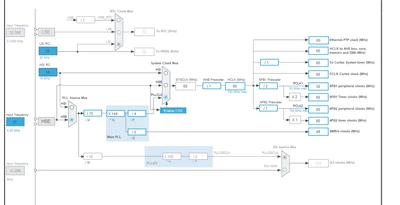
I created a custom STM32F411 PCB. I can program it and blink a LED for example just fine. I also have a STM32 blackpill board which uses the same MCU. When I run some USB HID code it works fine on the blackpill but once uploaded to my custom PCB and I plug it into my windows PC, it says the usb device malfunctioned and is not working. I followed all the guidelines from the datasheet for the USB design. (I dont need external pull-ups for D+, no need for VBUS sensing). Also I have a 25Mhz HSE clock that is properly configured for the precise 48Mhz USB clock even though its only running at FS. Any ideas to why this might be happening?
PeppersONLY_0-1766178736015.png

PeppersONLY_1-1766178932485.png


    This topic has been closed for replies.
    Best answer by TDK

    Impedance won't matter for that short of a trace.

    You said you swapped your data lines, what does that look like?

    Still think pulling BOOT0 to 3V3 on reset is the best debug approach. You have a resistor there. If you can swap data lines, should be able to short that to 3V3.

    Typically the device side has the plug connector, not receptacle.

    Large in focus pictures of the board may help.

    5 replies

    Super User
    December 19, 2025

    Nothing wrong with what is shown as far as I can see.

    If the same code works on equivalent hardware, the problem is likely not the code.

    For an UFQFPN48, I immediately question solderability. Was the part loaded correctly? Is the pad connected to GND? Faulty solder connections?

    Reset it with BOOT0 held high and BOOT1 held low. does the USB DFU bootloader start? If not, there's a problem with the hardware.

    Visitor II
    December 28, 2025

    I didnt expose any BOOT pins onto my PCB. The PCB was assembled with JLCPCB and I have tried 2 other of the same board and they have the same issue. I realized that I swapped the data lines to the usb connector footprints but still when swapping them externally to the correct lines I still get the same issue...

    Technical Moderator
    December 25, 2025

    Hi @PeppersONLY 

    Indeed, as mentioned @TDK UFQFPN48 is a fine-pitch package and can be tricky to solder. 

    • Ensure the USB D+ and D- lines are routed correctly with controlled impedance (~90 Ω differential).
    • Check for proper USB line length matching and minimal stubs.
    • Ensure stable power supply and clean with proper decoupling capacitors near the MCU

    If still cannot connect to DFU bootloader, you need to analyze your clock configuration and review your USB line routing

    Visitor II
    December 27, 2025

    ㅤㅤ

    Visitor II
    December 28, 2025

    PeppersONLY_0-1766889828110.png

    I am pretty sure this USB routing should be fine but I checked on a impedance calculator and my traces could be a little thicker. I still think this should be ok because its only UBS FS.

    Visitor II
    December 28, 2025

    Hey, it sounds like your custom board is mostly working since you can blink an LED, but the USB isn’t being recognized. A few things you could check:

    1. USB D+ and D- connections – Make sure the traces are short and similar in length. USB is picky about trace length and routing.

    2. Decoupling capacitors – Make sure you have the right caps near the MCU power pins. USB can fail if the power isn’t clean.

    3. USB pull-up – Some boards need a small resistor on D+ even if the datasheet doesn’t say so. The blackpill might have one built-in.

    4. Clock accuracy – Even if your 48 MHz is close, USB can fail if it’s off by more than a tiny bit. Double-check your clock settings and PLL.

    5. Try a different USB cable or port – Sometimes the cable or PC port can cause problems.

    If all of that looks fine, it might be worth comparing your PCB layout to the blackpill and see what small differences there are save from pinterest in USB circuitry.

    Hope this was helpful!

    TDKAnswer
    Super User
    December 28, 2025

    Impedance won't matter for that short of a trace.

    You said you swapped your data lines, what does that look like?

    Still think pulling BOOT0 to 3V3 on reset is the best debug approach. You have a resistor there. If you can swap data lines, should be able to short that to 3V3.

    Typically the device side has the plug connector, not receptacle.

    Large in focus pictures of the board may help.

    Visitor II
    December 30, 2025

    Can't believe I hadn't tried this but I tried a different board and now it works fine must be a defect or bad solder job...