Associate II
February 10, 2026
Solved

CAN communication between 3 Nucleo boards

  • February 10, 2026
  • 10 replies
  • 1078 views

Hi,

I am trying to establish CAN communication between three different MCUs: NUCLEO-H723ZG, NUCLEO-H755ZIQ, and NUCLEO-G474RE. However, I am unable to successfully communicate between the boards, even though the same baud rate has been configured on all MCUs. I have also connected an external CAN transceiver to each board for proper CAN bus operation.

On the NUCLEO-G474RE, I have enabled UART4 to send command data, using the following pins:

  • PC11 – UART4_RX

  • PC10 – UART4_TX


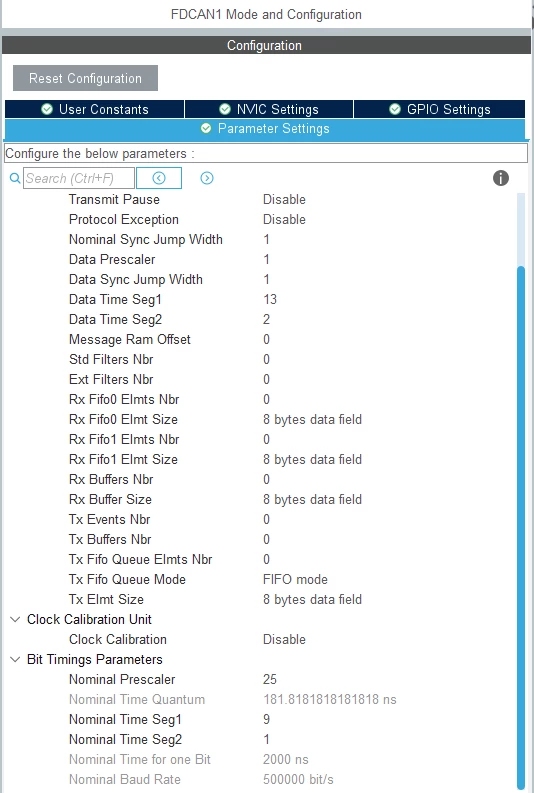
Clock Frequency [SYSCLK] & Baud Rate [CAN]:

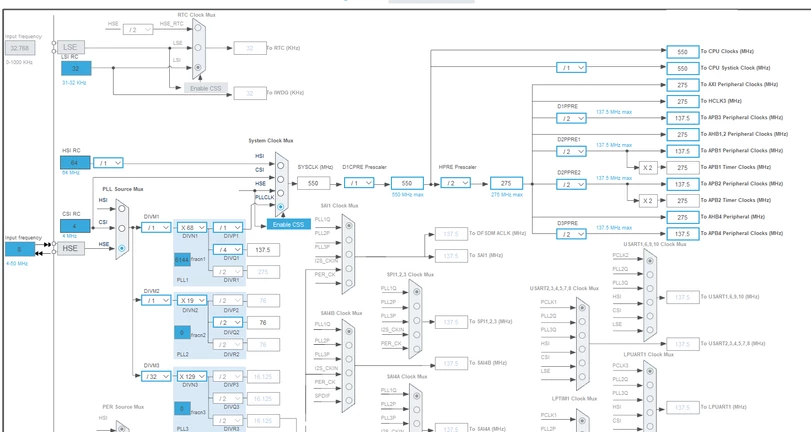
1. NUCLEO-H723ZG: 550 MHz

    Baud Rate: 500000 Bit/s
Srivatsan_2-1770723670441.png


Srivatsan_3-1770723803277.png


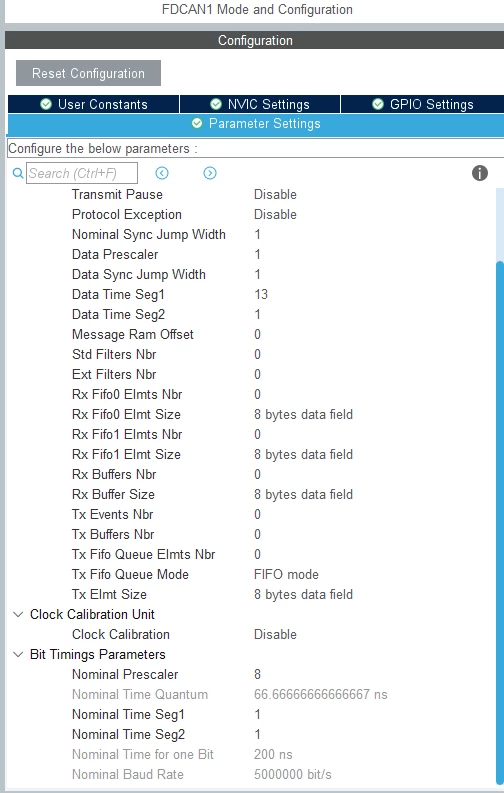
2. NUCLEO-H755ZIQ: 480 MHz

    Baud Rate: 500000 Bit/s
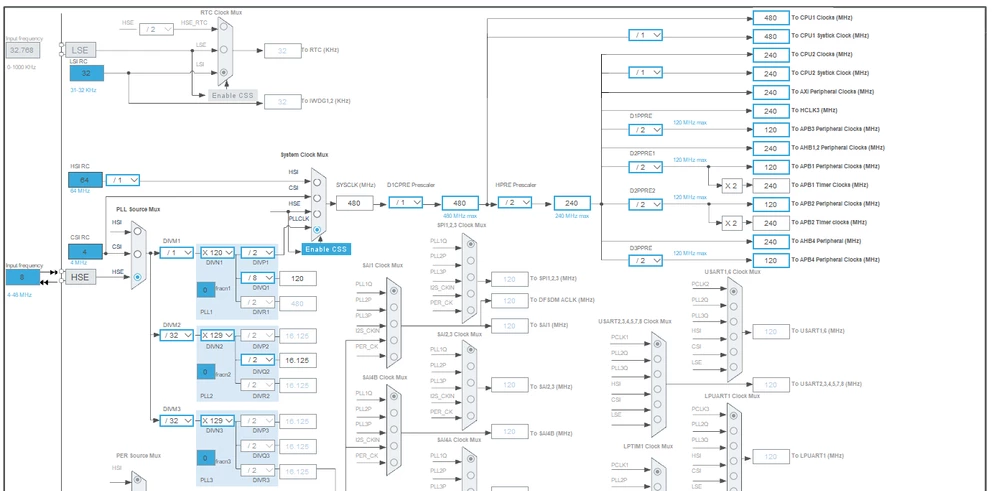
Srivatsan_0-1770723567676.png


Srivatsan_4-1770723922733.png


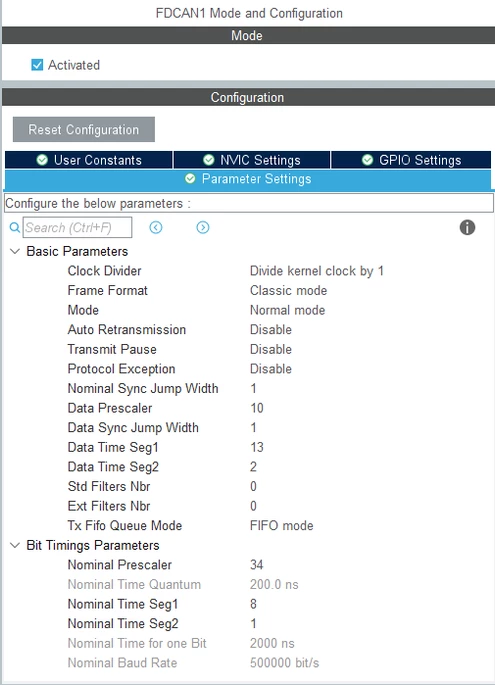
3. NUCLEO-G474RE: 170 MHz

    Baud Rate: 500000 Bit/s
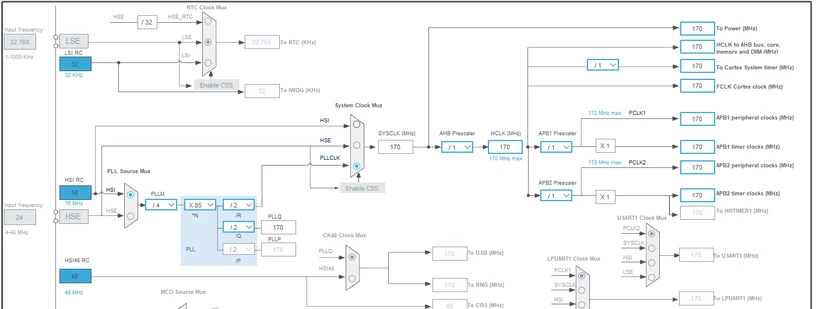
Srivatsan_1-1770723624279.png


Srivatsan_5-1770723986124.png


Best answer by mƎALLEm


I don't know what you did behind the scene. What Channel 1 refers to? G4 FDCAN Tx? or CAN analyzer Tx?

If one of them, H7 FDCAN_Rx is not receiving anything, so it's a hardware issue either a wiring issue or a transceiver issue. 

- So check your wiring on H7 side 

- Check the power supply of your transceiver

- Even, replace the transceiver used by STM32H7.

10 replies

Ozone
Principal
February 10, 2026

Have you used a scope to see what is happening on the CAN bus ?

Have you checked the CAN_Tx pins from the MCUs to the transceiver, if you see a signal ?

What do the TEC and REC counter values of the CAN peripheral say ?

> On the NUCLEO-G474RE, I have enabled UART4 to send command data, using the following pins: ...

How is this relevant here ?

Andrew Neil
Super User
February 10, 2026

@Srivatsan wrote:

I have also connected an external CAN transceiver to each board


What CAN transceiver?

Please show your schematic of how you connected the transceiver to the Nucleo board, and how you have the transceivers connected to each other.

Some good, clear photos of your setup could help.

How to write your question to maximize your chances to find a solution


Simple Classic CAN + FreeRTOS Demo simulating OBD and a vehicle

Guide to CAN (bxCAN/CAN2.0) configuration in Loop back mode on STM32 MCUs - with links to more examples at the end.

A complex system that works is invariably found to have evolved from a simple system that worked.A complex system designed from scratch never works and cannot be patched up to make it work.
mƎALLEm
Technical Moderator
February 10, 2026

Hello,

Many info are missing.

1-You need to tell what the problem is? on which side? on transmit or on receive?

"However, I am unable to successfully communicate between the boards" does tell nothing.

2- Please describe what you've did at this stage to debug the issue and show your CAN bus diagram in this way:

3- What transceiver are you using? and show your hardware schematic.

PS1: avoid using HSI for CAN and use external precise clock source such as a crystal. Here you are using HSI for G4 project! and avoid setting 1tq for one of the time bit segments:

mALLEm_0-1770727879474.png

PS2: please attach the ioc files instead of sharing screenshots of your CubeMx config


"To give better visibility on the answered topics, please click on ""Accept as Solution"" on the reply which solved your issue or answered your question."
SrivatsanAuthor
Associate II
February 10, 2026

I am using UART4 on the NUCLEO-G474RE to send command inputs along with the target address for toggling GPIO pins.

All three MCUs are connected through a CAN bus network. When a command is sent via UART4, the G474RE acts as the CAN master and transmits the corresponding CAN message to the other MCUs to control their GPIO outputs.

Each board is interfaced with a TJA1050 CAN transceiver for proper CAN communication.

Example use case:
If I send a command from the G474RE board to toggle a specific GPIO on the NUCLEO-H723ZG, the targeted GPIO pin should turn ON or OFF accordingly.

Srivatsan_1-1770728875950.png


Srivatsan_3-1770729505229.png


VCC is connected to the 5V 
GND is connected to the GND pin of the board

NUCLEO-G474RE (0x100) - Led Pin no: PA5 (acts as Master) 

PA12 - FDCAN1_TX 

PA11 - FDCAN1_RX 


PC11 - UART4_RX 

PC10 - UART4_TX


NUCLEO-H723ZG (0x101) - Led Pin no: PB0

PA12 - FDCAN1_TX 

PA11 - FDCAN1_RX


NUCLEO-H755ZIQ (0x102) - Led Pin no: PB0

PD1 - FDCAN1_TX 

PD0 - FDCAN1_RX


mƎALLEm
Technical Moderator
February 10, 2026

You need to simplify your test and make a simple communication without any command sent from the PC, that complicates things and (at this level) we don't know what the problem is? 

Please make a simple project where only CAN communication is done. So please remove the UART and other stuff.

PS3: you didn't answer all my questions above.

PS4: what about S pin level of the trancveiver?

mALLEm_0-1770729705900.png


"To give better visibility on the answered topics, please click on ""Accept as Solution"" on the reply which solved your issue or answered your question."
LCE
Principal II
February 10, 2026

Got 2 120R termination resistors on the bus?

But even more important: make it more simple at first:

- start with only 1 MCU, if possible get some known & working USB / CAN adapter

- use a scope to check that your initial message gets out of the sender

- do not use BRS in the beginning


I you have each MCU's CAN running on its own, then you can start connecting these.

mƎALLEm
Technical Moderator
February 10, 2026

@LCE wrote:

Got 2 120R termination resistors on the bus?

But even more important: make it more simple at first:

- start with only 1 MCU, if possible get some known & working USB / CAN adapter

- use a scope to check that your initial message gets out of the sender

I you have each MCU's CAN running on its own, then you can start connecting these.


Totally agree with this.


@LCE wrote:

- do not use BRS in the beginning


He's using Classic CAN mode. No need for BRS.

"To give better visibility on the answered topics, please click on ""Accept as Solution"" on the reply which solved your issue or answered your question."
mƎALLEm
Technical Moderator
February 10, 2026

I've just noticed this configuration:

mALLEm_1-1770737268965.png

That's a bad configuration.TSEG1 =TSEG2 = Tq!

You need to avoid such timing configuration and you need to position the sample point at about 87.5%. Decrease the the nominal prescaler and increase TSEG1 and TSEG2 values as much as possible with the proposed sample point.

Read this article: CAN (bxCAN) bit time configuration on STM32 MCUs . It treats bxCAN but applies also to FDCAN in Classic mode.

"To give better visibility on the answered topics, please click on ""Accept as Solution"" on the reply which solved your issue or answered your question."
LCE
Principal II
February 10, 2026

That's a bad configuration.TSEG1 =TSEG2 = Tq!

... and giving an interesting nominal bit rate of 5 Mbit/s :D

Which might be an interesting experiment if the STM32 can handle this. But TDC should be enabled.

mƎALLEm
Technical Moderator
February 10, 2026

@LCE wrote:

... and giving an interesting nominal bit rate of 5 Mbit/s :D


 LOL! nice catch. I didn't notice that. I saw it 500kb/s.. Classic mode @5Mb/s :D

"To give better visibility on the answered topics, please click on ""Accept as Solution"" on the reply which solved your issue or answered your question."
SrivatsanAuthor
Associate II
February 12, 2026

I have connected three MCU boards on a CAN bus with proper termination using two 120 Ω resistors at each end of the bus, resulting in an effective bus resistance of approximately 60 Ω. The grounds of all boards are connected together.

The three boards used are:

  • NUCLEO-G474RE (2 boards)

  • NUCLEO-H723ZG (1 board)

Each MCU board is interfaced with a TJA1050 CAN transceiver for CAN communication.

Hardware setup:

Srivatsan_0-1770881774198.png


I am using STM32CubeIDE version 1.19.0 and have flashed the CAN firmware onto each board. An external CAN bus monitor/analyzer is connected to observe the CAN traffic.

I am able to successfully monitor CAN data from the two G474RE boards (the data is attached below), but I do not see any CAN messages from the H723ZG board on the bus monitor.

All boards are configured with the same CAN baud rate of 500 kbit/s.

CAN Identifiers Used:

  • G474RE Board 1: 0x123

  • G474RE Board 2: 0x124

  • H723ZG Board: 0x125


Clock configuration:

G474RE (2 boards):-


SYSCLK:
 170 MHz
FD CAN :
170 MHz

Srivatsan_1-1770881774357.png


H723ZG (1 board):-


SYSCLK: 
550 MHz 
FD CAN :
 137.5 MHz

Srivatsan_2-1770881773928.png


Bus Monitor Data:

Srivatsan_3-1770881773788.png


Pins details:

NUCLEO-G474RE:

PA12 - FDCAN1_TX 

PA11 - FDCAN1_RX


NUCLEO-H723ZG:

PD1 - FDCAN1_TX 

PD0 - FDCAN1_RX

How you establish the communication in the H723ZG board?


mƎALLEm
Technical Moderator
February 12, 2026

@Srivatsan and @Ben11 ,

I've merged the threads. Please continue the discussion here and please provide a status about what we have provided as answers previously.

"To give better visibility on the answered topics, please click on ""Accept as Solution"" on the reply which solved your issue or answered your question."
SrivatsanAuthor
Associate II
February 12, 2026


I am able to establish basic CAN communication between the two G474RE boards; however, I am unable to communicate with the H723ZG board, even though the baud rate is configured the same on all boards (500 kbit/s).

Despite using identical baud rates, the H723ZG does not transmit or receive CAN messages. Could you please help explain why this mismatch might occur and what configurations should be verified to enable communication with the H723ZG? 

mƎALLEm
Technical Moderator
February 12, 2026

@Srivatsan wrote:

Could you please help explain why this mismatch might occur and what configurations should be verified to enable communication with the H723ZG? 


There is no explanation at this stage. Analysis is needed.

So as I understood you solved the communication issue between STM32G4 based boards. Still STM32H7 based board is not working.

I've already asked the following questions in this thread (That's why we prevent the threads duplication:(

1-You need to tell what the problem is? on which side? on transmit or on receive?

2- Please describe what you've did at this stage to debug the issue.

3- Show your hardware schematic.

PS1: avoid using HSI for CAN and use external precise clock source such as a crystal. Here you are using HSI for G4 project!

PS2: please attach the ioc files instead of sharing screenshots of your CubeMx config

We can't help you if we don't have all the elements needed.

Thank you for your understanding.

"To give better visibility on the answered topics, please click on ""Accept as Solution"" on the reply which solved your issue or answered your question."
SrivatsanAuthor
Associate II
February 12, 2026

1. The problem is on the RECEIVE side

2. 

  • Enabled FDCAN properly
  • Set classic CAN (good)
  • Matching bit timing (mostly OK)
  • Sending known ID (0x125)
  • Toggling LED to prove firmware is alive
  •  Using real transceivers (TJA1050)

3. 

Srivatsan_0-1770889083986.png


I've disabled into the HSI clock for G4 projects, and the projects files are attached below.