Associate II
January 28, 2026
Solved

CS Glitch with 9-Bit SPI on STM32

  • January 28, 2026
  • 1 reply
  • 196 views

Hi everyone,

I’m experiencing unexpected behavior while testing 9-bit SPI on an STM32, observed with a logic analyzer. The issue only occurs when the MOSI line is physically connected to the slave.

Observations:

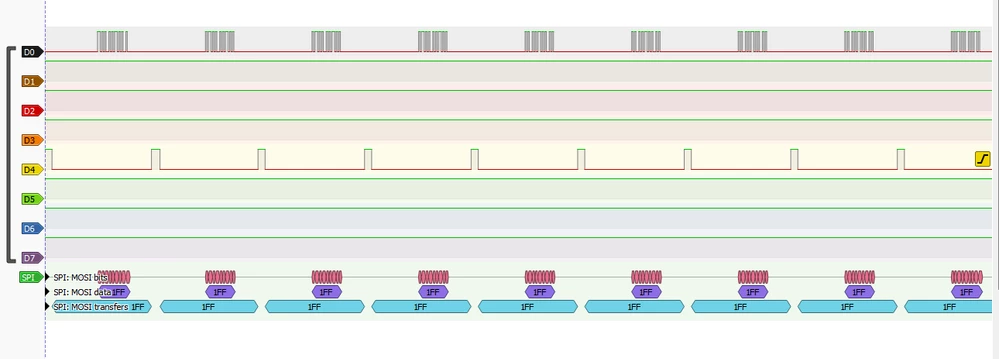
:keycap_1: MOSI not connected

  • CS and SCLK are correct

  • MOSI stays high

  • SPI decoder shows 0x1FF 

  • Expected behavior for a floating MOSI line

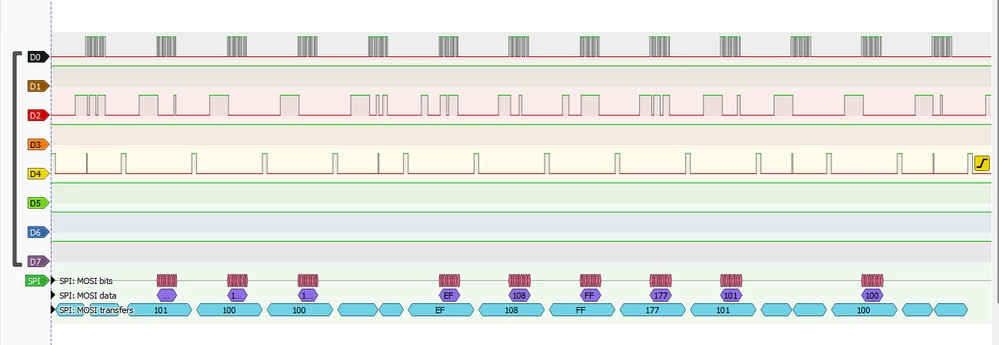
:keycap_2: MOSI connected to the slave

  • MOSI data becomes correct

  • But a very brief rising edge (glitch) appears on CS during data transmission

  • CS immediately returns active → causes unintended slave deselection

  • Result: data loss during the SPI frame

Additional info:

  • STM32 model: stm32u5g9j-dk2

  • SPI mode: 9-bit, master

  • SCLK frequency: 10 MHz

  • Is this a known issue with 9-bit SPI on STM32?

  • Should I add a pull-up/pull-down on CS or MOSI?

  • Any other suggestions to avoid this glitch?

Attached are screenshots showing the behavior.

Thanks in advance for your help!MOSI connectedMOSI connectedMOSI not connectedMOSI not connected
Best answer by TDK

This is signal noise due to cross-talk or a logic analyzer connection which is not ideal.

  • Measure the signal as close to the chip as possible.
  • Connect ground close to where you measure the signal.
  • Reduce pin frequency to the slowest possible that can still support the data rate.
  • Ensure logic analyzer is set to the same logic level as the signal.

1 reply

TDK
TDKBest answer
Super User
January 28, 2026

This is signal noise due to cross-talk or a logic analyzer connection which is not ideal.

  • Measure the signal as close to the chip as possible.
  • Connect ground close to where you measure the signal.
  • Reduce pin frequency to the slowest possible that can still support the data rate.
  • Ensure logic analyzer is set to the same logic level as the signal.
"If you feel a post has answered your question, please click ""Accept as Solution""."