

jaakjensen
Associate II
August 26, 2022
Solved

FLASH ECC Codes Cause Bus Fault on STM32H743

  • August 26, 2022
  • 16 replies
  • 17145 views

Hello,

For a few months now I have been having issues with writing data to flash memory on the STM32H743ZIT6. Most of the time, everything works great and I am able to read the data from flash successfully, but every now and again, the flash memory gets corrupted somehow and ECC codes are thrown (both single and double), which causes my device to have a bus fault.

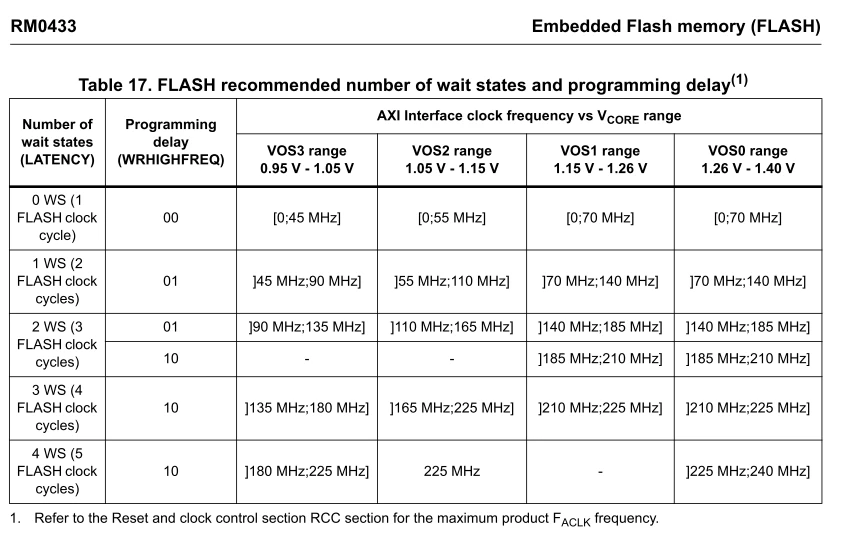
I am running the flash peripheral / AXI bus at 240Mhz and I have the flash wait states set to 4 WS (5 Flash clock cycles). I have followed all the guidelines related to the HW design and have the correct core capacitance on the VCAP pins. I write 256 bits of data to the flash memory approximately every 10 seconds to save the state of my device (of course I increment the write address after each write so that I'm not writing to the same position every time). When the sector is filled, it is then erased and then I start writing to the start of the sector. I also set the BOR bits to the highest voltage setting to try and prevent brown-out issues. I think these are most of the important settings you need to know.

Today while looking at my register settings in debug mode I noticed that the WRHIGHFREQ setting was set to 3 (aka 11) by default... I can't find anywhere in the HAL / code where this is done so it must be set automatically. The manual only lists valid settings for 0, 1, and 2 (see below). Can anyone tell me what the behavior is of the STM32H743ZIT6's flash module is when a setting of 3 is used for WRHIGHFREQ? Is it just invalid / undefined? Maybe this is my issue?

Does anyone have any ideas?
0693W00000StskjQAB.png

This topic has been closed for replies.
Best answer by FBL

Hello @jaakjensen​ 

Can you try

1- Check and clear the RDS and RDP errors prior to the erase/ write operations

2- Disable all interrupts before erase and program.

Maybe when debugging, the Cortex is trying to access memory. So it could reach reserved zone and it could result in an error which occurs only when accessing RDP protected area, so maybe this makes sense

I have found some related posts that could help you 

https://community.st.com/s/question/0D50X0000BaKiDBSQ0/spurious-rdperr-and-rdserr-when-all-protection-and-security-settings-are-off?t=1663333087127

16 replies

Pavel A.
Super User
August 27, 2022

Check also how you erase. Is the "voltage range" parameter good?

jaakjensen
Associate II
August 27, 2022

I think it is "good". I am using a voltage range of 4 AKA a programming parallelism of double-word. I assume this is OK. There is no documentation in the reference manual about which is "correct" - it is just a tradeoff between timing and power consumption.0693W00000StuF9QAJ.png 

jaakjensen
Associate II
August 27, 2022

I should also note that I am using the HAL_FLASH_Program() function to carry out my programming.

jaakjensen
Associate II
August 29, 2022

Does anyone else have feedback on this topic? Still seeking advice.

ST Technical Moderator
August 30, 2022

Hi @jaakjensen​ 

Please check the Flash register FLASH_ACR in Reference Manual Reset value: 0x0000 0037. So 3 stands for WRHIGHFREQ (Bits 5:4) and 7 stands for Latency

Also note that the application software has to program them to the correct value depending on the embedded Flash memory interface frequency. 

jaakjensen
Associate II
August 30, 2022

Hi @F.Belaid​ 

Thank you for the response. I forgot that all registers have a default reset value that is defined in the reference manual. Thank you for pointing that out. Still, the reset value, 3, is not a valid setting for WRHIGHFREQ for any clock frequency on STM32H743 according to Table 17 in RM0433, which I think is strange.

In addition, neither the HAL or STM32CUBEMX platform handle setting this value, even though they handle the LATENCY - the auto generated code for 240Mhz AXI Bus sets the LATENCY to the recommended value but does not set the WRHIGHFREQ.

Unless the user reads the reference manual and happens to see Table 17 and then goes digging in the FLASH LL drivers, they would probably not know how to set this setting.

Two questions:

  1. Do you know who I could report this issue to about the HAL / STM32CUBEMX platform not handling the WRHIGHFREQ settings?
  2. Could WRHIGHFREQ being set to the incorrect value lead to ECCs being tripped?
ST Technical Moderator
August 31, 2022

Hi again @jaakjensen​ 

To continue investigating the issue you are facing, I have some more questions and proposals:

1- Is ECC error related to last written word or is faced at a random address?

2- How long this default has been showing up? Were you erasing/writing the flash for a long period of time? Just remember to check the memory characteristics to not exceed the Flash memory endurance and data retention (refer to table 151 in product datasheet )

If you think that you exceeded maximum allowed values, it is recommended to use Backup SRAM for longer lifetime.

3- My understanding is that a value set to 3 for WRHIGHFREQ shouldn't create an issue. The reset value covers all intended frequencies in the table but in larger latency. Can you change WRHIGHFREQ to the value 0x2 for example? If you confirm that updating this bitfield resolves the issue, we need to investigate this on our side and report it internally for HAL and CubeMX implementation.

4- Is issue faced with only one sector all the times? If yes, does it appear if you use another sector?

5- Can you try to erase sector registers where you are having this error using CubeProgrammer ?

6- Please make sure to follow properly the procedure for sector erasing in your application as described in the section "4.3.10 FLASH erase operations" in Reference Manual

jaakjensen
Associate II
August 31, 2022
  1. It's not clear when it happens. When my product powers up for the first time, it erases the flash sector where I've decided to store data (bank 2, sector 6) and then it writes the first 256 bits of data to the start of the sector. Every ten seconds I increment the write address by 256 bits and then write 256 bits again. I repeat this process while the device is powered on to save various state settings. When the sector fills up with data and the write address reaches the address of sector 7, it erases sector 6 and resets the write address to the start of sector 6.
  2. This has been showing up for 4 months. It just happened last week on a brand new unit that had under 10 hours of use. Using my current approach where I increment, then write, the flash memory should last: ( ( 128 kbytes per sector ) / (256 bits) ) * ( 10 seconds / write) * (10,000 flash cycle endurance) = 12 years to wear out. And that's only if the device is powered on 24 hours a day, which it isn't.
  3. I have changed my WRHIGHFREQ setting to 0x2 and issued a firmware update to all our users. No issues yet but it has only been 5 days. This issue is unpredictable. It has happened to me personally 2 or 3 times over the last 4 months and only 4 times to the 40 units we have in the field.
  4. It only happens to the sector where I am saving state data
  5. Yes, I can erase the sector using the CubeProgrammer or by implementing an erase feature in the BusFault Handler, which clears the error. This is not an acceptable option though - important user data is stored in this sector and it should not be getting corrupted after less than 10 hours of use.
  6. I am using HAL_FLASHEx_Erase() to perform the erase procedure. Reviewing the code, this seems to follow all the steps in 4.3.10 for the flash sector erase process. I use FLASH_VOLTAGE_RANGE_4 when this step is executed.
ST Technical Moderator
September 5, 2022

Hi @jaakjensen​ 

Here are more proposals :

1- log start & end of erase, start & end of program and start & end of reset. Also, monitor TimeStamp to follow up

2- I suggest to reduce values of BOR and see the impact

Hoping to resolve your issue

jaakjensen
Associate II
September 5, 2022

Thanks so much for the response.

I will try these things and report back.

jaakjensen
Associate II
September 14, 2022

Hi @F.Belaid​ I have made an interesting discovery regarding this issue. I discovered it while analyzing the timing of the flash erase and write requests.

I am noticing that sometimes (it seems) a "state" write fails and we are left with an unwritten block in memory. I don't know why it fails yet but I noticed that there is an unwritten 256 bit block in memory. The system assumes that this previous write was successful and starts writing the next block 10 seconds later.

0693W00000SvOENQA3.png 

During the next bootup, the program scans for the last 256 bit block in memory with the first word being "STAT" in ASCII. It sees this blank block where a write failed and assumes that the block before it is the last successful saved state. It then starts writing its state from here. It will eventually overwrite the following two 256 bit blocks, which cause an ECC code to trip. It sometimes happens immediately when the following blocks are overwritten or during the next power cycle.

Now I just have to figure out what is causing the block writing failure.

jaakjensen
Associate II
September 14, 2022

Alright, so I have also narrowed down WHEN it occurs. It seems to be related to an erase error.

To give some more context about my program: there is a high priority interrupt that goes off every 1 msec, which is used to process a bunch of data supplied by the DMA. When the processing is done (typically after 0.6 msecs) we flush the cache and then release the CPU to handle lower priority tasks such as writing the state and updating the UI in the while() loop.

When things work as expected, the erase of the sector takes >4 seconds to complete. I just noticed it blocks the high priority interrupt that handles processing of the data... this is strange and I don't know how it is able to do this.0693W00000SvONKQA3.pngSometimes though, the erase is very brief (see below) and the high priority interrupt is not blocked. The P0 timing marker represents the "erase" while the P1 timing marker represents the "write". It is often during this situation when the failed write occurs.

0693W00000SvOP6QAN.png

jaakjensen
Associate II
September 14, 2022

It seems during the second scenario, an HAL_ERROR is returned by HAL_FLASHEx_Erase().

jaakjensen
Associate II
September 14, 2022

The error reported in HAL_FLASHEx_Erase() is from this section. I modified the return status to confirm which section reported the error.: 0693W00000SvOVAQA3.png

jaakjensen
Associate II
September 14, 2022

It seems like this error may be from a "RDPERR2" ? The PFLASH error code returned is 0x8080_0000. Which is strange because I have not set up a PCROP-protected word or a RDP-protected area.