Associate II
November 25, 2025
Solved

- How to determine DFU parameters to exit DFU Mode

  • November 25, 2025
  • 1 reply
  • 136 views

MCU: STM32F767ZI-NUCLEO

STM32CubeIDE Version 1.19.0

Hello Everyone!

We are trying to make the MCU enter DFU mode through firmware (without connecting BOOT0 and VDD). DFU mode works well, but we do not know how to determine USBD_DFU_APP_DEFAULT_ADD and USBD_DFU_APP_MASK (0x2FFE0000) in order to exit DFU mode in the following code(Line 37 in the code always fails.).

typedef void (*pFunction)(void);	
pFunction JumpToApplication;
uint32_t JumpAddress; 


int main(void)
{

 /* USER CODE BEGIN 1 */

 /* USER CODE END 1 */

 /* MCU Configuration--------------------------------------------------------*/

 /* Reset of all peripherals, Initializes the Flash interface and the Systick. */
 HAL_Init();

 /* USER CODE BEGIN Init */

 /* USER CODE END Init */

 /* Configure the system clock */
 SystemClock_Config();

 /* USER CODE BEGIN SysInit */

 /* USER CODE END SysInit */

 /* Initialize all configured peripherals */
 MX_GPIO_Init();
 MX_USB_DEVICE_Init();
 /* USER CODE BEGIN 2 */

 if(HAL_GPIO_ReadPin(DFU_Button_GPIO_Port, DFU_Button_Pin) == GPIO_PIN_RESET)
	{
	 uint32_t temp = *(__IO uint32_t*)USBD_DFU_APP_DEFAULT_ADD;
	 if(((*(__IO uint32_t*)USBD_DFU_APP_DEFAULT_ADD) & USBD_DFU_APP_MASK ) == USBD_DFU_APP_MASK )
	 {
		 /* Jump to user application */
		 JumpAddress = *(__IO uint32_t*) (USBD_DFU_APP_DEFAULT_ADD + 4);
		 JumpToApplication = (pFunction) JumpAddress;

		 /* Initialize user application's Stack Pointer */
		 __set_MSP(*(__IO uint32_t*) USBD_DFU_APP_DEFAULT_ADD);
		 JumpToApplication();
	 }
	}


 /* USER CODE END 2 */

 /* Infinite loop */
 /* USER CODE BEGIN WHILE */
 while (1)
 {
 /* USER CODE END WHILE */

 /* USER CODE BEGIN 3 */
 }
 /* USER CODE END 3 */
}

1. USBD_DFU_APP_DEFAULT_ADD
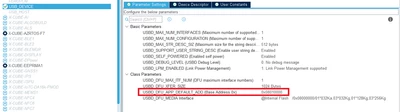
 

LeonSu_1-1764032909082.png

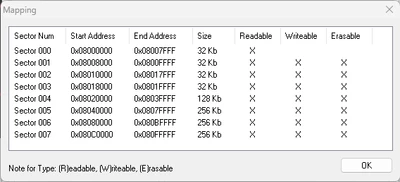
We try to set USBD_DFU_APP_DEFAULT_ADD to 0x08010000 based on the following information.

(1).Build Analyzer
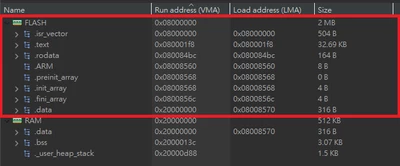
LeonSu_3-1764033269647.png

(2).Flash Mapping

LeonSu_4-1764035207193.png

//-------------------------------------------------------------------------------------------------------

2.USBD_DFU_APP_MASK 

We tried to find some information and found two different values: 0x2FFE0000 and 0x2FFC0000. I do not know how to choose between them to make the function work.


We will be grateful for any help you can provide.

Best answer by FBL

Hi @LeonSu 

Interesting! to conclude, USBD_DFU_APP_DEFAULT_ADD should be set to the start address of your user application in Flash : 0x08010000 in your case.

  1. USBD_DFU_APP_MASK should be used to verify the initial SP points to valid RAM; So both masks 0x2FFE0000 or 0x2FFC0000 are correct to check if the MSP value is within valid RAM address range.
  2. Before jumping to the application, de-initialize clocks, disable interrupts, and stop SysTick to ensure a clean MCU state. Check the MSP value at the application start address to confirm it’s valid before jumping, preventing jump failures

1 reply

Technical Moderator
November 25, 2025

Hello @LeonSu 

Did you check section 5.5 Leave DFU mode in USB DFU protocol used in the STM32 bootloader - Application note just as an example.

To give better visibility on the answered topics, please click on Accept as Solution on the reply which solved your issue or answered your question.Best regards,FBL
LeonSuAuthor
Associate II
December 17, 2025

Thank you, FBL, for your reply.
I tried to comment out line 37 and add the following code. It jumped to address 0x08010000 successfully.


HAL_RCC_DeInit();//release HSE,PLL

SysTick->CTRL=0;//stop stick tick
SysTick->LOAD=0;
SysTick->VAL = 0;
__disable_irq();

NVIC_DisableIRQ(USART1_IRQn);
NVIC_DisableIRQ(USART2_IRQn);
NVIC_DisableIRQ(USART3_IRQn);


FBLBest answer
Technical Moderator
December 18, 2025

Hi @LeonSu 

Interesting! to conclude, USBD_DFU_APP_DEFAULT_ADD should be set to the start address of your user application in Flash : 0x08010000 in your case.

  1. USBD_DFU_APP_MASK should be used to verify the initial SP points to valid RAM; So both masks 0x2FFE0000 or 0x2FFC0000 are correct to check if the MSP value is within valid RAM address range.
  2. Before jumping to the application, de-initialize clocks, disable interrupts, and stop SysTick to ensure a clean MCU state. Check the MSP value at the application start address to confirm it’s valid before jumping, preventing jump failures
To give better visibility on the answered topics, please click on Accept as Solution on the reply which solved your issue or answered your question.Best regards,FBL