
Associate II
February 24, 2026
Question

Issue Connecting STM32H745BIT6 Custom Board with STLINK-V3SET Debugger

  • February 24, 2026
  • 2 replies
  • 607 views

Hi Team,

We are currently working with a custom board that uses the STM32H745BIT6 MCU, and we are attempting to connect it to the STLINK-V3SET debugger. However, we are experiencing intermittent debugging issues described below:

  1. The debugger successfully enters debug mode only 2–3 times when done the first time.

  2. In most cases, the debugger connects and enters debug mode, but after approximately 6–8 seconds, it displays a “Target lost” error (please refer to the attached photo).

  3. Often, it shows “Target not responding.” When this happens, we need to power cycle the board. After turning the power supply off and on again, it behaves as described in point 2.

This issue has become a major roadblock in our development process.

Could you please advise if we might be missing something or configuring anything incorrectly? If you require any additional information from our side (errors, logs, etc.), please let us know and we will provide it.
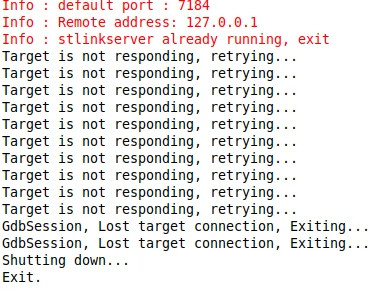
Prathiksha_0-1771933002729.png

Best regards,
Prathiksha

2 replies

mƎALLEm
Technical Moderator
February 24, 2026

Hello,

Check the VCORE voltage level versus the VOS you set and the power supply config in your software versus what is provided in the datasheet:

screenshot.png

Ensure you have followed the hardware guidelines described in the application note AN4938 "Getting started with STM32H74xI/G and STM32H75xI/GMCU hardware development" especially the VCAP part:

screenshot.png


"To give better visibility on the answered topics, please click on ""Accept as Solution"" on the reply which solved your issue or answered your question."
Associate II
February 24, 2026

Yes. These conditions are satisfied.
Attached the screenshot for your reference.

mƎALLEm
Technical Moderator
February 24, 2026

What about my first question? you need to monitor the Vcore voltage.

"To give better visibility on the answered topics, please click on ""Accept as Solution"" on the reply which solved your issue or answered your question."
TDK
Super User
February 24, 2026

This is likely a hardware design problem.

Why are there two grounds?

"If you feel a post has answered your question, please click ""Accept as Solution""."
Associate II
February 25, 2026

I checked that with the hardware team, that is no issue.

TDK
Super User
February 25, 2026

Maybe the hardware team can also explain why it's not working then.

"If you feel a post has answered your question, please click ""Accept as Solution""."