LPetr.1
Senior
January 19, 2026
Solved

NUCLEO-G491RE Standby mode power consumption test

  • January 19, 2026
  • 7 replies
  • 1031 views

I have ordered NUCLEO-G491R to test STANDBY mode power consumption. The power consumption measurements are taken via the PPK2 from Nordic.

https://www.nordicsemi.com/Products/Development-hardware/Power-Profiler-Kit-2
The steps:

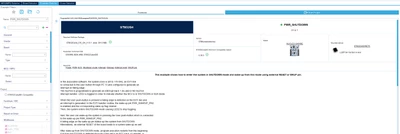
1. Take STM32CubeMX example project PWR_SHUTDOWN that is available for the Nucleo board.
LPetr1_0-1768826358525.png


2. Program the board (ensure the JP5 jumper is at the 5V_STLK position)

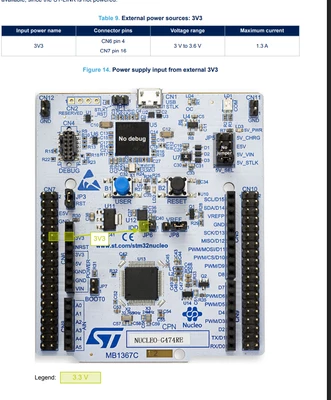
3. Remove the JP5 jumper because we will be powering the board via the external 3V3 (PPK2)
LPetr1_2-1768826475933.png


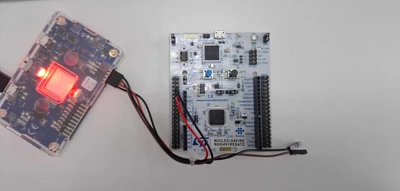
4. Connect the PPK2 to 3V3 and GND on the board.
LPetr1_0-1768827059286.png


5. Start sampling


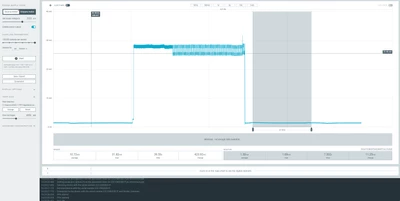
See the results below:
LPetr1_3-1768826508611.png

When the device enters STANDBY, the current consumption is measured at about 1.5mA which is way above what is declared on the datasheet.

What could be the reason that I cant achieve the declared current consumption for the STANDBY mode via the official example project? I am convinced that measurements of the PPK2 are valid as I have used this board in the past to measure very low currents and it was showing reasonable results.

Thanks in advance for any tips/suggestions.

Best answer by Gyessine

Hello @LPetr.1 

After further investigation, higher power consumption results from two main causes:

  • PB8-BOOT0 pin: Based on the product datasheet  it's not recommended to leave this pin unconnected, because it does not support analog input mode. If the pin is configured as BOOT0, set a defined logic level to ensure proper entry into the bootloader. If the pin is configured as PB8 by reprogramming the nSWBOOT0 option bit, it operates as a standard GPIO; however, analog input mode is not available. You likely removed jumper JP7 (BOOT0 jumper) on the Nucleo board, so pin PB8-BOOT0 is floating and causes power consumption depending on noise on this pin. Touching this pin changes the power consumption.

    Gyessine_0-1770024512347.png
  • Debug registers: You probably tried to debug the project, which activated the debug registers and caused the 1.4 mA consumption. You must clear the debug registers manually after each debug session when you want to run the project again. Try to insert the appropriate code to clear the debug registers.
    You can use this code sequence :

  • DBGMCU->CR &= ~(DBGMCU_CR_DBG_SLEEP |
     DBGMCU_CR_DBG_STOP |
     DBGMCU_CR_DBG_STANDBY);
    
     // If your device has APB1/APB2 freeze bits and you want timers to run
     // while debugger is attached, clear those as well.
     DBGMCU->APB1FZR1 = 0x00000000U;
     DBGMCU->APB1FZR2 = 0x00000000U;
     DBGMCU->APB2FZ = 0x00000000U; /* USER CODE END Init */

Here is a screenshot where I managed to get nA consumption with these tips.

Gyessine_1-1770024670112.png


If your issue still persists, please do not hesitate to provide feedback.

If this information solves your issue, mark it as a solution so that other ST community users can reference it.

Gyessine


7 replies

mƎALLEm
Technical Moderator
January 19, 2026

Hello,

According to picture you shared, you seems measuring the current consumption of the board not the power consumption of the MCU.

You need to measure the power consumption on JP6.

"To give better visibility on the answered topics, please click on ""Accept as Solution"" on the reply which solved your issue or answered your question."
LPetr.1
LPetr.1Author
Senior
January 19, 2026
Thanks for reply. Il measure the current via the JP6 tommorow.

Can you explain what else could be consuming so much power on the board?
mƎALLEm
Technical Moderator
January 19, 2026

You need to check the board's schematic. Any component consuming from 3.3V could be a source of current consumption. Check for example the availability of pull-up, pull-down resistors etc .. 

When you measure a MCU power consumption, the chip needs to be isolated from any other extra components.

"To give better visibility on the answered topics, please click on ""Accept as Solution"" on the reply which solved your issue or answered your question."
LPetr.1
LPetr.1Author
Senior
January 20, 2026

x

LPetr.1
LPetr.1Author
Senior
January 20, 2026

I have performed more experiments with the NUCLEO-G491RE board:

I have opened the following solder bridges:

1. SB17/SB23 (STLINK RX/TX)
2. SB15 (debug trace)
3. SB38
4. SB25/SB26/SB31/SB30  (external crystals)
5. SB6 (LED2)
6. SB16 (User button)
7. SB1
8. SB27
9. SB40/SB41 (SWD/SCLK)

The lowest current consumption I have captured is 170uA with all of those disabled which is still above the declared.

At this point I am not sure what else can I do to further test it. I am questioning if the HAL example code is really correct at this point, perhaps something is missing that is crucial to current saving.

Perhaps you have this or any simillar STM32G4 based Nucleo board and could check ?

Andrew Neil
Super User
January 20, 2026

As @mƎALLEm said, have you checked the schematics?

You need to look very carefully for anything which could possibly "leak" current.

https://community.st.com/t5/stm32-mcus-wireless/excess-current-consumption-running-b-l072z-lrwan1-from-battery/m-p/322961#M13092

A couple often missed are:

  • nRST from the ST-Link;
  • Target VDD measurement by the ST-Link.


Also remember that the STM32 may need a power cycle (not just a reset) after a debugger has been connected.

A complex system that works is invariably found to have evolved from a simple system that worked.A complex system designed from scratch never works and cannot be patched up to make it work.
LPetr.1
LPetr.1Author
Senior
January 20, 2026

Of course I have checked the schematics, but my hardware knowledge is somewhat limited. I have attempted to open all of those solder bridges after reviewing the schematic and what I have managed to identify as possible current leakage spots.

regarding the

  • nRST from the ST-Link;

, I have removed the J1 and J3, so I assume that should be fine right?

regarding the

  • Target VDD measurement by the ST-Link.

It is not fully clear what you mean, perhaps you could clarify?

I see you have had simmilar problems 

LPetr.1
LPetr.1Author
Senior
January 20, 2026

What is also concerning that when measuring the total board power consumption when powering the board via external 3V3, its about 1.4mA (even with all the SB's opened and disconnected) 

And when measuring via JP6 is around 260uA

So despite the fact that the current consumption of the MCU is way above what it should be, I also cannot wrap my head around why the total board power consumption is 1.4 mA, even with all pins configured as analog. What could be drawing so much current ?

Andrew Neil
Super User
January 20, 2026

The total board power includes the ST-Link, LEDs, etc ...

A complex system that works is invariably found to have evolved from a simple system that worked.A complex system designed from scratch never works and cannot be patched up to make it work.
LPetr.1
LPetr.1Author
Senior
January 20, 2026

Sure, but when I power via the external 3V3 ST-Link is not being powered (its using seperate 3V3_STLK).
I have configured all pins as analog, so any existing LED's should not really matter, furthermore, I have opened the SB6 and SB16 which disabled the user the only user LED and user button.

There is pretty much nothing else that could be consuming power on 3V3 line, but there is somehow 1mA which confuses me.

LPetr.1
LPetr.1Author
Senior
January 21, 2026

I continue my experimentation:

I have opened all solder bridges apart the two:
SB11 and SB38

At this point I feel like I have removed almost everything what's possible.

When powering the board via the external 3V3, the board current consumption is 600-700uA, the MCU itself current consumption is around 260uA

I am not sure what else I could try/measure to understanding what is happening and what causing the current to be higher than expected. I am considering removing (desoldering) the components one by one from the board that could have such affect but not sure if that makes any sense.

Also, I have not managed to find any information online (articles/tutorials or youtube videos) that would show proof and examples of STM32G series low power results. All STM low power information online is related to STM32L or STM32F series which is unfortunate

Technical Moderator
January 22, 2026

Hello @LPetr.1 

Can you please try to run the attached project and measure the current consumption on your Nucleo board? Also, compare the results with your custom PCB to evaluate the current hardware against the Nucleo board.

I tested standby mode with the Nucleo G491 and measured several tenths of microamperes. I could not reach 1.4 mA.

The board already consumes 1 mA in run mode.
Also try to measure it using a calibrated ammeter
BR
Gyessine

To give better visibility on the answered topics, please click on Accept as Solution on the reply which solved your issue or answered your question.
GyessineBest answer
Technical Moderator
February 2, 2026

Hello @LPetr.1 

After further investigation, higher power consumption results from two main causes:

  • PB8-BOOT0 pin: Based on the product datasheet  it's not recommended to leave this pin unconnected, because it does not support analog input mode. If the pin is configured as BOOT0, set a defined logic level to ensure proper entry into the bootloader. If the pin is configured as PB8 by reprogramming the nSWBOOT0 option bit, it operates as a standard GPIO; however, analog input mode is not available. You likely removed jumper JP7 (BOOT0 jumper) on the Nucleo board, so pin PB8-BOOT0 is floating and causes power consumption depending on noise on this pin. Touching this pin changes the power consumption.

    Gyessine_0-1770024512347.png
  • Debug registers: You probably tried to debug the project, which activated the debug registers and caused the 1.4 mA consumption. You must clear the debug registers manually after each debug session when you want to run the project again. Try to insert the appropriate code to clear the debug registers.
    You can use this code sequence :

  • DBGMCU->CR &= ~(DBGMCU_CR_DBG_SLEEP |
     DBGMCU_CR_DBG_STOP |
     DBGMCU_CR_DBG_STANDBY);
    
     // If your device has APB1/APB2 freeze bits and you want timers to run
     // while debugger is attached, clear those as well.
     DBGMCU->APB1FZR1 = 0x00000000U;
     DBGMCU->APB1FZR2 = 0x00000000U;
     DBGMCU->APB2FZ = 0x00000000U; /* USER CODE END Init */

Here is a screenshot where I managed to get nA consumption with these tips.

Gyessine_1-1770024670112.png


If your issue still persists, please do not hesitate to provide feedback.

If this information solves your issue, mark it as a solution so that other ST community users can reference it.

Gyessine


To give better visibility on the answered topics, please click on Accept as Solution on the reply which solved your issue or answered your question.
Andrew Neil
Super User
February 2, 2026

@Gyessine wrote:
  • Debug registers: You probably tried to debug the project, which activated the debug registers and caused the 1.4 mA consumption. You must clear the debug registers manually after each debug session when you want to run the project again. Try to insert the appropriate code to clear the debug registers.

@LPetr.1  Also note that clearing this can require a full power-cycle - not just a reset - as I mentioned earlier.

A complex system that works is invariably found to have evolved from a simple system that worked.A complex system designed from scratch never works and cannot be patched up to make it work.