Associate II
July 25, 2025
Solved

stm32c071kbt6 not detected as a USB device
  • July 25, 2025
  • 2 replies
  • 368 views

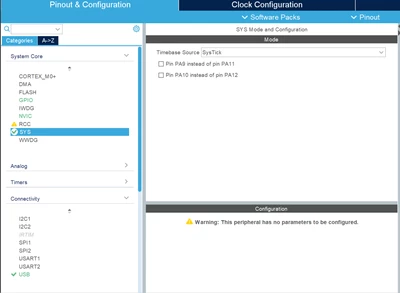
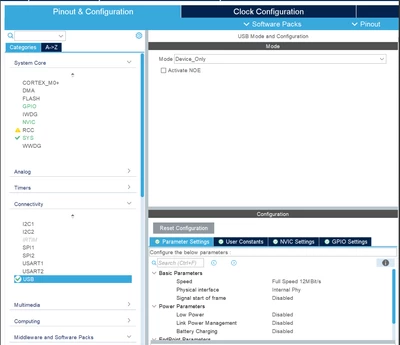
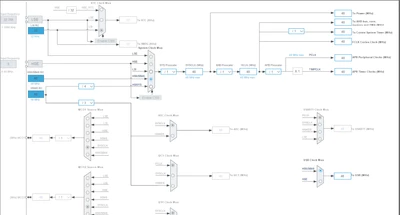
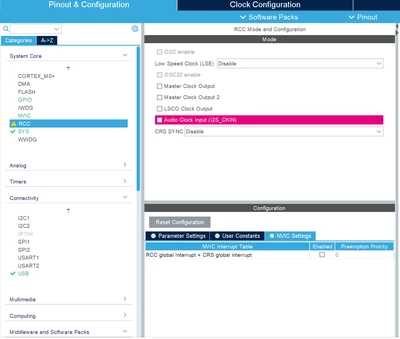
labubu_0-1753441851429.pnglabubu_1-1753441865409.png


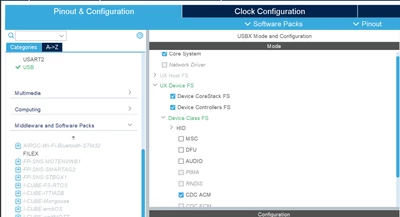
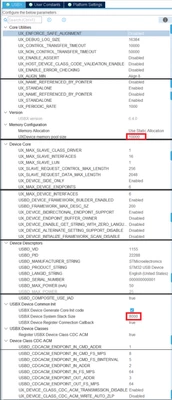
labubu_4-1753441920588.pnglabubu_5-1753441929800.pnglabubu_6-1753441940579.pnglabubu_7-1753441950561.png

以上就是我配置的所有内容。您能指出我的配置有任何问题吗?根据上述配置,我的设备现在在开机时无法在计算机的设备管理器中检测为 USB 设备。

Edit: That's all I have configured. Can you point out any issues with my configuration? With the above configuration, my device is now not detected as a USB device in the computer's device manager at boot time.

Best answer by Imen.D

Hello @labubu ,

First, you should ensure the USB cable is functional and properly connected. Verify that the USB pins, jumpers on the STM32C0 board are correctly connected. 

Is the USB driver installed correctly?

Check also if the USB VBUS pin is properly powered.

Verify that the USB descriptors (device, configuration, and endpoint descriptors) are correctly configured.

If you can provide more details about the hardware schematics or USB pin connections for your STM32C0 board to further analysis the issue.

2 replies

Imen.DBest answer
Technical Moderator
July 29, 2025

Hello @labubu ,

First, you should ensure the USB cable is functional and properly connected. Verify that the USB pins, jumpers on the STM32C0 board are correctly connected. 

Is the USB driver installed correctly?

Check also if the USB VBUS pin is properly powered.

Verify that the USB descriptors (device, configuration, and endpoint descriptors) are correctly configured.

If you can provide more details about the hardware schematics or USB pin connections for your STM32C0 board to further analysis the issue.

"When your question is answered, please close this topic by clicking ""Accept as Solution"".ThanksImen"
labubuAuthor
Associate II
July 30, 2025

Thank you. It has been resolved.

Technical Moderator
July 30, 2025

How did you fix the issue?  Did my answer solve your problem?

Please share the final solution, so that more Community members can benefit from this thread.

"When your question is answered, please close this topic by clicking ""Accept as Solution"".ThanksImen"