Associate II
September 18, 2025
Solved

STM32F401RBTx goes hard fault when clock speed is high

  • September 18, 2025
  • 2 replies
  • 286 views

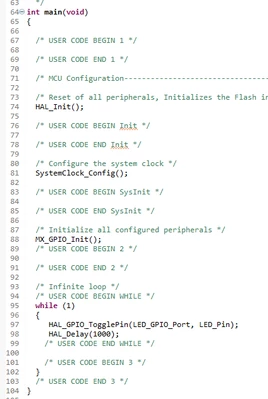
I saw a strange behavior when using STM32F401RBTx, to show you I added only 1 output as LED and  toggled it. 
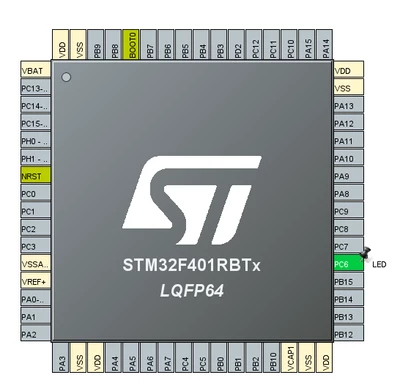
alig_ones_0-1758196919434.png

alig_ones_1-1758196967793.png

I have just that much code. I tried with 16 MHz, 48 MHz, 64 MHz, 84 MHz. It went hard fault when speed is 64 MHz or 84 MHz. 
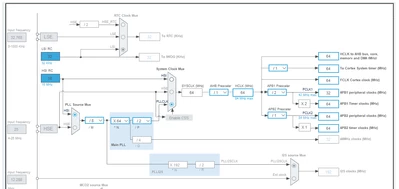
 

alig_ones_2-1758197260671.png

This is the clock setting which calculated by STM32CubeIDE.


It goes inside of HAL_RCC_ClockConfig function and can't go beyond HAL_InitTick function. When I put breakpoint inside HAL_InitTick I could delay hard fault little bit and saw below callstack.
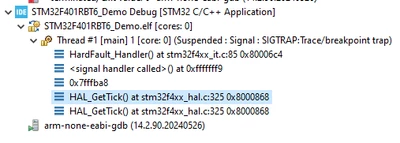
alig_ones_3-1758198391854.png

I tried this with 2 microcontrollers and same thing was happening. How can I solve this? Thank you.


Best answer by alig_ones

It turned out it was hardware issue as you stated. Unfortunately I saw this post (same issue) after I shared my post. I contacted to the hardware team and asked if VCAP is correctly placed and has 1.26V on it, they found out there is problem with paths and they fixed. Now its working fine. Thank you everyone!

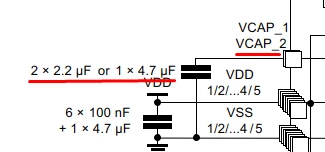
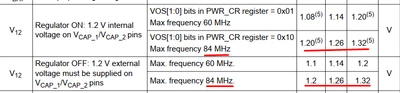
Guys who have same issue be sure VCAP1 has below capacitor and voltage values:

alig_ones_0-1758269153421.png

alig_ones_1-1758269244049.png


2 replies

RobK1
Associate II
September 18, 2025

Could this have something to do with it?


RobK1_1-1758200208081.png


alig_onesAuthor
Associate II
September 18, 2025

I didn't do any configuration for this but I can see it is already configured as Power Scale 2, even before HAL_RCC_ClockConfig function. It is also set in the hard fault handler.


alig_ones_0-1758202248388.png

alig_ones_1-1758202332064.png


mƎALLEm
Technical Moderator
September 18, 2025

What board are you using? a custom board? 

If so, did you refer to the STM32F4xxx hardware getting started application note AN4488, especially the schematics on page 34?

"To give better visibility on the answered topics, please click on ""Accept as Solution"" on the reply which solved your issue or answered your question."
TDK
Super User
September 18, 2025

Hard fault on high clock speeds suggests a hardware issue, not a code issue.

Is this a custom board? VCAP voltage okay? Power sufficient? Wait states set appropriately?

Include the schematic and IOC file if you can.

"If you feel a post has answered your question, please click ""Accept as Solution""."
alig_onesAuthorBest answer
Associate II
September 19, 2025

It turned out it was hardware issue as you stated. Unfortunately I saw this post (same issue) after I shared my post. I contacted to the hardware team and asked if VCAP is correctly placed and has 1.26V on it, they found out there is problem with paths and they fixed. Now its working fine. Thank you everyone!

Guys who have same issue be sure VCAP1 has below capacitor and voltage values:

alig_ones_0-1758269153421.png

alig_ones_1-1758269244049.png