Associate
March 10, 2026
Solved

STM32F401RE not detected via SWD – ST-Probe shows probe but Flash size = 0x00

  • March 10, 2026
  • 5 replies
  • 402 views

Hello,

I designed a custom PCB using the STM32F401RE (LQFP64), but I cannot connect to the MCU through SWD. I am using an ST-Link probe and the st-probe command-line tool.

When I run the probe command, the ST-Link probe itself is detected, but the target MCU is not properly identified. The tool reports the flash size as 0x00.

MCU: STM32F401RE
Debugger: ST-Link probe
Tool: st-probe

Observed behavior:

  • ST-Link probe is detected correctly.

  • The MCU is not detected.

  • Flash size reported as 0x00.

Power measurements:

  • VDD = 3.3 V

  • VDDA = 3.3 V (through ferrite bead BLM18AG601SN1D)

  • VCAP ≈ 1.2 V (2.2 µF capacitor connected directly, ~8 mm trace, no vias)

  • NRST = 3.3 V

  • Total board current ≈ 18 mA (two LEDs also present)

The MCU does not heat up, and current consumption appears normal.

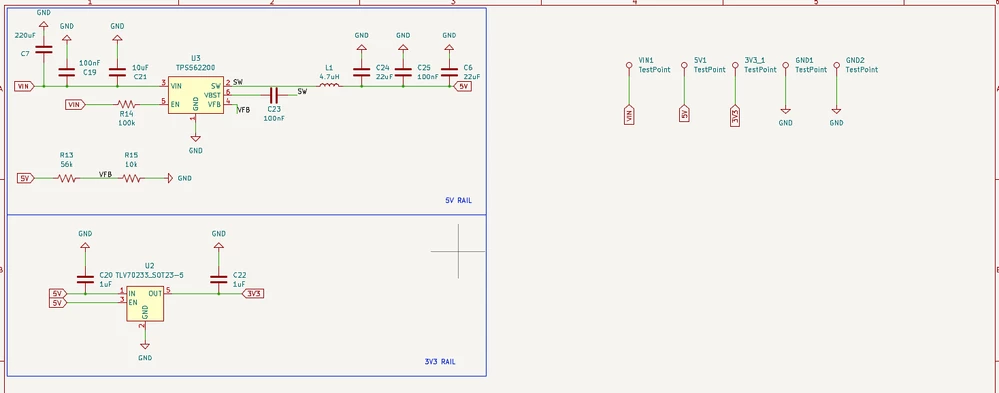
Power architecture:
12 V input → buck converter → 5 V → LDO → 3.3 V (MCU supply)

Analog supply filtering:
VDD → ferrite bead → VDDA
Decoupling capacitors are placed near the MCU.

Debug connections:
SWDIO → PA13
SWCLK → PA14
NRST connected to the debugger
VREF connected to 3.3 V
BOOT0 pulled down with 10 kΩ

Minimal hardware configuration:
For initial bring-up I have connected only the required components for the MCU to boot:

  • Power supply and decoupling capacitors

  • Boot configuration resistors

  • VCAP capacitor

  • SWD debugging header

No external peripherals are connected to the MCU pins.

There is no external clock connected:

  • No HSE crystal

  • No LSE crystal

The MCU should therefore start using the internal HSI oscillator.

Troubleshooting attempted:

  • Verified all voltages with a multimeter

  • Checked board current (~18 mA)

  • Tried lowering SWD frequency

  • Tried connecting under reset

Attachments:

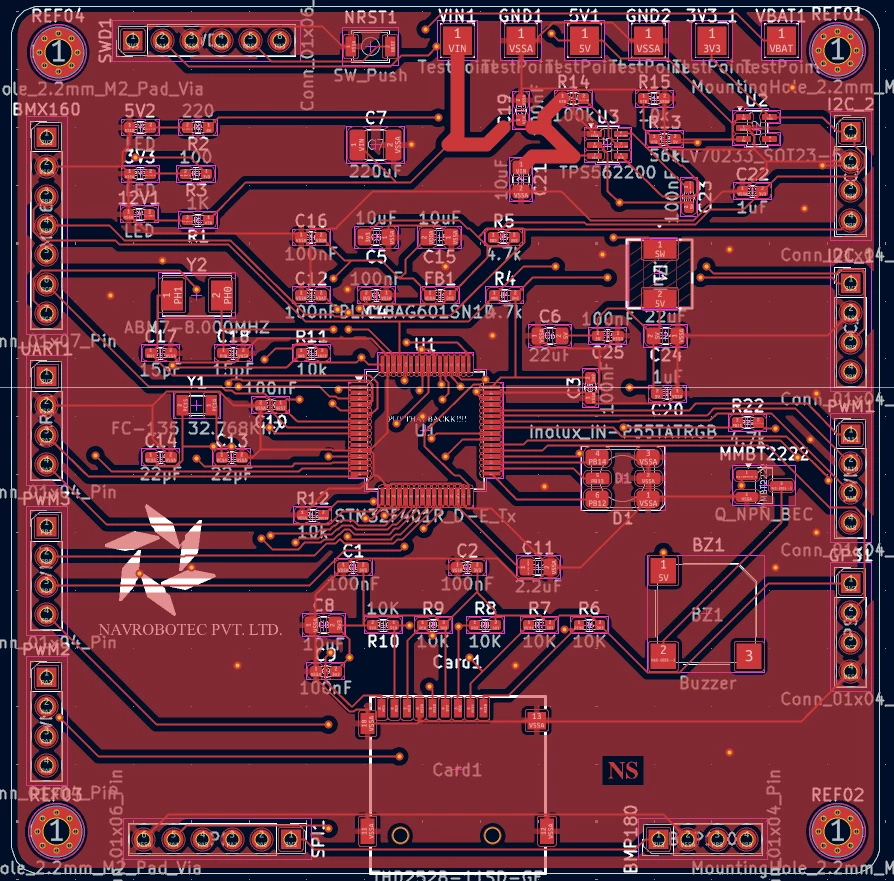
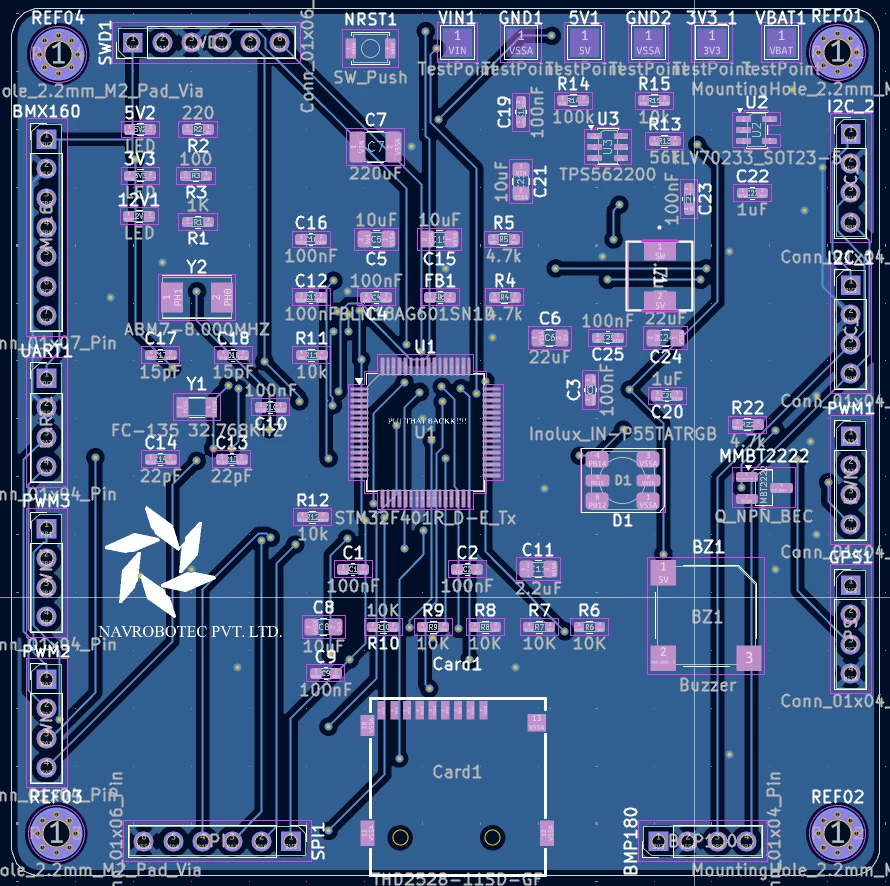
  • PCB photos

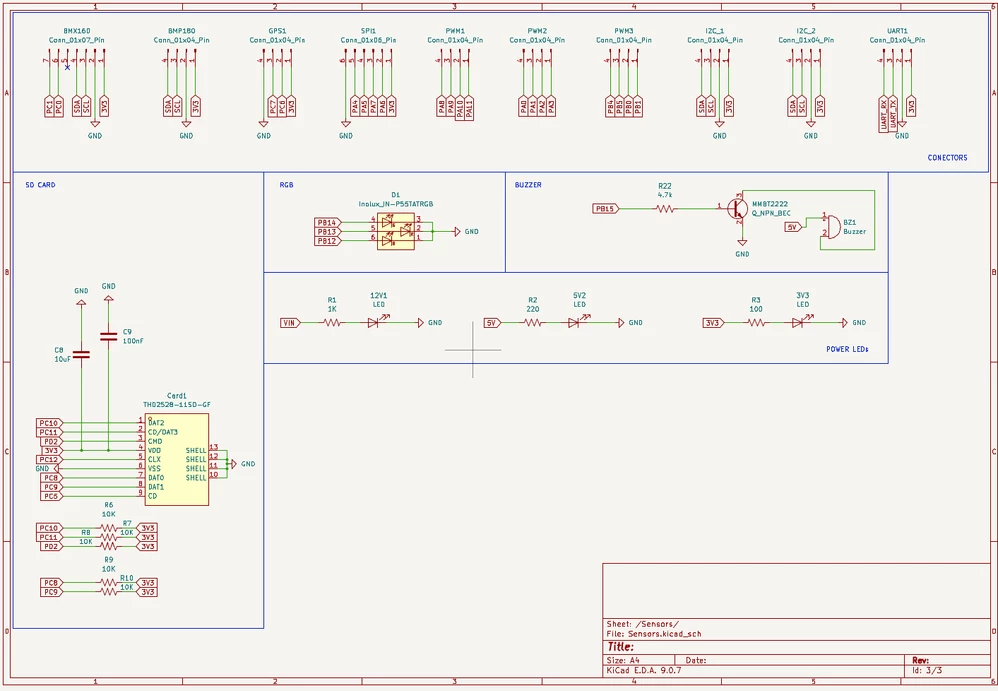
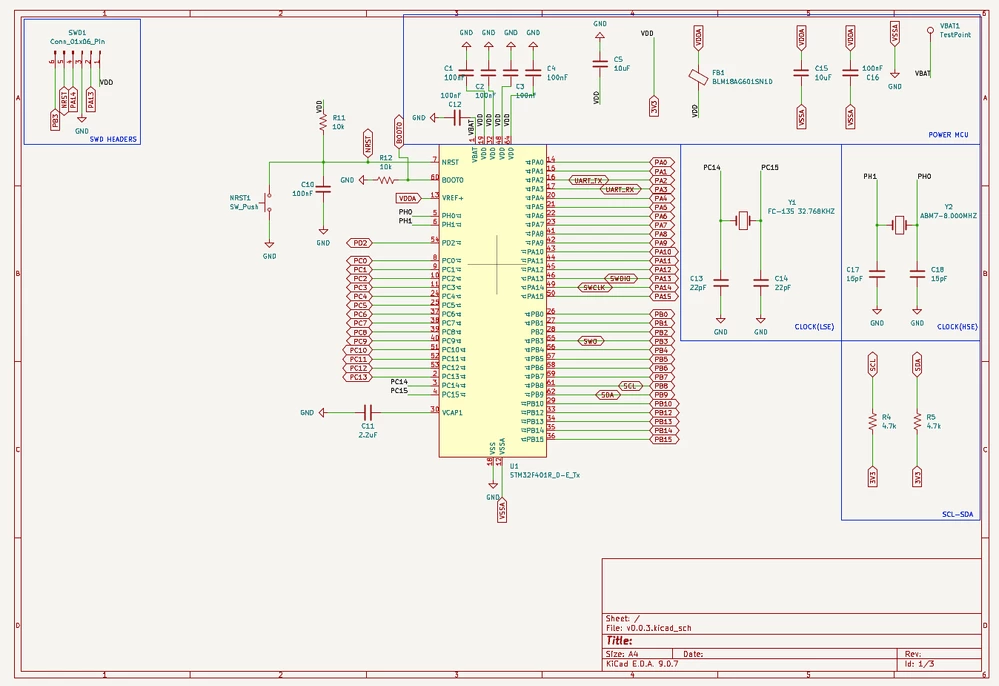
  • Schematic photos

Could someone help identify possible hardware issues that might prevent the MCU from being detected over SWD?

Thank you.
 

Screenshot 2026-03-11 at 3.55.20 AM.pngScreenshot 2026-03-11 at 3.55.37 AM.pngScreenshot 2026-03-11 at 3.56.03 AM.pngScreenshot 2026-03-11 at 3.57.26 AM.pngScreenshot 2026-03-11 at 3.57.40 AM.png

Best answer by TDK

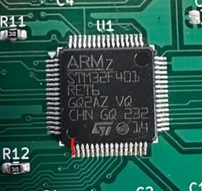
The orientation is incorrect. Pin 1 on the chip is here:

Screenshot 2026-03-11 144339.png

This does not match your pin 1 marking on the silkscreen.


5 replies

TDK
Super User
March 10, 2026

Debugger: ST-Link probe

What programmer are you using? Counterfeits tend not to work well and not work with STM32CubeIDE.

Does VCAP1 have 1.2 V? If so, chip is alive and waiting for commands.

Tool: st-probe

How about with STM32CubeProgrammer?

"If you feel a post has answered your question, please click ""Accept as Solution""."
Associate
March 11, 2026

Thank you for the response.

I checked the VCAP1 voltage again, and it is still showing 0 V.

I have not tried STM32CubeProgrammer because I am building my own custom HAL and my workflow relies on st-probe for flashing and debugging. I previously tested the same HAL implementation on the STM32F401RE Nucleo board, and it worked correctly there.

Also, this is actually my third custom board attempt using this MCU.

I checked the VCAP capacitor, and it measures around 2.17 µF with my meter, however it is rated 2.2uF . The routing from the VCAP pin to the capacitor looks correct, and it is connected directly to ground without vias.

Since the VCAP1 voltage itself is 0 V, it seems the internal core regulator might not be starting properly.

Could you suggest what conditions must be satisfied for the internal regulator to start and generate the ~1.2 V on VCAP? Are there any specific hardware requirements or common pitfalls when designing with the STM32F401RE that could cause this behavior?

Thank you for the help.

TDK
Super User
March 11, 2026

If VCAP has no voltage, the chip isn't getting power.

Schematic looks okay. Maybe the part isn't soldered correctly. Show a large in focus picture of the actual board. Maybe orientation is wrong.


In your original post you said VCAP was 1.2 V and now in your second post you said it was 0 V. Why?

"If you feel a post has answered your question, please click ""Accept as Solution""."
Associate
March 11, 2026

Thank you for the response.

I checked the board again and verified a few things.

All VDD pins measure 3.3 V, and VDDA is also at 3.3 V.
NRST is at 3.3 V as well.

I also checked **continuity between the MCU pins and the corresponding capacitors **, and the connections appear correct. The SWD signals and power pins all show proper continuity to the header and supply rails.

Regarding the earlier VCAP measurement, I likely made an error during the first measurement. After checking again carefully, the VCAP pin is currently reading 0 V.

To rule out soldering or orientation issues, I am attaching clear photos of the actual PCB, including the MCU area and the SWD header, so that the solder joints and orientation can be inspected.

Thank you for the suggestion.


IMG_3401.jpgIMG_3402.jpg

mƎALLEm
Technical Moderator
March 11, 2026

Maybe not issue related but why VBAT is not connected to VDD (if you are not using a battery)?

screenshot.png

"To give better visibility on the answered topics, please click on ""Accept as Solution"" on the reply which solved your issue or answered your question."
Associate
March 11, 2026

Thank you for the response.

you are correct that it should be connected to VDD if no battery is used. That was an oversight in the original design. I have already corrected it on the board by shorting VBAT and VDD.


TDK
TDKBest answer
Super User
March 11, 2026

The orientation is incorrect. Pin 1 on the chip is here:

Screenshot 2026-03-11 144339.png

This does not match your pin 1 marking on the silkscreen.


"If you feel a post has answered your question, please click ""Accept as Solution""."
Associate
March 11, 2026

It worked!!! :party_popper:

Thank you so much for pointing that out. The issue was indeed the orientation of the MCU. After correcting the orientation according to the proper Pin 1 location, the chip is now detected correctly.

You probably just saved me from having to spin another PCB revision, so I really appreciate the help.

Thanks again!

TDK
Super User
March 11, 2026

You should mark the solution that helped you as the solution, not your own reply. It helps others find the correct solution.

"If you feel a post has answered your question, please click ""Accept as Solution""."