Associate II
November 14, 2025
Solved

STM32G474: need to use of custom bootloader or ST bootloader?

  • November 14, 2025
  • 3 replies
  • 303 views

Hi,

I do not have a lot of experience with the STM32. I used other processors in the past like the LCP1768. We developed a custom bootloader to be able the load a new firmware into the uProcessor.


In our current case, the STM32G474 is connected by USB to our PC software. Is it possible to give the processor a command to reboot in bootloader-mode. Because the boot-pin is already in use by the I2C-bus.

Is this possible with the normal bootloader or do we need to develop our own bootloader to do this?

Where can I find information to do this?

Thanks in advance.

With kind regards,

ErX
Best answer by mƎALLEm

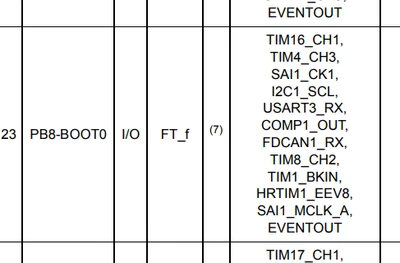
OK I understood what do you mean by "boot-pin", this one:

mALLEm_0-1763118773543.png

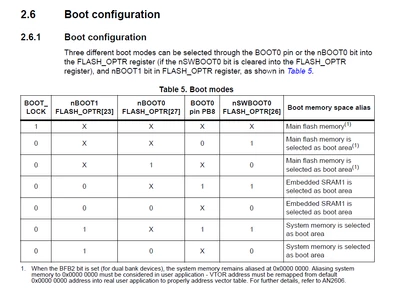
You still have the access to the ST bootloader but for that you need to use the boot modes in option bytes where the boot-pin is no more usable. Refer to the RM0440 / section 2.6 Boot configuration:

mALLEm_1-1763118921170.png


3 replies

Technical Moderator
November 14, 2025

Hello @ErX 

You can jump to bootloader from your application code. 

Please refer to the article below:

How to jump to system bootloader from application ... - STMicroelectronics Community

For more information about system bootloader please refer to the application note below:

Introduction to system memory boot mode on STM32 MCUs - Application note

"To give better visibility on the answered topics, please click on ""Accept as Solution"" on the reply which solved your issue or answered your question.Saket_Om"
mƎALLEm
Technical Moderator
November 14, 2025

Hello @ErX and welcome to the ST community,

If the resources allocated to the ST bootloader (according to the AN2606) are used you need to develop your own bootloader.

But you need to provide details which pin are used by I2C? PA11, PA12?

mALLEm_3-1763118059985.png

But according the the datasheet I2C is not mapped neither on PA11 nor on PA12:

mALLEm_4-1763118120372.png

mALLEm_5-1763118168548.png

You need to refer to the AN2606 / section 50 STM32G47xxx/48xxx devices 

"To give better visibility on the answered topics, please click on ""Accept as Solution"" on the reply which solved your issue or answered your question."
mƎALLEm
mƎALLEmBest answer
Technical Moderator
November 14, 2025

OK I understood what do you mean by "boot-pin", this one:

mALLEm_0-1763118773543.png

You still have the access to the ST bootloader but for that you need to use the boot modes in option bytes where the boot-pin is no more usable. Refer to the RM0440 / section 2.6 Boot configuration:

mALLEm_1-1763118921170.png


"To give better visibility on the answered topics, please click on ""Accept as Solution"" on the reply which solved your issue or answered your question."
ErXAuthor
Associate II
November 14, 2025

Hi,

thanks for the information. I will dive into it.


Greetings,

ErX.

mƎALLEm
Technical Moderator
November 14, 2025

So accept it as solution if it did answer your question.

"To give better visibility on the answered topics, please click on ""Accept as Solution"" on the reply which solved your issue or answered your question."