Associate
June 11, 2025
Solved

STM32H747 with OV5460 low frame rate

  • June 11, 2025
  • 3 replies
  • 477 views

I am using STM32H747 MCU with OV5460 camera. The FPS i got from the camera is around12-13 fps is that any method to increase the frame rate.

I tried by increase PLL clock but there is no image received.

Thanks

Best answer by KDJEM.1

Hello @KHowe;


Thank you for updating the post and providing more details about the target.

To achieve the target resolution and the frame rate, you need to refer to the OV5640 datasheet, and STM32H747 datasheet and check all constraints.

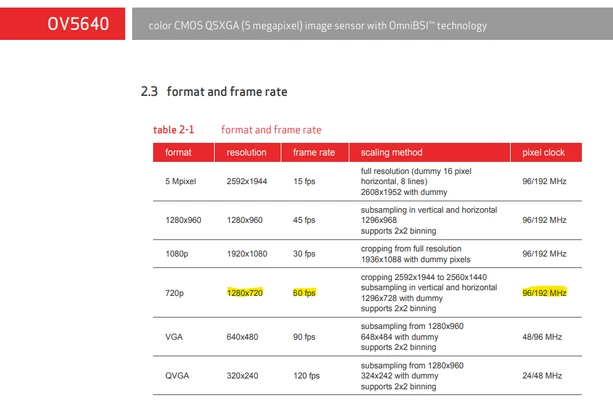
As mentioned in the OV5640 datasheet, to reach 1280x720 resolution and 60 fps frame rate, you need to configure the pixel clock at 96 MHz.

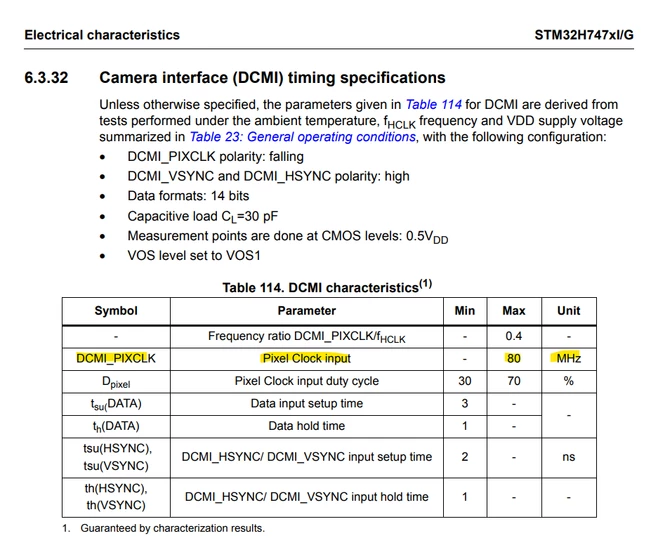
But when we refer to the STM32H747 datasheet, we see that the maximum pixel clock is 80 MHz.

To reach higher frame rates, I recommend you to decrease the image resolution to ensure the maximum pixel rate constraints.
KDJEM1_0-1750755692159.png

KDJEM1_1-1750755872362.png

Thank you.

Kaouthar

3 replies

KDJEM.1
Technical Moderator
June 11, 2025

Hello @KHowe;


I recommend you to look at How to improve DCMI frame rate: An example using a ov5640 camera module.  This article explains how to increase the DCMI frame rate of an existing example, which is DCMI_ContinousCap_EmbeddedSynchMode in STM32CubeU5 package, from 7.5 fps to 15 fps.

So, I advise you to refer to this article to increase the frame rate.


Thank you.

Kaouthar

To give better visibility on the answered topics, please click on Accept as Solution on the reply which solved your issue or answered your question.
KHoweAuthor
Associate
June 24, 2025

yes i follow the steps and it dint give me much improvement. Is the MCU unable support high fps on this? my target is  800*600@60fps

KDJEM.1
KDJEM.1Best answer
Technical Moderator
June 24, 2025

Hello @KHowe;


Thank you for updating the post and providing more details about the target.

To achieve the target resolution and the frame rate, you need to refer to the OV5640 datasheet, and STM32H747 datasheet and check all constraints.

As mentioned in the OV5640 datasheet, to reach 1280x720 resolution and 60 fps frame rate, you need to configure the pixel clock at 96 MHz.

But when we refer to the STM32H747 datasheet, we see that the maximum pixel clock is 80 MHz.

To reach higher frame rates, I recommend you to decrease the image resolution to ensure the maximum pixel rate constraints.

KDJEM1_0-1750755692159.png

KDJEM1_1-1750755872362.png

Thank you.

Kaouthar

To give better visibility on the answered topics, please click on Accept as Solution on the reply which solved your issue or answered your question.
KDJEM.1
Technical Moderator
July 4, 2025

Hello @KHowe;


Any update about the issue? Is your request answered or not?

If yes,  please click on Accept as Solution on the reply which answered your question.


Thank you.

Kaouthar

To give better visibility on the answered topics, please click on Accept as Solution on the reply which solved your issue or answered your question.
