
Associate III
July 15, 2025
Solved

STM32L011G4U6TR build Error: Flash Overflow

  • July 15, 2025
  • 2 replies
  • 533 views

Hello All,


I am using STM32L011G4U6TR for one of my application development.


I have written a code where I am using,11 GPIO, 1 UART and Internat EEProm.

When I am building the code in I am getting below Error and not able to load the Application on STM32L011G4U6TR board.

If someone could guide how to resolve it, would be helpful. (Have removed the unnecessary arrays variables and using minimum variables to optimized ).


Description Resource Path Location Type
IPL_Handpiece_Control_Board_Firmware.elf section `.text' will not fit in region `FLASH' IPL_Handpiece_Control_Board_Firmware C/C++ Problem
make: *** [makefile:64: IPL_Handpiece_Control_Board_Firmware.elf] Error 1 IPL_Handpiece_Control_Board_Firmware C/C++ Problem
region `FLASH' overflowed by 568 bytes IPL_Handpiece_Control_Board_Firmware C/C++ Problem

Shiv09_0-1752586521299.png


Note when I am commenting some part of needed code then, I am able to load it and debug, but I need all the GPIO, UART, EEprom working together. Will do as per suggestions.


Regards,

SMD
 

Best answer by Andrew Neil

Try sorting the list by size, and look at the largest things ...


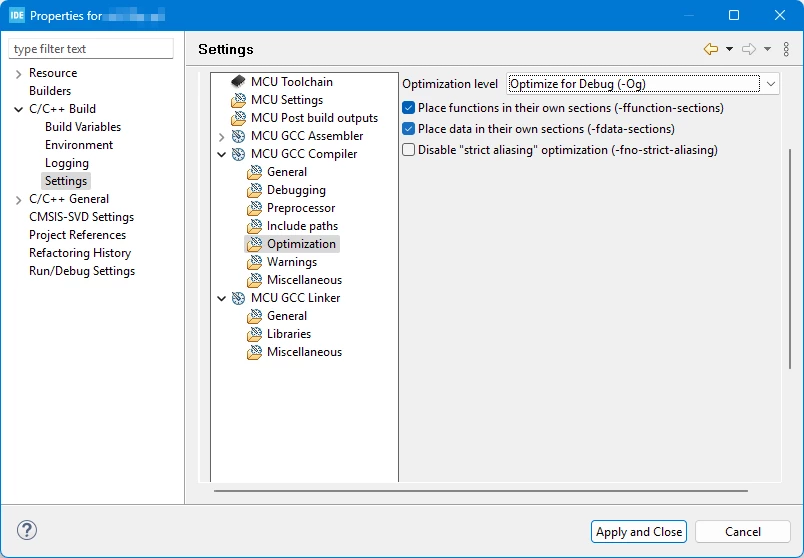
Have you tried increasing optimisation yet?

One key optimisation is that unused functions don't get included in the final image ...

GCC Optimisation levels are documented here;

https://gcc.gnu.org/onlinedocs/gcc/Optimize-Options.html

"-Og should be the optimization level of choice for the standard edit-compile-debug cycle, offering a reasonable blend of optimization, fast compilation and debugging experience" - see here.


PS:

AndrewNeil_0-1752659344850.png


2 replies

TDK
Super User
July 15, 2025

Your program is limited to the amount of FLASH available.

To reduce program size, you can do a few things:

  • Comment out unnecessary code or otherwise streamline code.
  • Use the Release Configuration rather than Debug Configuration.
  • Compile with higher optimization settings.
"If you feel a post has answered your question, please click ""Accept as Solution""."
Andrew Neil
Super User
July 15, 2025

@Shiv09 wrote:

I am using STM32L011G4U6TR


So it has only 16K of Flash.

The message tells you that you are 568 bytes over that:

IPL_Handpiece_Control_Board_Firmware C/C++ Problem
region `FLASH' overflowed by 568 bytes IPL_Handpiece_Control_Board_Firmware C/C++ Problem


@Shiv09 wrote:

Have removed the unnecessary arrays variables and using minimum variables to optimized


That would reduce RAM use, but it's Flash that's overflowing - not RAM.

You need to reduce the code size.

Use the CubeIDE Build Analyser to see what, exactly, is using up all the space.

common space hogs include

  • floating-point
  • printf
  • possibly HAL

As @TDK suggested, try a higher optimisation setting.


PS:

AndrewNeil_0-1752587644153.png

https://www.st.com/resource/en/user_manual/um2609-stm32cubeide-user-guide-stmicroelectronics.pdf#page=129


A complex system that works is invariably found to have evolved from a simple system that worked.A complex system designed from scratch never works and cannot be patched up to make it work.
Shiv09Author
Associate III
July 16, 2025

Hello @Andrew Neil 

Thanks for the reply, Yes tried to go as per your suggestions, I can see the HAL functions and some Implemented functions (these having lower size), so any best possible way to optimize more and use the code ?

Shiv09_0-1752658809126.png

Andrew Neil
Andrew NeilBest answer
Super User
July 16, 2025

Try sorting the list by size, and look at the largest things ...


Have you tried increasing optimisation yet?

One key optimisation is that unused functions don't get included in the final image ...

GCC Optimisation levels are documented here;

https://gcc.gnu.org/onlinedocs/gcc/Optimize-Options.html

"-Og should be the optimization level of choice for the standard edit-compile-debug cycle, offering a reasonable blend of optimization, fast compilation and debugging experience" - see here.


PS:

AndrewNeil_0-1752659344850.png


A complex system that works is invariably found to have evolved from a simple system that worked.A complex system designed from scratch never works and cannot be patched up to make it work.