Associate II
March 6, 2025
Solved

Trying to run a blinking LED on STM32H755ZI-Q

  • March 6, 2025
  • 5 replies
  • 2332 views

Hi,

am new to STM32 and i am trying to configurate my Nucleo but i don't understand my problem i am trying to setup a basic blink code with the basic structure (serial port communication with putty , debugger stlinkv3 and communication between cores but i can manage to ger it right thank you for any help or advises)

my problem is i cant manage to setup a basic ioc files configuration  for my stm32h755zi-q in the stmcubeide 1.18 i have a basic blink code using both core that work but when i try to setup whit other clock parameters configuration i cant manage to start the program (stlink v3 on the bord look like i cant connect)
Best answer by mƎALLEm

Hello,

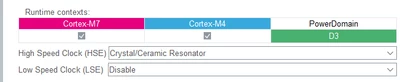
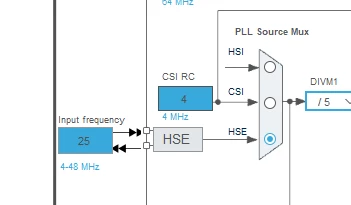
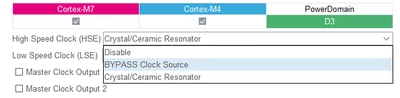
In your project you set the HSE in Crystal/Ceramic Resonator

mALLEm_2-1741250281583.png


mALLEm_1-1741250265714.png

While it should be set in Bypass mode:

mALLEm_3-1741250321188.png

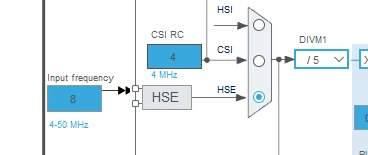
With Input frequency set to 8MHz:

mALLEm_4-1741250370136.png


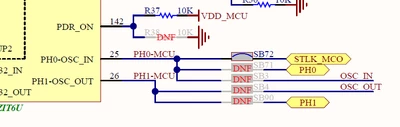
From the schematics, there is no external crystal mounted on the board:

mALLEm_0-1741251071682.png

And the frequency is generated by the STLINK MCO.

See this article.

Attached a project where the two LEDs green and red are toggling. Each led is toggling with a core.

Hope that helps.

5 replies

mƎALLEm
mƎALLEmBest answer
Technical Moderator
March 6, 2025

Hello,

In your project you set the HSE in Crystal/Ceramic Resonator

mALLEm_2-1741250281583.png


mALLEm_1-1741250265714.png

While it should be set in Bypass mode:

mALLEm_3-1741250321188.png

With Input frequency set to 8MHz:

mALLEm_4-1741250370136.png


From the schematics, there is no external crystal mounted on the board:

mALLEm_0-1741251071682.png

And the frequency is generated by the STLINK MCO.

See this article.

Attached a project where the two LEDs green and red are toggling. Each led is toggling with a core.

Hope that helps.

"To give better visibility on the answered topics, please click on ""Accept as Solution"" on the reply which solved your issue or answered your question."
Associate II
October 23, 2025

Your code ran good on my Nucleo H755ZIT6U, but you were setting M4 and M7 at 61234 port, I just swapped M4 to 61238 and it debugged. For newbies, here is my understanding as I am also learning:

M4 breakdown 0xa05f0000 is not an error. See how to "stepover" in "STM32 Dual Core 1 How to debug" by ControllerTechs on Youtube. When you build (upload) to 2 cores, the M4 will sleep and wait for M7 wake-up signal. M7 sees M4 sleeping, configures all core clock, does setups, wakes M4 up first, then M7 will start working. This is why M4 LED is blinking first, then M7. To start the new code please press the Reset button. 

Thank you


Associate II
March 6, 2025

thank you for your help i am still new to this 
i made the changes in the ioc like you told me 

William133467_3-1741251539818.png


i change some multipliers to get 400mhz , 200 and 100


William133467_2-1741251485019.png


but i get this error when i try to start for infos i use the configs from
" Getting started with projects based on dual-core STM32H7 microcontrollers
in STM32CubeIDE"


William133467_1-1741251400004.png


i get this error now like last time 

William133467_0-1741251175587.png


Associate II
March 6, 2025

William133467_0-1741253946353.png

i think my problem come from this i am trying on hse 8.33 if this work i will "Accept as Solution" in your reply if it works

thank you


edit
i change the mco output
and got this error

William133467_0-1741254385088.png


mƎALLEm
Technical Moderator
March 6, 2025

Just updated my previous post to attach a project where the two LEDs green and red are toggling. Each led is toggling with a core.

Hope that helps.

"To give better visibility on the answered topics, please click on ""Accept as Solution"" on the reply which solved your issue or answered your question."
Associate II
March 6, 2025

thank you for the program this help a lot 

do i use the good stlink config?

do i use this

William133467_0-1741257812039.png

or this configuration?

William133467_1-1741257844301.png


also do i use your config or the one provided by :
" Getting started with projects based on dual-core STM32H7 microcontrollers
in STM32CubeIDE"
thank you for your help and time


Christophe VRIGNAUD
ST Employee
March 6, 2025

Hello,

There is no HSE crystal on the Nucleo except if you have soldered one.
So just use the default configuration for STLink default configuration as said above => MCO output = HSI/2.

Double core is a bit tricky when you begin. As a first step, try to get your application work with the default configuration as indicated in the application note.

Best regards

Associate II
March 6, 2025

thank you for your informations i am trying to setup a good clock that will be use in my project to generate clocks and signals for a CCD sensors as well as gathering data in real live. i am trying to setep the microcontrolers in the best seteup before ading the timers and gpio 

mƎALLEm
Technical Moderator
March 6, 2025

Hello @William133467 ,

Did you test my project? 

Did you succeed the toggling?

"To give better visibility on the answered topics, please click on ""Accept as Solution"" on the reply which solved your issue or answered your question."
Associate II
March 6, 2025

the program work i can flash it and run it 
but in the debuger i get this error


William133467_3-1741261641817.png

i am using the debug config of " Getting started with projects based on dual-core STM32H7 microcontrollers
in STM32CubeIDE"
and launching a launc group

edit
add code