
ashishkv29
Associate
June 29, 2025
Solved

Unable to Connect to Custom Target STM32F412CEU6 via SWD

  • June 29, 2025
  • 5 replies
  • 472 views

Hi , I am also making custom board for GPS, and same issue I am facing, unable to connect via SWD, Please help to debug.
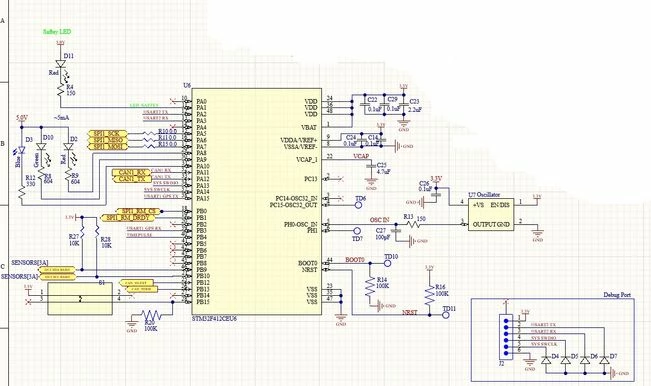

MCU.jpg

Best answer by ashishkv29

Solved, Issue was on ST-Link v3 Mini, via connector pin head able to access but not via solder pads.


Thanks.

5 replies

Associate
July 2, 2025

Remove the diodes on the debug port, it will work. 

ashishkv29
Associate
July 3, 2025

Removed all 4, but still same issue

Andrew Neil
Super User
July 3, 2025

How are you trying to connect and how, exactly, is it failing? Show logs & screenshots.

Has this board ever worked?

If it's brand new, have you checked basics: power supplies; component orientations; current draw; etc?

You don't have NRST on your debug header; Have you tried adding that, and then connecting under hardware reset?

How to solve connection errors when connecting and programming the STM32 target board.

How to solve debugger connection issues

A complex system that works is invariably found to have evolved from a simple system that worked.A complex system designed from scratch never works and cannot be patched up to make it work.
ashishkv29
Associate
July 3, 2025

How are you trying to connect and how, exactly, is it failing? Show logs & screenshots.

Ans: Connected ST-Link v3 SWDIO to MCU SWDIO and CLK to CLK, and GND and VCC from MCU Board.

ST-Link Log

Screenshot 2025-07-03 230946.png

Traces and Component Placement :

Screenshot 2025-07-03 224429.png

Red is top layer and Blue is Bottom layer

Screenshot 2025-07-03 232512.png

Schematic:

MCU.jpg

Board Stackup:

ashishkv29_0-1751565756566.png

Also maintaned impedance for signal = 50 and for CAN=120

Has this board ever worked?

Ans: No.

If it's brand new, have you checked basics: power supplies; component orientations; current draw; etc?

Ans: Yes MCU & Oscillator placed in correct orientation. and current draw is 6.84 mA ( While not coneting ST-Link USB to PC) and 6 mA ( while connecting ST-Link USB to PC).

You don't have NRST on your debug header; Have you tried adding that, and then connecting under hardware reset?

Ans: Yes I tired MCU NRST(Pull High SCH - test point TD11) Joining directly to ST-Link RST pin and even by MCU NRST (pull low joing -SCH test point TD11 to GND )

ashishkv29
ashishkv29AuthorBest answer
Associate
July 11, 2025

Solved, Issue was on ST-Link v3 Mini, via connector pin head able to access but not via solder pads.


Thanks.