Rub�n Acerete Halli
Associate II
April 19, 2017
Solved

Problems using the internal bootloader with an STM32F7

  • April 19, 2017
  • 14 replies
  • 4174 views
Posted on April 19, 2017 at 12:18

Hello, I would like updating the firmware of an STM32F767ZI using the internal boot loader. I am using the USART3 (PB10 and PB11). In order to transfer the program I am using the program �Flash Loader Demostrator�.

My testing application has two parts. A led blink implemented in the main loop and the jump to the internal boot loader implemented in and EXTI interrupt. In that way when I press a button the application jump to the internal boot loader code and starts the updating process.

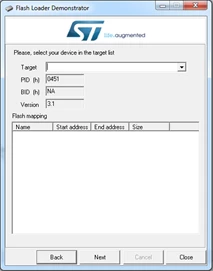
When I press the button and I star the communication with the flash Loader everything seems ok:
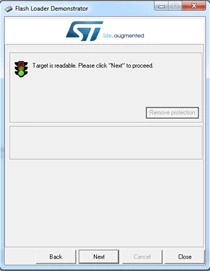
0690X00000606VfQAI.png0690X00000606TOQAY.png

When I try reading the firmware appear the following message:
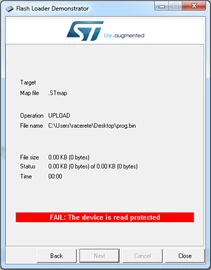
0690X00000606oLQAQ.png

I try enabling the reading with the Flash Loader:
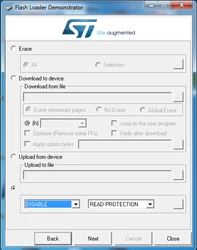
0690X00000606oQQAQ.png

The program informs that the memory will be erased. After the process the result is:
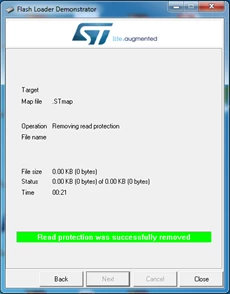
0690X00000606oVQAQ.png

When I try reading the program the result is the same as before:
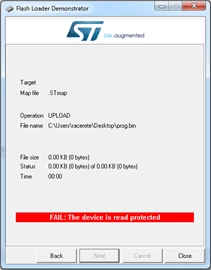
0690X00000606oaQAA.png

If I use the ST_LINK Utility I can read and write the memory without problems. The configuration of the Option Bytes is:
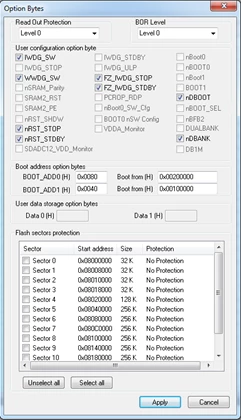
0690X00000606VeQAI.png

I have tested the same process with STM32F407 and everything works fine.

Can anyone help me?

#bootloader #flash-loader-demonstrator #stm32f7 #read-protection
This topic has been closed for replies.
Best answer by Imen.D
Posted on April 25, 2017 at 16:58

Hi

,

Please find attached a newer version of the FlashLoader demonstrator supporting STM32F7 devices.

Try it and keep me informed if it is working as expected or you faced any issue using it.

Thanks

Imen

________________

Attachments :

STMFlashLoader Demo_V2.9.0RC4.zip : https://st--c.eu10.content.force.com/sfc/dist/version/download/?oid=00Db0000000YtG6&ids=0680X000006HyZb&d=%2Fa%2F0X0000000bB9%2FYFV_iSjUbmd5ku0V_1q_jaaH4yU3v6lHbqGRs2VZofA&asPdf=false

14 replies

Rub�n Acerete Halli
Associate II
April 21, 2017
Posted on April 21, 2017 at 11:32

No one can help me? None idea?

Imen.DBest answer
Technical Moderator
April 25, 2017
Posted on April 25, 2017 at 16:58

Hi

,

Please find attached a newer version of the FlashLoader demonstrator supporting STM32F7 devices.

Try it and keep me informed if it is working as expected or you faced any issue using it.

Thanks

Imen

________________

Attachments :

STMFlashLoader Demo_V2.9.0RC4.zip : https://st--c.eu10.content.force.com/sfc/dist/version/download/?oid=00Db0000000YtG6&ids=0680X000006HyZb&d=%2Fa%2F0X0000000bB9%2FYFV_iSjUbmd5ku0V_1q_jaaH4yU3v6lHbqGRs2VZofA&asPdf=false
"When your question is answered, please close this topic by clicking ""Accept as Solution"".ThanksImen"
Rub�n Acerete Halli
Associate II
April 25, 2017
Posted on April 25, 2017 at 18:04

Thank you very much!!!

Using your program every thing works perfectly.

I don't know why in the ST web (

http://www.st.com/content/st_com/en/products/development-tools/software-development-tools/stm32-software-development-tools/stm32-programmers/flasher-stm32.html

 ) isn't the last version. 
Technical Moderator
April 25, 2017
Posted on April 25, 2017 at 23:14

This new version will be available soon on the web to support new devices.

Imen

"When your question is answered, please close this topic by clicking ""Accept as Solution"".ThanksImen"
Daniel Collado
Associate II
June 14, 2018
Posted on June 14, 2018 at 17:18

Hi, I am also trying to use the internal bootloader but in my case I do not even stablish conection with the board, the error says to verify the boot mode configuration because the Boot loader cannot be started (image attached). I have connected boot0 and boot1 to '1' and '0' respectively and connected the board with usb and got virtual COM11, but fails. What else should I do? I tried all baudrates but nothing.0690X0000060L4qQAE.png

Gunnar Bohlen
Associate III
October 4, 2018

Hello,

where do I find the attachment?

I would like to flash an STM32F765 via UART1

Thank you.

Technical Moderator
October 4, 2018

Hello @Gunnar Bohlen​ ,

I recommend you to use the STM32CubeProgrammer software tool for device-programming and firmware upgrade for STM32 microcontrollers, following the instruction in the User Manual and System requirements. 

  • Link:

https://my.st.com/content/my_st_com/en/products/development-tools/software-development-tools/stm32-software-development-tools/stm32-programmers/stm32cubeprog.html

Kind Regards,

Imen

"When your question is answered, please close this topic by clicking ""Accept as Solution"".ThanksImen"
Gunnar Bohlen
Associate III
October 4, 2018

Hello,

thank you for this info.

Unfortunatelky this does not solve our problem.

We try to flash a STM32F765 via UART1.

The Programming software sends a 0x7f to detect the device and gets an answer 0xC0 0x79. Correct answer woiuld be only 0x79.

Using UART3 the device answer is correct and the device can be programmed.

In the final design it is not possible to use UART3 - is there any workaround to use UART1 ?

Or is it a known bug in the bootloader?

Thank you.

Nawres GHARBI
Technical Moderator
December 4, 2018

Hi @Gunnar Bohlen​ 

Could you please copy paste the trace log

Gunnar Bohlen
Associate III
October 12, 2018

Hello,

can anyone from ST please confirm that programming a STM32F765NIH6 Rev. Z via USART1 can be done with STM32CubeProgrammer?

If not we have to move to USART3 (which seems to work) and this requires several changes in the PCB.

Thank you.

Tesla DeLorean
Guru
October 12, 2018

I can check with an STM32F756G-EVAL over the weekend, it exposes USART1 via the RS232 port, and does mention support for ISP.

https://www.st.com/en/evaluation-tools/stm32756g-eval.html

Tips, Buy me a coffee, or three.. PayPal VenmoUp vote any posts that you find helpful, it shows what's working..
Tesla DeLorean
Guru
October 13, 2018

I found Cube Programmer v1.2.0 to be less than satisfactory, I was able to identify the chip and loader ID via both the RS232 and VCP connections to the board at 9600 8E1, but after that the progress bar would just swoosh back and forth endlessly.

STM32F756NGH6 Rev Z, Chip 0x449, Loader Ver 3.1

#Stm32f756g-eval​ 

Tips, Buy me a coffee, or three.. PayPal VenmoUp vote any posts that you find helpful, it shows what's working..
Gunnar Bohlen
Associate III
October 19, 2018

Hello,

thank you for testing this.

The chip you used was not exactly the one that I have here (STM32F765 vs. STM32F756)

Chip ID is 0x451, Bootloader protocol version : 3.1

I assume the binary file of the bootloader code is not exactly the same, so there is a chance that there is a bootloader bug in the device that we use ?!?

In case there is a known bug in the bootloader, ST could create a workaround in Cube programmer and discard the wrong first anser byte? (in case this is the only problem...., maybe only a bad initialiaztion of USART1?

As I said before, USART3 is working as expected, but the pins are not accessible in the current design.

Therefore I would be happy is ST says either:

-Yes its a known bug but no woraround available

-Yes its a known bug and a woraround available in *** weeks.

-...

With a clear answer we can decide to do a redesign or wait.