Rub�n Acerete Halli
Associate II
April 19, 2017
Solved

Problems using the internal bootloader with an STM32F7

  • April 19, 2017
  • 14 replies
  • 4174 views
Posted on April 19, 2017 at 12:18

Hello, I would like updating the firmware of an STM32F767ZI using the internal boot loader. I am using the USART3 (PB10 and PB11). In order to transfer the program I am using the program �Flash Loader Demostrator�.

My testing application has two parts. A led blink implemented in the main loop and the jump to the internal boot loader implemented in and EXTI interrupt. In that way when I press a button the application jump to the internal boot loader code and starts the updating process.

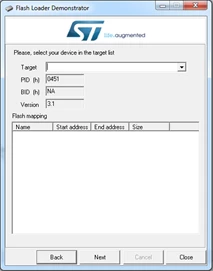
When I press the button and I star the communication with the flash Loader everything seems ok:
0690X00000606VfQAI.png0690X00000606TOQAY.png

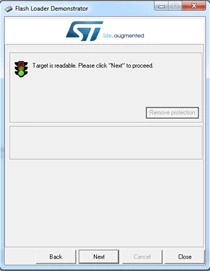
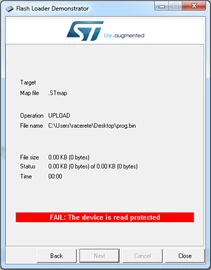
When I try reading the firmware appear the following message:
0690X00000606oLQAQ.png

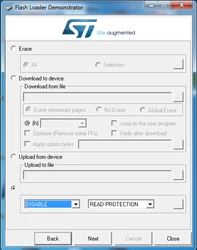
I try enabling the reading with the Flash Loader:
0690X00000606oQQAQ.png

The program informs that the memory will be erased. After the process the result is:
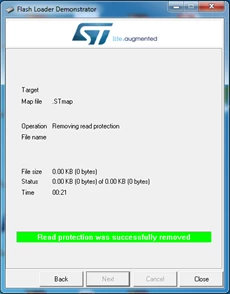
0690X00000606oVQAQ.png

When I try reading the program the result is the same as before:
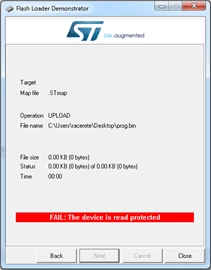
0690X00000606oaQAA.png

If I use the ST_LINK Utility I can read and write the memory without problems. The configuration of the Option Bytes is:
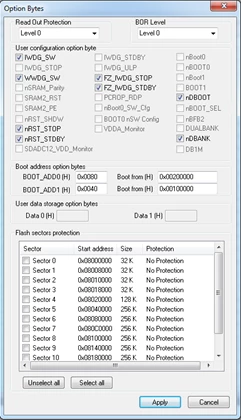
0690X00000606VeQAI.png

I have tested the same process with STM32F407 and everything works fine.

Can anyone help me?

#bootloader #flash-loader-demonstrator #stm32f7 #read-protection
This topic has been closed for replies.
Best answer by Imen.D
Posted on April 25, 2017 at 16:58

Hi

,

Please find attached a newer version of the FlashLoader demonstrator supporting STM32F7 devices.

Try it and keep me informed if it is working as expected or you faced any issue using it.

Thanks

Imen

________________

Attachments :

STMFlashLoader Demo_V2.9.0RC4.zip : https://st--c.eu10.content.force.com/sfc/dist/version/download/?oid=00Db0000000YtG6&ids=0680X000006HyZb&d=%2Fa%2F0X0000000bB9%2FYFV_iSjUbmd5ku0V_1q_jaaH4yU3v6lHbqGRs2VZofA&asPdf=false

14 replies

Technical Moderator
October 19, 2018

Hello,

I will raise your feedback internally to the appropriate team for check and investigation.

We'll keep you informed soon by our results.

Kind Regards,

Imen

"When your question is answered, please close this topic by clicking ""Accept as Solution"".ThanksImen"
Tesla DeLorean
Guru
October 19, 2018

Have also STM32F779I-EVAL (0x451)

Tips, Buy me a coffee, or three.. PayPal VenmoUp vote any posts that you find helpful, it shows what's working..
Gunnar Bohlen
Associate III
December 4, 2018

Hello,

I do not have a valid trace file.

The flash tool sends the databyte 0x71 and it seems it expects a valid answer, otherwise the device it not detected and I can't do anything.

I used a scope to find out what is going on (no answer at all, wrong singal levels etc.) and found out that the answer from UART1 is 0xC0 0x79. On the other UART3 the scope shows the correct answer (only 0x79) , and the flash tool detects the correct device.

Nawres GHARBI
Technical Moderator
December 10, 2018

Hi @Rub�n Acerete Halli​ ,

Will be fixed next release 1.4.0 which will be on the web W51