jumman_JHINGA
Senior III
February 26, 2025
Solved

Touch Display getting flicker when data is getting updated through TouchGFX task

  • February 26, 2025
  • 13 replies
  • 1822 views

Hello Friends.


Now i have started working on bigger display with TouchGFX Custom Boards. Im using 10.1 inch 1024x600 touch display. using QUADSPI,SDRAM, FMC and LTDC.


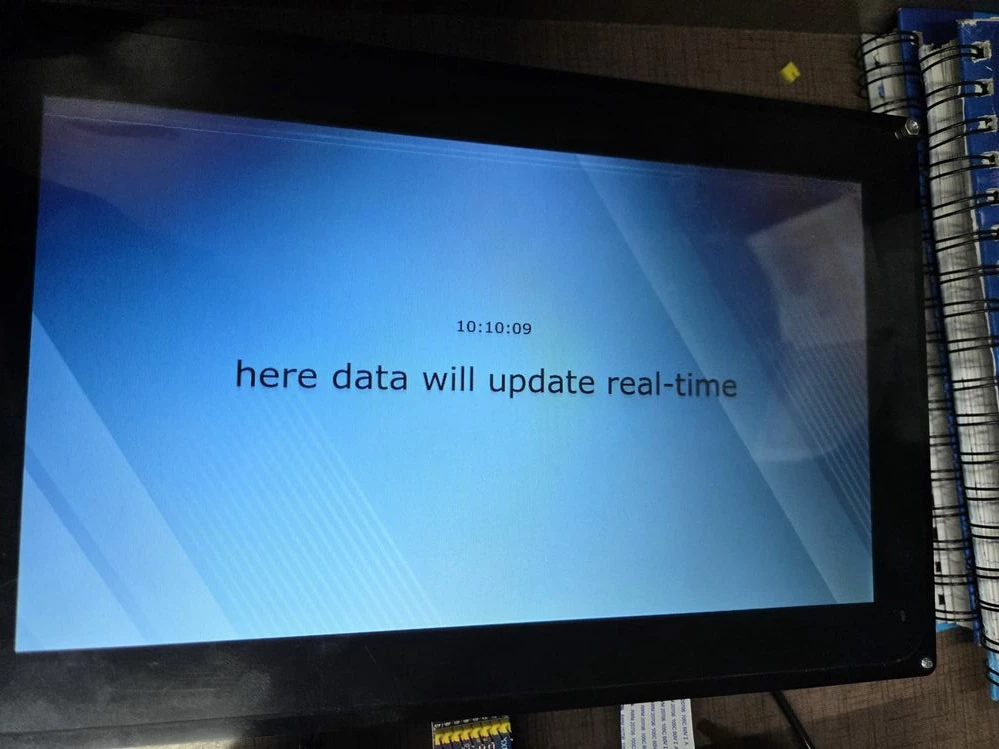
Through TouchGFX Designer i taken one backgoround image, one Text Area buffer and one Digital clock. when im not updating digital clock data and text area im  getting proper display.
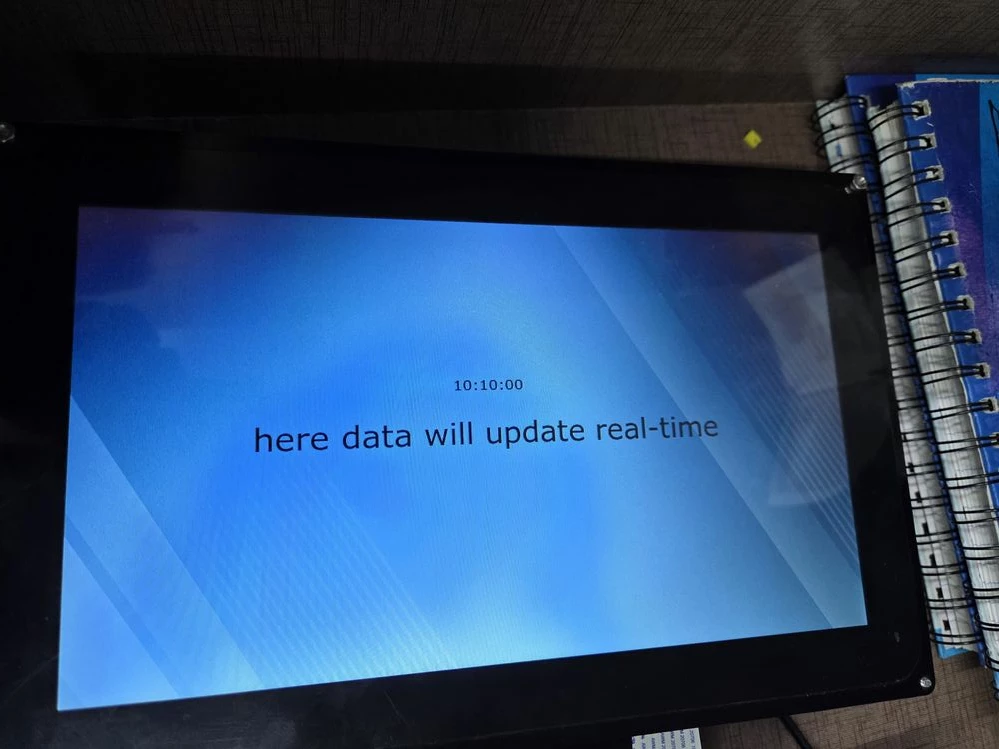
Nor.jpeg

but when i starts updating digital clock in void screenView::handleTickEvent() then my display starts flickering and white lines appearing on display.
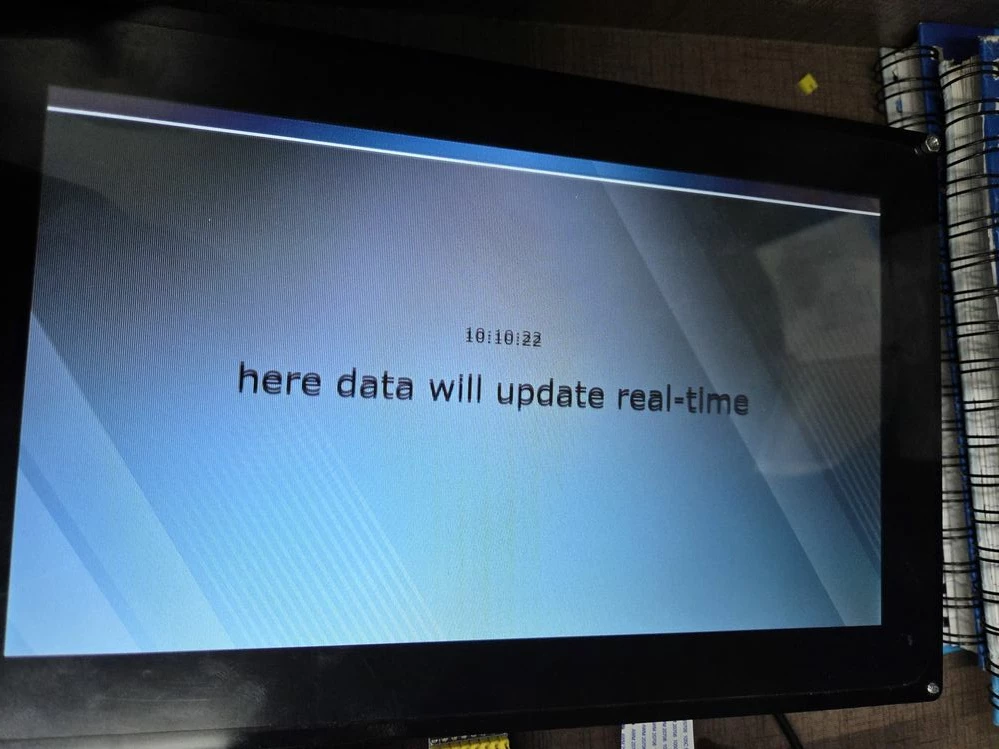
FL.jpegFL2.jpeg


my LTDC configuration:

void MX_LTDC_Init(void)
{

 /* USER CODE BEGIN LTDC_Init 0 */

 /* USER CODE END LTDC_Init 0 */

 LTDC_LayerCfgTypeDef pLayerCfg = {0};

 /* USER CODE BEGIN LTDC_Init 1 */

 /* USER CODE END LTDC_Init 1 */
 hltdc.Instance = LTDC;
 hltdc.Init.HSPolarity = LTDC_HSPOLARITY_AL;
 hltdc.Init.VSPolarity = LTDC_VSPOLARITY_AL;
 hltdc.Init.DEPolarity = LTDC_DEPOLARITY_AL;
 hltdc.Init.PCPolarity = LTDC_PCPOLARITY_IPC;
 hltdc.Init.HorizontalSync = 40;
 hltdc.Init.VerticalSync = 9;
 hltdc.Init.AccumulatedHBP = 200;
 hltdc.Init.AccumulatedVBP = 29;
 hltdc.Init.AccumulatedActiveW = 1224;
 hltdc.Init.AccumulatedActiveH = 629;
 hltdc.Init.TotalWidth = 1384;
 hltdc.Init.TotalHeigh = 659;
 hltdc.Init.Backcolor.Blue = 0;
 hltdc.Init.Backcolor.Green = 0;
 hltdc.Init.Backcolor.Red = 0;
 if (HAL_LTDC_Init(&hltdc) != HAL_OK)
 {
 Error_Handler();
 }
 pLayerCfg.WindowX0 = 0;
 pLayerCfg.WindowX1 = 1024;
 pLayerCfg.WindowY0 = 0;
 pLayerCfg.WindowY1 = 600;
 pLayerCfg.PixelFormat = LTDC_PIXEL_FORMAT_RGB888;
 pLayerCfg.Alpha = 255;
 pLayerCfg.Alpha0 = 0;
 pLayerCfg.BlendingFactor1 = LTDC_BLENDING_FACTOR1_PAxCA;
 pLayerCfg.BlendingFactor2 = LTDC_BLENDING_FACTOR2_PAxCA;
 pLayerCfg.FBStartAdress = 0xD0000000;
 pLayerCfg.ImageWidth = 1024;
 pLayerCfg.ImageHeight = 600;
 pLayerCfg.Backcolor.Blue = 0;
 pLayerCfg.Backcolor.Green = 0;
 pLayerCfg.Backcolor.Red = 0;
 if (HAL_LTDC_ConfigLayer(&hltdc, &pLayerCfg, 0) != HAL_OK)
 {
 Error_Handler();
 }
 /* USER CODE BEGIN LTDC_Init 2 */

 /* USER CODE END LTDC_Init 2 */

}


my FMC configuration:

void MX_FMC_Init(void)
{
 /* USER CODE BEGIN FMC_Init 0 */

 /* USER CODE END FMC_Init 0 */

 FMC_SDRAM_TimingTypeDef SdramTiming = {0};

 /* USER CODE BEGIN FMC_Init 1 */

 /* USER CODE END FMC_Init 1 */

 /** Perform the SDRAM1 memory initialization sequence
 */
 hsdram1.Instance = FMC_SDRAM_DEVICE;
 /* hsdram1.Init */
 hsdram1.Init.SDBank = FMC_SDRAM_BANK2;
 hsdram1.Init.ColumnBitsNumber = FMC_SDRAM_COLUMN_BITS_NUM_8;
 hsdram1.Init.RowBitsNumber = FMC_SDRAM_ROW_BITS_NUM_12;
 hsdram1.Init.MemoryDataWidth = FMC_SDRAM_MEM_BUS_WIDTH_16;
 hsdram1.Init.InternalBankNumber = FMC_SDRAM_INTERN_BANKS_NUM_4;
 hsdram1.Init.CASLatency = FMC_SDRAM_CAS_LATENCY_3;
 hsdram1.Init.WriteProtection = FMC_SDRAM_WRITE_PROTECTION_DISABLE;
 hsdram1.Init.SDClockPeriod = FMC_SDRAM_CLOCK_PERIOD_2;
 hsdram1.Init.ReadBurst = FMC_SDRAM_RBURST_ENABLE;
 hsdram1.Init.ReadPipeDelay = FMC_SDRAM_RPIPE_DELAY_1;
 /* SdramTiming */
 SdramTiming.LoadToActiveDelay = 2;
 SdramTiming.ExitSelfRefreshDelay = 7;
 SdramTiming.SelfRefreshTime = 4;
 SdramTiming.RowCycleDelay = 6;
 SdramTiming.WriteRecoveryTime = 2;
 SdramTiming.RPDelay = 2;
 SdramTiming.RCDDelay = 2;

 if (HAL_SDRAM_Init(&hsdram1, &SdramTiming) != HAL_OK)
 {
 Error_Handler( );
 }

 /* USER CODE BEGIN FMC_Init 2 */
 FMC_Bank1_R->BTCR[0] &= ~FMC_BCRx_MBKEN;
 BSP_SDRAM_Init();
 /* USER CODE END FMC_Init 2 */
}

i dont have a idea whats going wrong with this display. if any one knows please help to resolve this issue.

Best answer by jumman_JHINGA

Im happy to inform you guys that my issue got resolved!..

There is some issue present in the  External crystal Frequency (HSE) , Instead of HSE i taken HSI and its starts working correctly.   

13 replies

PMerv.1
Associate
February 26, 2025

If yours LTDC settings for display are correct, what about LTDC clock ? For 1024x600 you need at least freq around 50-60Mhz - see example bellow  - Riverdi 10.1" uses 57.92Mhz
image.png

jumman_JHINGA
Senior III
February 26, 2025

hi @PMerv.1  thanks for replying. im using waveshares 10.1 Capacitive LCD Touch(D) display. i tried LTDC frquency from 20 MHz to 45 MHz its showing same. but when im increasing frequency above 45MHz its flickring even more. max frequnecy i tried is 59MHZ.

PMerv.1
Associate
February 26, 2025

Strange, 745-DISCO (4.3" 480x272) uses LTDC clocks around 10Mhz, same kit but 5" 800x480 already needs around 20-30Mhz. And if you have even bigger resolution, you need higher LTDC clocks in principle....
Anyway, do you have some datasheet for that kind of LCD ? Is here already some LVDS -> RGB (LTDC) converter IO  (like Riverdi uses it for that big displays) ?
PS: my mistake in first reply: Riverdi 10.1 uses 1280x800 and 58Mhz, so  for 1024x600 + some LTDC  clock equation

PMerv1_0-1740556341109.png


jumman_JHINGA
Senior III
February 26, 2025

as pr my display data sheet its supports 44.9 to 63 MHZ frequency. im refering this Data Sheet .

PMerv.1
Associate
February 26, 2025

It seems your seetings is correct, anyway try to play with  h/v sync width (pdf says h: 1-140 /  v:1-20) )  + LTDC clocks between 40 - 70Mhz.
 + yes, it's LVDS display, so check your LVDS -> LTDC converter circuit

PMerv1_0-1740562305609.png


jumman_JHINGA
Senior III
February 27, 2025

hii @PMerv.1  im playing with  play with  h/v sync width and LTDC clocks ... BTW what i need to check in LVDS to LTDC converter circuite?

PMerv.1
Associate
February 27, 2025

Anyway, I've remember, I had similar problems with Riverdi 10 (see this video here https://k00.fr/RiverdiFLicker )
And my solution was to remove Riverdi TouchGFX RTOS task (in CubeMX)  and create/start it manually in my app manager as last task, and it was solved...

uint32_t TouchGFXStack[8192]; 

/*****************************************************************************/
// Definitions for TouchGFXTask

const osThreadAttr_t TouchGFXTask_attributes = {
 .name = "TouchGFXTask",
 .cb_mem = &TouchGFXTcb,
 .cb_size = sizeof(TouchGFXTcb),
 .stack_mem = (void*)TouchGFXStack,
 .stack_size = sizeof(TouchGFXStack),
 .priority = (osPriority_t) osPriorityNormal,
};


// Start application's processes in defined order
// supervisor priority is osPriorityNormal

static void StartAppProcs(AppSuper * obj) 
{
 // execute tasks of application - MEP - oblsuha CAN Rx/Tx - 2ms loop
 ExecUfProc(ComManCreate(&comMan, comManStack, sizeof(comManStack)), osPriorityAboveNormal);
 while (!ComManIsRdy()) ufDelay(1);
 ExecUfProc(IoManCreate(&ioMan, ioManStack, sizeof(ioManStack)), osPriorityNormal);
 while (!IoManIsRdy()) ufDelay(1);

 // creation of TouchGFXTask
 osThreadNew(TouchGFX_Task, NULL, &TouchGFXTask_attributes);
 ufDelay(4);
}

// and Screen1View.cpp...
void Screen1View::handleTickEvent()
{
	HrTm tm = {0};

	hmi_cnt++;

	HrTimeToTm(RtcGet(), &tm);

 // clock modal window on ?
	if (modalClock.isVisible() == true)
	{
	 if ((hmi_cnt % 2) == 0) {
 	 anClk.setTime24Hour((int)tm.hour, (int)tm.min, (int)tm.sec); // AnalogClock update
 	 digClk.setTime24Hour((int)tm.hour, (int)tm.min, (int)tm.sec); // AnalogClock update
	 }
	 return;
	}
}


 About LVDS circuit: see this picture, t his is LVDS converter made by Riverdi. Differential tracks, equal lenghts of tracks....not easy to design it correctly..... But how to check it....I'don;t know....

Screenshot_2025-02-27-18-21-07-884_lockscreen.png

jumman_JHINGA
Senior III
March 1, 2025

Removing TouchGFXTask from CubeMX and creating and starting it manually dosent working. its giving same out put 

Graduate
March 4, 2025

Hi @jumman_JHINGA  & @PMerv.1 

I’m facing a similar issue. We’ve designed a custom board using the STM32H743II controller, with one 16MB Quad SPI and one 16MB SDRAM for a 7-inch display with a resolution of 1024x600. The GUI built through the TouchGFX Designer is displayed perfectly on this screen.

However, when we connect a 10.1-inch display (also with 1024x600 resolution) using the RGB interface, we are experiencing slight flickering. We kept the CubeMX configuration and the GUI settings the same, but the display behavior is different.


Thanks!

jumman_JHINGA
Senior III
March 5, 2025

@Muddassir_AZMI  no progress :)

jumman_JHINGA
Senior III
March 8, 2025

@INaee.1  would you like help me ,to resolve this issue?

INaee.1
Associate II
March 10, 2025

Hi @jumman_JHINGA 
I have been quite busy since past few months and was not following the forum.

I was facing similar issue with one of my experiment.

by reducing the LTDC frequency , I managed to control the flickering during update of the display.

here is one of my experiment with Google Nexus 7 inch display with 1280x800 resolution. 


WhatsApp Image 2025-01-30 at 11.28.09_177f402c.jpg

WhatsApp Image 2025-02-02 at 23.29.36_12a05473.jpg

The first screen is connected with ComAp's Inteli-compact NT over modbus RTU and my screen has more then 30 parameters , updating in real time. also the icons are changing colors as I programmed.

My custom designed board is similar as below.

20230811_104211.jpg

here is one of the video of my similar experiment with Samsung Tab 10.1 inch 1280x800 tft with LVDS interface.

https://www.youtube.com/watch?v=6nlMZ3EMQXA

regards

I.N