

Solved
Touch Display getting flicker when data is getting updated through TouchGFX task
Hello Friends.
Now i have started working on bigger display with TouchGFX Custom Boards. Im using 10.1 inch 1024x600 touch display. using QUADSPI,SDRAM, FMC and LTDC.
Through TouchGFX Designer i taken one backgoround image, one Text Area buffer and one Digital clock. when im not updating digital clock data and text area im getting proper display.
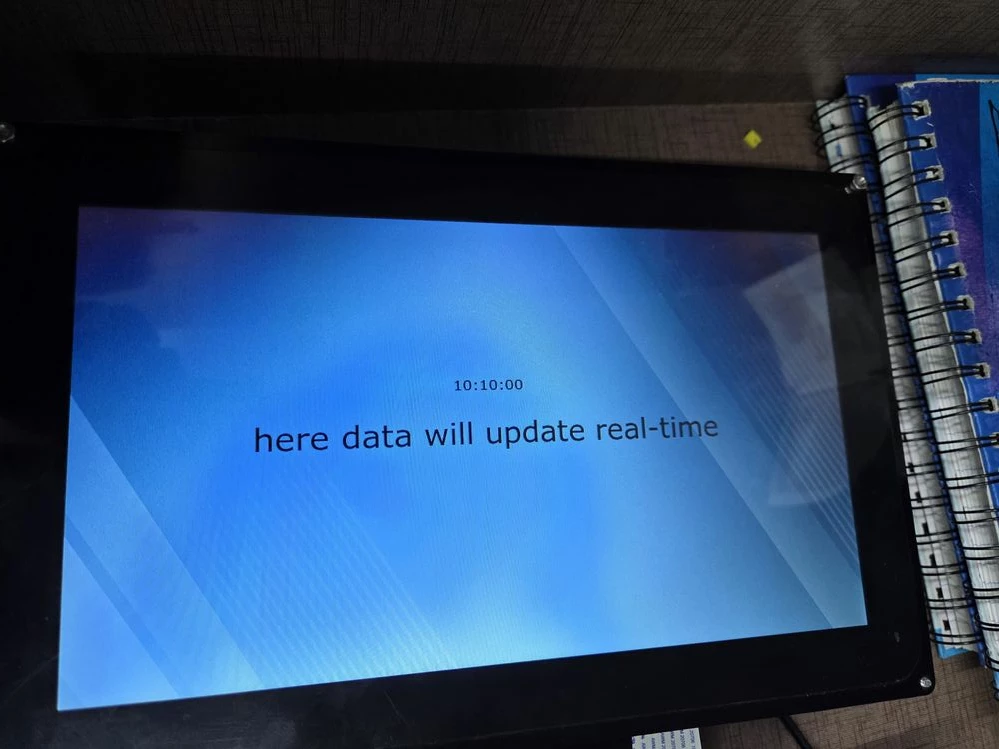
but when i starts updating digital clock in void screenView::handleTickEvent() then my display starts flickering and white lines appearing on display.
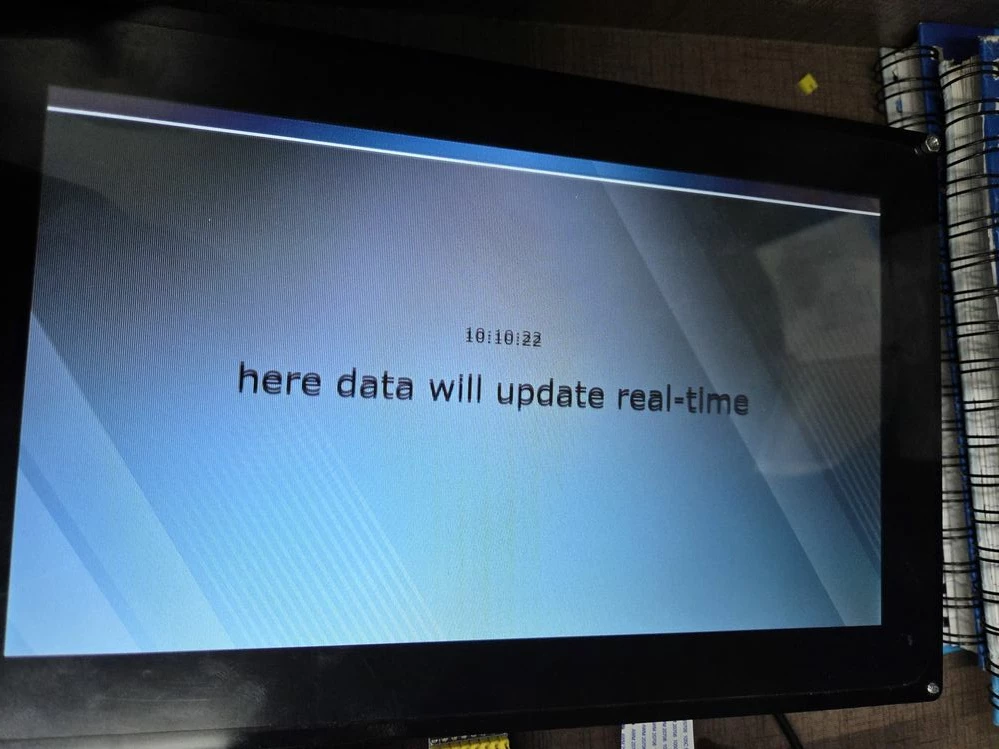
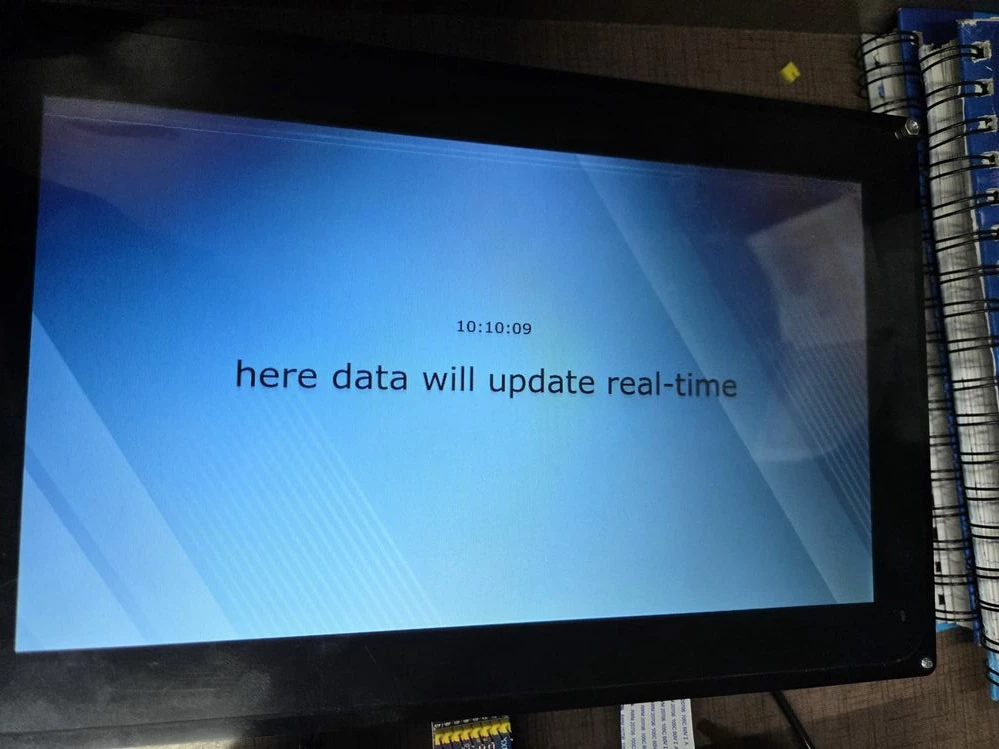
my LTDC configuration:
void MX_LTDC_Init(void)
{

 /* USER CODE BEGIN LTDC_Init 0 */

 /* USER CODE END LTDC_Init 0 */

 LTDC_LayerCfgTypeDef pLayerCfg = {0};

 /* USER CODE BEGIN LTDC_Init 1 */

 /* USER CODE END LTDC_Init 1 */
 hltdc.Instance = LTDC;
 hltdc.Init.HSPolarity = LTDC_HSPOLARITY_AL;
 hltdc.Init.VSPolarity = LTDC_VSPOLARITY_AL;
 hltdc.Init.DEPolarity = LTDC_DEPOLARITY_AL;
 hltdc.Init.PCPolarity = LTDC_PCPOLARITY_IPC;
 hltdc.Init.HorizontalSync = 40;
 hltdc.Init.VerticalSync = 9;
 hltdc.Init.AccumulatedHBP = 200;
 hltdc.Init.AccumulatedVBP = 29;
 hltdc.Init.AccumulatedActiveW = 1224;
 hltdc.Init.AccumulatedActiveH = 629;
 hltdc.Init.TotalWidth = 1384;
 hltdc.Init.TotalHeigh = 659;
 hltdc.Init.Backcolor.Blue = 0;
 hltdc.Init.Backcolor.Green = 0;
 hltdc.Init.Backcolor.Red = 0;
 if (HAL_LTDC_Init(&hltdc) != HAL_OK)
 {
 Error_Handler();
 }
 pLayerCfg.WindowX0 = 0;
 pLayerCfg.WindowX1 = 1024;
 pLayerCfg.WindowY0 = 0;
 pLayerCfg.WindowY1 = 600;
 pLayerCfg.PixelFormat = LTDC_PIXEL_FORMAT_RGB888;
 pLayerCfg.Alpha = 255;
 pLayerCfg.Alpha0 = 0;
 pLayerCfg.BlendingFactor1 = LTDC_BLENDING_FACTOR1_PAxCA;
 pLayerCfg.BlendingFactor2 = LTDC_BLENDING_FACTOR2_PAxCA;
 pLayerCfg.FBStartAdress = 0xD0000000;
 pLayerCfg.ImageWidth = 1024;
 pLayerCfg.ImageHeight = 600;
 pLayerCfg.Backcolor.Blue = 0;
 pLayerCfg.Backcolor.Green = 0;
 pLayerCfg.Backcolor.Red = 0;
 if (HAL_LTDC_ConfigLayer(&hltdc, &pLayerCfg, 0) != HAL_OK)
 {
 Error_Handler();
 }
 /* USER CODE BEGIN LTDC_Init 2 */

 /* USER CODE END LTDC_Init 2 */

}
my FMC configuration:
void MX_FMC_Init(void)
{
 /* USER CODE BEGIN FMC_Init 0 */

 /* USER CODE END FMC_Init 0 */

 FMC_SDRAM_TimingTypeDef SdramTiming = {0};

 /* USER CODE BEGIN FMC_Init 1 */

 /* USER CODE END FMC_Init 1 */

 /** Perform the SDRAM1 memory initialization sequence
 */
 hsdram1.Instance = FMC_SDRAM_DEVICE;
 /* hsdram1.Init */
 hsdram1.Init.SDBank = FMC_SDRAM_BANK2;
 hsdram1.Init.ColumnBitsNumber = FMC_SDRAM_COLUMN_BITS_NUM_8;
 hsdram1.Init.RowBitsNumber = FMC_SDRAM_ROW_BITS_NUM_12;
 hsdram1.Init.MemoryDataWidth = FMC_SDRAM_MEM_BUS_WIDTH_16;
 hsdram1.Init.InternalBankNumber = FMC_SDRAM_INTERN_BANKS_NUM_4;
 hsdram1.Init.CASLatency = FMC_SDRAM_CAS_LATENCY_3;
 hsdram1.Init.WriteProtection = FMC_SDRAM_WRITE_PROTECTION_DISABLE;
 hsdram1.Init.SDClockPeriod = FMC_SDRAM_CLOCK_PERIOD_2;
 hsdram1.Init.ReadBurst = FMC_SDRAM_RBURST_ENABLE;
 hsdram1.Init.ReadPipeDelay = FMC_SDRAM_RPIPE_DELAY_1;
 /* SdramTiming */
 SdramTiming.LoadToActiveDelay = 2;
 SdramTiming.ExitSelfRefreshDelay = 7;
 SdramTiming.SelfRefreshTime = 4;
 SdramTiming.RowCycleDelay = 6;
 SdramTiming.WriteRecoveryTime = 2;
 SdramTiming.RPDelay = 2;
 SdramTiming.RCDDelay = 2;

 if (HAL_SDRAM_Init(&hsdram1, &SdramTiming) != HAL_OK)
 {
 Error_Handler( );
 }

 /* USER CODE BEGIN FMC_Init 2 */
 FMC_Bank1_R->BTCR[0] &= ~FMC_BCRx_MBKEN;
 BSP_SDRAM_Init();
 /* USER CODE END FMC_Init 2 */
}
i dont have a idea whats going wrong with this display. if any one knows please help to resolve this issue.