
BWKidd
Senior
January 2, 2025
Question

Weird horizontal artifacts in touchGFX buttons

  • January 2, 2025
  • 22 replies
  • 6672 views

Hi Folks and Happy New Year!

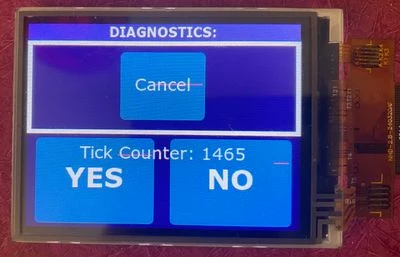
I've been trying to track down a problem I'm having with my project for several months now. Essentially I'm getting these red-ish lines through portions of my buttons, but only when (I presume) they are drawn or redrawn - namely when the screen first loads, when they are pressed, or when as in this example, they have text drawn over them that updates. 
IMG_7199.JPEG

In the case of the above picture, I've been able to get the lines to appear more consistently by layering some text over top of some of the buttons and then updating that text with each tick where it says "Tick Counter: xxxx". I managed to luck out and have it appear on the "Cancel" of the cancel button this time, though it probably only happens about 1 out of 10 times when the screen loads.

These lines have been appearing pretty consistently throughout my development on the project, and they seem (though I'm still not completely sure) to be happening regardless of my application code. The reason I say this is that I've commented out large portions of my application code and had them still appear. Frustratingly, they are not consistent. I can do a build, have them appear, and then insert a trivial line of code (even a NOP), and then they will disappear, only to reappear again after I add a few more lines.

This really seems to point to some sort of issue where I'm writing off the edge of an array or something (it seems that parts of my frame buffer are getting inadvertently overwritten? But then why just buttons? And why does it still happen when I essentially remove my application code?) 

I've included my TOUCHGFXHAL code that has my driver code in it.

Details on my project:

MCU: STM32L496VGTN

Display: NHD-2.8-240320AF-CSXP-FT (ST7789 Controller) connected via FMC 16-bit parallel

External Flash: MT25QL128A using quad-spi with a custom loader

Firmware details: No RTOS (Bare Metal/super-loop)

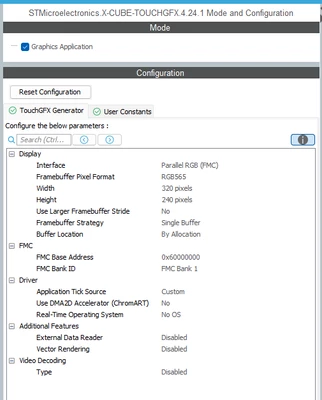
Touch GFX Configuration:
BWKidd_0-1735835937379.png


Other possible helpful details:

  • My display has no TE line, so I'm updating it manually using a timer at 10Hz by calling Oswrappers::signalVSync(). I had this called in the timer callback function, but recently moved it into the main loop and the problem actually seemed to happen more consistently if anything.
  • I've confirmed that these artifacts are actually contained in the framebuffer, so its not some sort of electrical noise that's corrupting pixels as they're transmitted to the display.

Any tips, tricks, or advice towards debugging this issue would be greatly appreciated. You might say figuring this out has become my new year's resolution!


22 replies

BWKidd
BWKiddAuthor
Senior
January 3, 2025

On additional thing I just noticed - if I set the button's alpha value to 254 or less, instead of 255, I don't seem to get the artifacts. I don't know how this factors into the problem, but figured I would mention it.

ST Employee
January 21, 2025

Hello,

Can you try to increase the stack size in the linker script?

BWKidd
BWKiddAuthor
Senior
January 22, 2025

@mathiasmarkussen 

Thank you for your response. I had increased my stack and heap size from their project defaults a while ago - they are currently set to a minimum heap of 0x1000 and minimum stack of 0x2000: 

BWKidd_0-1737552587421.png

Do you think I should try higher? I did try filling the stack with a known pattern to make sure it did not seem to be suffering from overflow, and it appeared to be well behaved and within the limits of the stack boundaries, though it is always possible I mis-interpreted the results.


One further note, my second post about the alpha value appears to have been yet another 'red herring', Further testing seems to indicate that changing the alpha value did not really have any effect on the presence or absence of these artifacts.


Graduate II
January 22, 2025

Hello Kidd

Have you test to move your images to internal flash instead of external flash ? It might be worth of trying.

Br JTP

BWKidd
BWKiddAuthor
Senior
January 22, 2025

@JTP1 I'll see if I can attempt this. The project has a lot of text/image assets, so I'll have to create a stripped-down version and see if I can reproduce the artifacts. Is the suspicion that the lines are being caused by something wrong with the external flash interface?

BWKidd
BWKiddAuthor
Senior
January 22, 2025

@JTP1 The bars do go away when I force everything onto the internal flash - unfortunately this doesn't mean much at the moment, as even small changes in unrelated code causes these lines to come and go from build to build. I certainly am open to examining my quadspi code further, though I'm not sure what I would be looking for.

ST Employee
January 23, 2025

How do you access the qspi in your application? If it's memory mapped which i guess based on your touchGFXHAL.cpp, I can only think of configuration being on the edge or something like dummy cycles being wrong, although I would think that would be consistent and worse.

You could start by trying to create an image with a single uniform colour and placing that in external memory, and reading some contents of it into a buffer and confirming that you have the correct colour. You should probably try for the very beginning, somewhere in the middle, and the very end of the image. If you are using memory mapped mode you can also just inspect the memory in a debugger.

If that looks fine you could put it in a UI and continously invalidate it. You can do that by setting an interaction that runs on every tick, either with code calling invalidate(); or selecting the show widget option and selecting your image.

See if you have any artifacts in that case, otherwise you can overlay one or several box, possibly with some alpha blending, and see if that triggers the problem.

If you have access to a logic analyzer that is capable of decoding qspi, you could try to capture some data and verify that all the data sent by the flash on the interface is correct.


Another thing entirely is your screen updates. If the screen is running at 60 Hz, which is likely, your timer updates the frame buffer more than once per display frame. Is the FMC interface fast enough to complete in 10 ms?
Try setting your timer at a lower rate and see if you still have the glitches.


BWKidd
BWKiddAuthor
Senior
January 24, 2025

@mathiasmarkussen Thank you for these ideas. I'm accessing my QSPI external flash in memory mapped mode:


static void MX_QUADSPI_Init(void)
{

 /* USER CODE BEGIN QUADSPI_Init 0 */

 /* USER CODE END QUADSPI_Init 0 */

 /* USER CODE BEGIN QUADSPI_Init 1 */

 /* USER CODE END QUADSPI_Init 1 */
 /* QUADSPI parameter configuration*/
 hqspi.Instance = QUADSPI;
 hqspi.Init.ClockPrescaler = 2;
 hqspi.Init.FifoThreshold = 4;
 hqspi.Init.SampleShifting = QSPI_SAMPLE_SHIFTING_NONE;
 hqspi.Init.FlashSize = 23;
 hqspi.Init.ChipSelectHighTime = QSPI_CS_HIGH_TIME_1_CYCLE;
 hqspi.Init.ClockMode = QSPI_CLOCK_MODE_0;
 hqspi.Init.FlashID = QSPI_FLASH_ID_2;
 hqspi.Init.DualFlash = QSPI_DUALFLASH_DISABLE;
 if (HAL_QSPI_Init(&hqspi) != HAL_OK)
 {
 Error_Handler();
 }
 /* USER CODE BEGIN QUADSPI_Init 2 */

 // Initialize QUADSPI Flash Memory
 if (QSPI_ResetChip() != HAL_OK) {
 	 ;	// TODO: Add Error Handling
 }

 HAL_Delay(1);

 if (QSPI_AutoPollingMemReady(HAL_QPSI_TIMEOUT_DEFAULT_VALUE) != HAL_OK) {
 	 ;	// TODO: Add Error Handling
 }

 if (QSPI_WriteEnable() != HAL_OK) {
 	 ;	// TODO: Add Error Handling
 }

 if (QSPI_Configuration() != HAL_OK) {
 	 ;	// TODO: Add Error Handling
 }

 if (QSPI_AutoPollingMemReady(HAL_QPSI_TIMEOUT_DEFAULT_VALUE) != HAL_OK) {
 	 ;	// TODO: Add Error Handling
 }

 // Setup memory mapping
 	if (CSP_QSPI_EnableMemoryMappedMode() != HAL_OK) {
 		;	// TODO: Add Error Handling
 	}
 /* USER CODE END QUADSPI_Init 2 */

}

I suppose that my dummy cycles could be wrong, but the only place I have problems are where there are touch-gfx buttons, never over top of backgrounds or other drawing objects, and I'm using the same code in my custom loader which seems to function correctly - would dummy cycle setup being wrong still allow such things to operate properly?

I'm currently testing my code with a simple screen with 3 buttons and a text area that is drawn such that in overlaps with all three buttons (I've attached a video showing what it looks like running):

BWKidd_0-1737729529759.png


I'm invalidating the "Test Text Area" with every tick.

I'm also using a slower tick - 10x per second rather than 60, since I don't need smooth animations for this application.

Per some suggestions made to me outside this forum I have moved my screen update code into my timer tick routine and I also changed to using DMA2D to move the data, which as you alluded to substantially improves the speed it takes to update the display:


void TOUCHGFXHAL_signalVSync() {	// Wrapper for triggering VSync

 // VSync has occurred, increment TouchGFX engine vsync counter
 HAL::getInstance()->vSync();
 // VSync has occurred, signal TouchGFX engine
 OSWrappers::signalVSync();

 if (refreshRequested && !displayRefreshing)
 {
 // Swap frame buffers immediately instead of waiting for the task to be scheduled in.
 // Note: task will also swap when it wakes up, but that operation is guarded and will not have
 // any effect if already swapped.

 touchgfx::HAL::getInstance()->swapFrameBuffers();

 displayRefreshing = true;
 HAL_GPIO_WritePin(TP_PC0_GPIO_Port, TP_PC0_Pin, GPIO_PIN_HIGH);	// Raise pin for timing display write
 // Set window, enable display reading to GRAM, transmit buffer using DMA
 setLCDwindow(0, 0, TFT_WIDTH, TFT_HEIGHT);
 LCD_IO_WriteReg(RAMWR);

 uint32_t sourceAddress = (uint32_t)(currFbBase);
		uint32_t destinationAddress = (uint32_t)(FMC_BANK1_MEM); // FMC / LCD Data Register

		// Configure DMA2D
		hdma2d.Init.Mode = DMA2D_M2M; 	// Memory to Memory mode
		hdma2d.Init.ColorMode = DMA2D_OUTPUT_RGB565; 	// Output format: RGB565
		hdma2d.Init.OutputOffset = 0;	// Set the offset based on the width of the rectangle being drawn

		if (HAL_DMA2D_Init(&hdma2d) != HAL_OK)
		{
			Error_Handler();
		}

		// Note it appears that DMA transfers are limited to about 70,000 pixels (RGB565/2-bytes each) of data so transfers are
		// broken up into two equal transfers

		// Start the 1st half of the transfer
		if (HAL_DMA2D_Start(&hdma2d, sourceAddress, destinationAddress, TFT_WIDTH, TFT_HEIGHT/2) != HAL_OK)
		{
			Error_Handler();
		}

		// Wait for transfer to complete
		if (HAL_DMA2D_PollForTransfer(&hdma2d, 1000) != HAL_OK)
		{
			Error_Handler();
		}

		// Start the 2nd half of the transfer (Note transfer starts half-way through frameBuffer, which is
		// TFT_WIDTH*TFT_HEIGHT/2 pixels, but each pixel is 2 bytes, so actual offset is sourceAddress+TFT_WIDTH*TFT_HEIGHT
		if (HAL_DMA2D_Start(&hdma2d, sourceAddress+TFT_WIDTH*TFT_HEIGHT, destinationAddress, TFT_WIDTH, TFT_HEIGHT/2) != HAL_OK)
		{
			Error_Handler();
		}

		// Wait for transfer to complete
		if (HAL_DMA2D_PollForTransfer(&hdma2d, 1000) != HAL_OK)
		{
			Error_Handler();
		}

		HAL_GPIO_WritePin(TP_PC0_GPIO_Port, TP_PC0_Pin, GPIO_PIN_LOW);	// Raise pin for timing display write

 displayRefreshing = false;
 }
}


ST Employee
January 24, 2025

Hello,

I have a new suggestion, that I think you should try first.

At the time that void TouchGFXHAL::flushFrameBuffer is called, the rendering is done, but DMA2D may still be transferring asset data from external flash to the frame buffer. To handle this, you can add dma.flush(); before your display code.

I still think you should consider changing your tick rate to 16 ms or so, unless a 10ms tick rate is important for you for some reason.

Using a DMA to transfer data to the FMC (using interrrupts and a control flag to make sure the transfer is done before you set up a new one) would probably give a good performance gain. You may need to use linked list mode to be able to break up the data in multiple chunks

You could also consider a partial frame buffer. This would take up less memory and transfer less data to the display at a time, so the DMA will work in normal mode. If you want an example of how this can be achieved with FMC (8 bit in this case) and DMA transfer to the display, you can look at the NUCLEO-H563ZI + RVA35HI board setup in the designer. I think it is available from version 4.24 onwards.

BWKidd
BWKiddAuthor
Senior
January 27, 2025

@mathiasmarkussen 

I'm not sure if I've fully tested all of your suggestions, or if I addressed them all in my last post, but just tried to make sure that the QSPI flash data is reliably transferring to the display by repeatedly writing one of the button bitmaps straight from memory to the display:

void displayBitmap(uint16_t bitmapId)
{
 // Retrieve the bitmap
 touchgfx::Bitmap bitmap = touchgfx::Bitmap(bitmapId);

 // Get the pixel data and dimensions
 const uint8_t* pixelData = bitmap.getData();
 uint16_t width = bitmap.getWidth();
 uint16_t height = bitmap.getHeight();

 // Configure display to receive data for the bitmap
 setLCDwindow(100, 100, width, height); // Set display window to the bitmap size
 LCD_IO_WriteReg(RAMWR); // Write to display RAM

 // Transfer the bitmap data to the display via FMC

 for (uint32_t y = 0; y < height; y++)
 {
 for (uint32_t x = 0; x < width; x++)
 {
 uint32_t pixel = ((uint32_t*)pixelData)[y * width + x];

 uint16_t rgb565 = ((pixel >> 8) & 0xF800) | // Extract red (bits 16-23), shift, and mask for 5 bits
 ((pixel >> 5) & 0x07E0) | // Extract green (bits 8-15), shift, and mask for 6 bits
 ((pixel >> 3) & 0x001F); // Extract blue (bits 0-7), shift, and mask for 5 bits

 LCD_IO_WriteData( rgb565 ); // Write each pixel to the display
 }
 }
}


I commented out all the TouchGFX code and am just running this 10x per second:


displayBitmap(BITMAP_BUTTON_140X100_ACTIVE_ID);


The button's image draws to the screen with no problems, artifacts or distortions. I'm not sure if this is fully testing the QSPI flash connection/drivers, but figured it was worth a try.

To your other suggestion of flushing the DMA prior to writing the display in flushFrameBuffer(), this doesn't seem to make any difference, though I probably need to do some more testing there. In this case I implemented it this way: 

void TouchGFXHAL::flushFrameBuffer(const touchgfx::Rect& rect)
{
	dma.flush();

	uint16_t* frameBuffer = getTFTFrameBuffer();
	setLCDwindow(rect.x, rect.y, rect.width, rect.height);
	LCD_IO_WriteReg(RAMWR);
	for (int32_t y = rect.y; y < rect.bottom(); y++) {
		for (int32_t x = rect.x; x < rect.right(); x++) {

			*FMC_BANK1_MEM = frameBuffer[y * TFT_WIDTH + x];
		}
	}

 TouchGFXGeneratedHAL::flushFrameBuffer(rect);
}

Again, I'm not sure if this was what you had in mind, so feel free to redirect me as necessary. Thank you!


ST Employee
January 28, 2025

This was indeed what I meant.

I dno't know what to chase here. You write in your original post that you have verified the errors are in the frame buffer. Have you verified this by dumping memory, or what do you mean by that statement?

In that case, looking at the code that transfers to the display is probably barking up the wrong tree.

Have you looked at how large the Rect you get is, and how long the data transfer takes? You could, for example, pull a GPIO high while transferring, that would show you if you miss frames. If you are ever close to your VSync speed, that might cause problems.

You could try modifying your test to cache the bitmap in RAM, but again, if you are entirely sure the problem is also present in your framebuffer, this will probably also show no improvement.

You should probably enter the inner loop to do this:


*FMC_BANK1_MEM = frameBuffer[y * TFT_WIDTH + x];
__DSB();


DSB synchronizes memory, so the program will not continue running until all operations that affect memory, including caches, branch prediction and so on has completed before continuing. That is advisable to do for FMC in any case.

BWKidd
BWKiddAuthor
Senior
January 28, 2025

@mathiasmarkussen - I verified that the errant pixels were in the frame buffer by putting a breakpoint at the end of my transfer-framebuffer-to-display routine and then stepping the code until I saw one of the errors, and then reading out the frame buffer using the memory browser at the location that I see the artifact at:

For example:

BWKidd_0-1738071549554.png

Which I was able to determine with a little guessing to be at line 229 in my display, so in the memory browser it looks like:

BWKidd_1-1738071855558.png

0xF992 is a magenta color the same color I'm seeing on my display (and checking the rest of the colors before and after, they are also consistent with what I'm seeing on the display as well):


To your point about transfer time, if I perform the transfer using the CPU:


 for (int32_t i = 0; i < TFT_WIDTH*TFT_HEIGHT; i++) {
 	LCD_IO_WriteData(currFbBase[i]);
 }


Then it takes about 70% of all available computational time available (obviously not sustainable). The On-Time for the pulse below represents the amount of time required to perform the transfer.

BWKidd_4-1738073315180.png


Using DMA2D transfers (using the code in the post above), I can get this down to less than 10%, which is obviously the way to go...

BWKidd_3-1738073242927.png

But what is interesting (or perhaps obvious) is that no matter what I use, I still get the artifacts, which further reinforces your point that the problem is occurring before we transfer the image, and that the transfer code isn't the issue. So then the next question I suppose would be what do I look at next? TouchGFX manages everything from a rendering perspective, so how would I be messing that up? Memory buffer overrun? Blowing my stack? These both seem unlikely since I've managed to comment out nearly all of my application code and still get the artifacts.

I did also try:

 for (int32_t i = 0; i < TFT_WIDTH*TFT_HEIGHT; i++) {
 	LCD_IO_WriteData(currFbBase[i]);
 	__DSB();
 }

But that had seemingly no effect. Was that how I was supposed to use the __DSB() statement? (Thank you for your continued support on this!)

ST Employee
January 29, 2025

That was indeed what I meant regarding the __DSB() statement.

Looking at the picture in your original post, it seems that the errors span the text in the cancel button, but the error is not present in the pixels that belong to the text. To me, that indicates that the error is in the bitmap that is loaded from flash, and not the rendering.

That leaves DMA2D and the flash itself.

Do you have room in internal flash for one of you buttons? You could use the L8 format or RGB compression if needed. You could try that and see if you still get errors in the other buttons, but not the one in internal flash - that would indicate that the problem is with your external flash. I would guess it is a signal integrity issue rather than an error in your code.

You could also try to decrease the clock speed of the flash significantly and see if the errors still appear at a similar rate.

BWKidd
BWKiddAuthor
Senior
January 29, 2025

@mathiasmarkussen 

Thanks for that observation. I'm definitely getting artifacts over the buttons in where I invalidate that centrally located text area, but your absolutely right, the one I picked to show what I was seeing didn't have any text over it, although the whole purpose of the text area drawing over the buttons was to force invalidation and try and make the artifacts show up more consistently so that they could be easily detected when they happen.

Per your suggestion (as well as @JTP1's), I commented out the linker assignments that push all the graphical assets to the external flash:


 ...
 /*ExtFlashSection :
 {
 	*(ExtFlashSection ExtFlashSection.*)
 	*(.gnu.linkonce.r.*)
 	. = ALIGN(0x4);
 } >QUADSPI
 FontFlashSection :
 {
 	*(FontFlashSection FontFlashSection.*)
 	*(.gnu.linkonce.r.*)
 	. = ALIGN(0x4);
 } >QUADSPI
 TextFlashSection :
 {
 	*(TextFlashSection TextFlashSection.*)
 	*(.gnu.linkonce.r.*)
 	. = ALIGN(0x4);
 } >QUADSPI*/
}


and the artifacts do go away.

I then started digging into my QUADSPI MX settings and driver code.

The first thing I noticed is that I have my QUADSPI pre-scaler set to 2, and with my main clock running at 80MHz, I assume this would mean that it was running at 20MHz, and my oscilloscope agrees. Setting the prescaler to 0 makes it run at 80MHz, and interestingly (or maybe frustratingly) the artifacts go away. No sure what's going on there, as I would expect if I were having a timing issue that running faster would make things much worse.

I did also note something in my QUADSPI driver code that didn't make much sense, namely in the QSPI_Configuration function:


/*Enable quad mode and set dummy cycles count*/
uint8_t QSPI_Configuration(void) {

 QSPI_CommandTypeDef sCommand;
 uint16_t reg;

 // Command Code: READ VOLATILE CONFIGURATION REGISTER (Command: 0x85)
 sCommand.Instruction =			READ_VOLATILE_CONFIG_REG_CMD;

 // Command-Address-Data (Single Line SPI): 1-0-1
 sCommand.InstructionMode =		QSPI_INSTRUCTION_1_LINE;
 sCommand.AddressMode =			QSPI_ADDRESS_NONE;
 sCommand.DataMode =				QSPI_DATA_1_LINE;

 // Address Bytes: None (not required)
 sCommand.AddressSize =			0; // No address for this command

 // Dummy Clock Cycles: 0
 sCommand.DummyCycles =			0;

 // Other
 sCommand.AlternateByteMode =	QSPI_ALTERNATE_BYTES_NONE;
 sCommand.DdrMode =				QSPI_DDR_MODE_DISABLE;
 sCommand.DdrHoldHalfCycle =		QSPI_DDR_HHC_ANALOG_DELAY;
 sCommand.SIOOMode =				QSPI_SIOO_INST_EVERY_CMD; // Instruction sent with every command

 // Number of data bytes to read: 2
 sCommand.NbData =				1;

 if (HAL_QSPI_Command(&hqspi, &sCommand, HAL_QPSI_TIMEOUT_DEFAULT_VALUE)
 != HAL_OK) {
 return HAL_ERROR;
 }

 if (HAL_QSPI_Receive(&hqspi, (uint8_t*)(&reg), HAL_QPSI_TIMEOUT_DEFAULT_VALUE) != HAL_OK) {
 return HAL_ERROR;
 }

 if (QSPI_WriteEnable() != HAL_OK) {

 return HAL_ERROR;
 }

 /*set dummy cycles*/
 MODIFY_REG(reg, 0xF0F0, ((DUMMY_CLOCK_CYCLES_READ_QUAD << 4) | (DUMMY_CLOCK_CYCLES_READ_QUAD << 12)));

 sCommand.Instruction = WRITE_VOL_CFG_REG_CMD;

 if (HAL_QSPI_Command(&hqspi, &sCommand, HAL_QPSI_TIMEOUT_DEFAULT_VALUE)
 != HAL_OK) {
 return HAL_ERROR;
 }

 if (HAL_QSPI_Transmit(&hqspi, (uint8_t*)(&reg), HAL_QPSI_TIMEOUT_DEFAULT_VALUE) != HAL_OK) {
 return HAL_ERROR;
 }
 return HAL_OK;
}


This code is of course borrowed from one of the BSP/demo code packages (I forget exactly which one), and one line I didn't understand and just left the way it was was:

MODIFY_REG(reg, 0xF0F0, ((DUMMY_CLOCK_CYCLES_READ_QUAD << 4) | (DUMMY_CLOCK_CYCLES_READ_QUAD << 12)));

But looking in the datasheet, the volatile configuration register only 8 bits wide, so probably don't need or want the  '(DUMMY_CLOCK_CYLES_READ_QUAD<<12)'. If remove it, the artifacts go away, though this is far from a definitive fix, especially given how they go away for any number of other changes. I'm not sure if I'm circling the root problem here or just finding more red herrings.

For completeness, I should mention that my Dummy Cycles are set to 8, which I believe is correct based on the datasheet (or perhaps even a little conservative).

Signal integrity-wise things seem ok at 20MHz (Prescaler = 2), but I get artifacts. At 80MHz (Prescaler = 0), no artifacts, but signals look not great, though I'm not sure if this isn't just my scope setup. At prescaler = 3, and 10 (two arbitrary values that I picked) the artifacts also don't appear. So I don't know what to think.

I haven't figured out how to put one button in internal flash and leave the rest external, though i'll see if I can figure that out tomorrow.