
BWKidd
Senior
January 2, 2025
Question

Weird horizontal artifacts in touchGFX buttons

  • January 2, 2025
  • 22 replies
  • 6672 views

Hi Folks and Happy New Year!

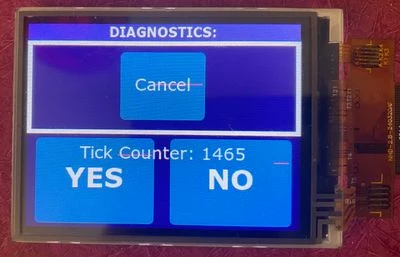
I've been trying to track down a problem I'm having with my project for several months now. Essentially I'm getting these red-ish lines through portions of my buttons, but only when (I presume) they are drawn or redrawn - namely when the screen first loads, when they are pressed, or when as in this example, they have text drawn over them that updates. 
IMG_7199.JPEG

In the case of the above picture, I've been able to get the lines to appear more consistently by layering some text over top of some of the buttons and then updating that text with each tick where it says "Tick Counter: xxxx". I managed to luck out and have it appear on the "Cancel" of the cancel button this time, though it probably only happens about 1 out of 10 times when the screen loads.

These lines have been appearing pretty consistently throughout my development on the project, and they seem (though I'm still not completely sure) to be happening regardless of my application code. The reason I say this is that I've commented out large portions of my application code and had them still appear. Frustratingly, they are not consistent. I can do a build, have them appear, and then insert a trivial line of code (even a NOP), and then they will disappear, only to reappear again after I add a few more lines.

This really seems to point to some sort of issue where I'm writing off the edge of an array or something (it seems that parts of my frame buffer are getting inadvertently overwritten? But then why just buttons? And why does it still happen when I essentially remove my application code?) 

I've included my TOUCHGFXHAL code that has my driver code in it.

Details on my project:

MCU: STM32L496VGTN

Display: NHD-2.8-240320AF-CSXP-FT (ST7789 Controller) connected via FMC 16-bit parallel

External Flash: MT25QL128A using quad-spi with a custom loader

Firmware details: No RTOS (Bare Metal/super-loop)

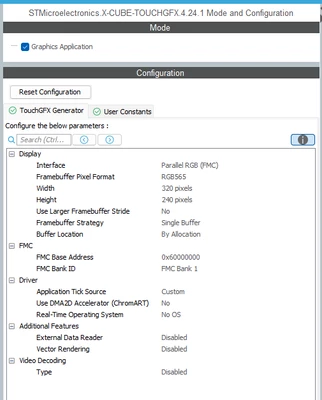
Touch GFX Configuration:
BWKidd_0-1735835937379.png


Other possible helpful details:

  • My display has no TE line, so I'm updating it manually using a timer at 10Hz by calling Oswrappers::signalVSync(). I had this called in the timer callback function, but recently moved it into the main loop and the problem actually seemed to happen more consistently if anything.
  • I've confirmed that these artifacts are actually contained in the framebuffer, so its not some sort of electrical noise that's corrupting pixels as they're transmitted to the display.

Any tips, tricks, or advice towards debugging this issue would be greatly appreciated. You might say figuring this out has become my new year's resolution!


22 replies

BWKidd
BWKiddAuthor
Senior
January 29, 2025

And here are my quadspi flash drivers for the MT25QL128.

ST Employee
January 30, 2025

I think you'll be better off troubleshooting QSPI issues elsewhere in the forum.

I can say that my experience is that dummy cycles do matter quite a lot, but you will usually lose the first pixels, not the last ones. In you case the buttons are quite uniform in colour, so that might be the case, of course, although I would assume the flash would just continue delivering sequential bits, which would be the same ones still. But according to the datasheet I found you should be fine with 1 dummy bit at 39 MHz, and it does not specify anything lower. At 80 MHz you should be at 5 or 6. It might be the issue, but again, I'm no QSPI expert :)

Why are you running at 20 instead of 80?

You can put single images in the internal flash in the designer as show in the screenshot.

.

BWKidd
BWKiddAuthor
Senior
January 30, 2025

Sounds good on the qspi issues - I'll take it there once I confirm that's what I'm dealing with.

Why am I running at 20 MHz instead of 80? That's a great question, without a great answer. In part because I set it that way a long time ago not necessarily understanding that's what I was setting it to and...now I'm leaving it there because at the moment if I change to anything else, the artifacts go away...including when I run the qspi faster...except I know they're not truly gone, they are just waiting to show up later...which is what makes this whole thing so gosh-darn impossible to figure out.

Thanks so much for that screen shot, that was really helpful.

I put a copy of one of the buttons into internal flash, and you are right, no artifacts on that button, while they appear on the other two coming from external qspi flash. So...qspi flash it is! Except...

I thought "well how about I run comparison of the bitmap in external flash with the one on internal flash":

void compareBitmaps()
{
 // Load bitmaps from internal flash and QSPI flash
 const uint8_t* internalBitmap = touchgfx::Bitmap(BITMAP_BUTTON_140X100_ACTIVE_INTERNAL_ID).getData();
 const uint8_t* qspiBitmap = touchgfx::Bitmap(BITMAP_BUTTON_140X100_ACTIVE_ID).getData();

 // Get bitmap sizes (assuming both are the same size)
 uint32_t size = touchgfx::Bitmap(BITMAP_BUTTON_140X100_ACTIVE_ID).getWidth() *
 touchgfx::Bitmap(BITMAP_BUTTON_140X100_ACTIVE_ID).getHeight() *
 4; // Bitmaps seem to be stored in ARGB8888 format
 // Compare memory contents
 for (uint32_t i = 0; i < size; i++)
 {
 if (internalBitmap[i] != qspiBitmap[i])
 {
 	TX_String("Mismatch in Memory!!!\r\n"); // <== Set a BREAKPOINT HERE!!!!
 }
 }
}

And would you believe I've been running every tick it for over an hour with it never halting at the breakpoint? I'm also doing my normal display routines and there's artifacts all over the buttons per usual. What the....?

I wonder if it's too late to pursue a career in theatrical lighting and set design?


ST Employee
January 31, 2025

That is odd. I'm back to some sort of buffering issue. TouchGFX can use DMA2D to fetch the bitmap in extflash and copy it to the framebuffer. I can see you have that turned off in your TouchGFX configuration. What happens if you turn that on?

BWKidd
BWKiddAuthor
Senior
January 31, 2025

Are you referring to changing this parameter?

BWKidd_0-1738329909328.png

Without changing anything else, this happens:

BWKidd_1-1738330122060.png

I hadn't seen this issue before, but the reason I had been keeping that setting off was because when I turned it on, I was getting this: Trying to setup DMA2D with TouchGFX and an FMC con... - STMicroelectronics Community


ST Employee
January 31, 2025

Yes, that is the setting I was referring to. You should ensure that DMA2D is enabled in your initialization code. The settings don't matter, TouchGFX will take care of this, as well as setting up transfers to the frame buffer.

You should not reconfigure DMA2D. If you want to use DMA to transfer data to the FMC, you should use plain DMA.

BWKidd
BWKiddAuthor
Senior
January 31, 2025

Ah, yes that fixed the issue with the screen only partially drawing. I'll get normal DMA setup for my FMC transfers. No artifacts either, for the moment.

BWKidd
BWKiddAuthor
Senior
January 31, 2025

Well, I should have tested the larger font size (Size 80, Verdana Bold) because that still has the problem I mentioned before:

BWKidd_0-1738343790305.png

When I disable ChromArt under the TouchGFX settings these weird character distortions go away.


ST Employee
February 3, 2025

Is that a static text or a number that increments? Are the artifacts consistent; in this case the 1 is correct, are all 1s correct? Are all 2s broken in exactly the same way?

Be aware that for normal DMA you may run into an issue with the number of blocks that can be transferred in one go. I so not recall if the DMA on L4 supports this, but some DMAs have a linked list mode to handle this, otherwise you can handle that manually in a callback.

Another option is to try to switch frame buffer strategy to partial frame buffer. This transfers a number of blocks of a predefined size to update the memory in the display. You can manually set the size and number of blocks, so you can limit the size to what you can handle in one transfer. At the same time, you will save some RAM since the normal framebuffer is replaced by the blocks.

The project for STM32U575 with RVA35 display module that ships with the TouchGFX designer is set up in this manner and uses DMA for FMC transfers, if you would like some inspiration.

BWKidd
BWKiddAuthor
Senior
February 3, 2025

The text is dynamic - I was updating it with every tick, mainly to force invalidations for those buttons and "stress test" the system. I just changed my code to increment the counter manually so that I could go through each digit manually.

void ArtifactTestScreenView::vfYesButton() { // Lower Left button
	textPrompt.invalidate();
}

void ArtifactTestScreenView::vfNoButton() {	// Lower right button
	counter++;
	Unicode::snprintf(textPromptBuffer, TEXTPROMPT_SIZE, "%d", counter);
	textPrompt.invalidate();
}

The following digits are scrambled (and always in the same way as far as I can tell): 2, 3, 5, 6, 7, 9. The rest of the numbers seem to be ok (0, 1, 4, 8). I've included a video so that you can see it happen as I press the buttons (sorry the video is turned sideways)

What is interesting is that as it repaints the portion of the digit for the button depressed image, it seems to do it correctly, but as soon as I release the button, it goes back to garbage.


In regard to using normal DMA, it seems to be working ok - I'm doing the transfer in two equal blocks for the whole screen, as at the moment I'm just transferring the entire screen, which seems to be working, the previous complaint non-withstanding:

void TOUCHGFXHAL_signalVSync() {	// Wrapper for triggering VSync
	const uint32_t HALF_PIXEL_COUNT = (TFT_WIDTH * TFT_HEIGHT) / 2;

 // VSync has occurred, increment TouchGFX engine vsync counter
 HAL::getInstance()->vSync();
 // VSync has occurred, signal TouchGFX engine
 OSWrappers::signalVSync();

 if (refreshRequested && !displayRefreshing) {
		touchgfx::HAL::getInstance()->swapFrameBuffers();

		displayRefreshing = true;
		HAL_GPIO_WritePin(TP_PC0_GPIO_Port, TP_PC0_Pin, GPIO_PIN_HIGH);	// Raise pin for timing display write

		// Set LCD window
		setLCDwindow(0, 0, TFT_WIDTH, TFT_HEIGHT);
		LCD_IO_WriteReg(RAMWR);

		// Configure 1st Half DMA transfer
		if (HAL_DMA_Start(&hdma_memtomem_dma2_channel1,
				(uint32_t)currFbBase, // Source: Framebuffer
				(uint32_t)FMC_BANK1_MEM, // Destination: LCD GRAM
				HALF_PIXEL_COUNT) != HAL_OK) // Number of 16-bit pixels
		{
			Error_Handler();
		}

		// Wait for DMA transfer to complete
		if (HAL_DMA_PollForTransfer(&hdma_memtomem_dma2_channel1, HAL_DMA_FULL_TRANSFER, 1000) != HAL_OK)
		{
			Error_Handler();
		}

		// Configure 2nd Half DMA transfer
		if (HAL_DMA_Start(&hdma_memtomem_dma2_channel1,
				(uint32_t)currFbBase+HALF_PIXEL_COUNT*2, // Start at halfway through the frame buffer which is the pixel count x the number of bytes per pixel (2 bytes for RGB565)
				(uint32_t)FMC_BANK1_MEM, // Destination: LCD GRAM
				HALF_PIXEL_COUNT) != HAL_OK) // Number of 16-bit pixels
		{
			Error_Handler();
		}

		// Wait for DMA transfer to complete
		if (HAL_DMA_PollForTransfer(&hdma_memtomem_dma2_channel1, HAL_DMA_FULL_TRANSFER, 1000) != HAL_OK)
		{
			Error_Handler();
		}

		HAL_GPIO_WritePin(TP_PC0_GPIO_Port, TP_PC0_Pin, GPIO_PIN_LOW);	// Raise pin for timing display write

		displayRefreshing = false;
	}
}

I've been reluctant to move to a partial framebuffer strategy, mainly because transferring data to the display seemed to be working, but if you think this is a better strategy for my setup I'll see if I can get it working.


ST Employee
February 4, 2025

You could use a transfer complete interrupt on the DMA to increase performance by moving the update code to a dedicated screen transfer function that can take a variable to control which half of the pixels to transfer. That would free up some CPU cycles. But I guess that is not the problem here.

I have two things I would like to investigate. 

Try to modify your code from above to this:

void ArtifactTestScreenView::vfYesButton() { // Lower Left button
	counter--;
	Unicode::snprintf(textPromptBuffer, TEXTPROMPT_SIZE, "%d", counter);
	textPrompt.invalidate();
	//invalidate();
}

void ArtifactTestScreenView::vfNoButton() {	// Lower right button
	counter++;
	Unicode::snprintf(textPromptBuffer, TEXTPROMPT_SIZE, "%d", counter);
	textPrompt.invalidate();
	//invalidate();
}

First, it would be interesting to see if the scrambled letters are the same when counting up and counting down, I'm wondering whether it's the number being drawn incorrectly, or if there is somehow a part of the previous number remaining.

The lines with comments just invalidate the entire display, i wonder if that shows the entire number correctly.

ST Employee
February 7, 2025

I've asked around the office a bit, and it's not clear what causes this.

Can you try to set your QSPI to the higher clock again?

Do you also have the problem if you lower the alpha value of the text field?

Another thing that may cause this is that in your TOUCHGFXHAL_signalVSync() function, you should not call 

 // VSync has occurred, increment TouchGFX engine vsync counter
 HAL::getInstance()->vSync();
 // VSync has occurred, signal TouchGFX engine
 OSWrappers::signalVSync();

until the very end, to avoid TouchGFX starting rendering of the next frame while you are transferring the data.

BWKidd
BWKiddAuthor
Senior
February 7, 2025

Thanks for checking around for me.

I've put the QSPI prescaler at 0, moved the Vsync triggers to the end of my TOUCHGFXHAL_signalVSync(), and dropped the alpha value of the text from 255 to 255. Unfortunately, there was no discernable change in behavior after applying the changes (I did them sequentially testing each one as I went).

ST Employee
February 17, 2025

I'm back after a little winter break :)

Are you specifically linking text data in your linker script (FontFlashSection and TextFlashSection)?

If not, you could add this to your linker script:


 FontFlashSection :
	{
		*(FontFlashSection FontFlashSection.*)
		*(.gnu.linkonce.r.*)
 . = ALIGN(0x4);
	} >QSPI

 TextFlashSection :
	{
		*(TextFlashSection TextFlashSection.*)
		*(.gnu.linkonce.r.*)
 . = ALIGN(0x4);
	} >QSPI


Then you can play around with linking to internal and external flash or some combination between the two.

You could also try to locate the FontFlashSection in your .map file and compare the flash contents to the compiled code.

BWKidd
BWKiddAuthor
Senior
February 17, 2025

I'm glad you were able to take a little break, and as it turns out I did pretty much the same thing!

I currently have this at the bottom of my linker file:

 ExtFlashSection :
 {
 	*(ExtFlashSection ExtFlashSection.*)
 	*(.gnu.linkonce.r.*)
 	. = ALIGN(0x4);
 } >QUADSPI
 FontFlashSection :
 {
 	*(FontFlashSection FontFlashSection.*)
 	*(.gnu.linkonce.r.*)
 	. = ALIGN(0x4);
 } >QUADSPI
 TextFlashSection :
 {
 	*(TextFlashSection TextFlashSection.*)
 	*(.gnu.linkonce.r.*)
 	. = ALIGN(0x4);
 } >QUADSPI

 I commented out the "FontFlashSection" so that it (presumably) remapped it to internal flash, and the character corruption for 2, 3, 5, 6, 7, and 9 went away! So, does that indicate that we are back to some sort of issue with reading my quadspi flash at times then? Strange how it is so consistently affects only certain numbers. I'll dig into the quadspi flash in greater detail hopefully later this week or early next week - right now the focus is on re-doing the PCB layout out my prototype board for some mechanical and minor electrical changes.