ryan rusty
Associate
August 19, 2020
Solved

How to STM32MP1-DK2 node-red ?

  • August 19, 2020
  • 1 reply
  • 3401 views

I would like to use node-red on STM32MP157C-DK2 to handle datas computed and shared with IPCC by Cortex-M4.

Any advice ?

Thank you

This topic has been closed for replies.
Best answer by ryan rusty

Here is my share of an unpretentious guide that allowed me to install nodejs and node-red locally on an STM32MP157C-DK2.

Hope this can help.

First of all, my config: SD card 16Gb with latest ecosystem release v2.0.0

  • Connect with ssh root and make apt cache up to date.
root@stm32mp1:~# apt-get update

  • Install nodejs and check version
root@stm32mp1:~# apt-get install nodejs
root@stm32mp1:~# node -v

  • Install nodejs npm dependencies
root@stm32mp1:~# apt-get install nodejs-npm

  • Install node-red
root@stm32mp1:~# npm install -g -unsafe-perm node-red

  • Start node-red
root@stm32mp1:~# node-red

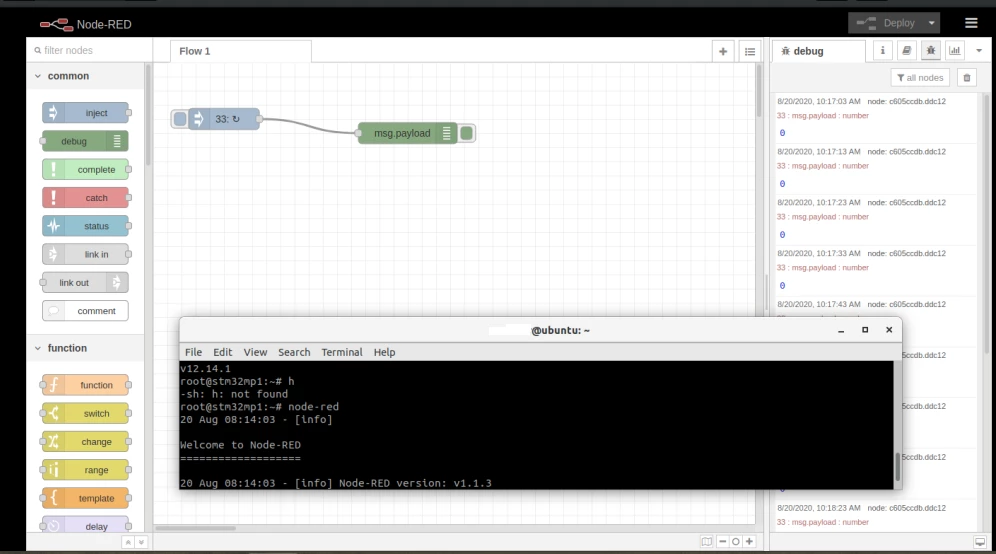
  • After Starting flow success, open web browser and connect to node-red server using the ip adress of the STM32MP1 board on port 1880 (in my case http://192.168.1.33:1880)

 0693W000003PqbGQAS.png

Thank to apt support on new ecosystem release v2.0.0

1 reply

ryan rusty
ryan rustyAuthorBest answer
Associate
August 20, 2020

Here is my share of an unpretentious guide that allowed me to install nodejs and node-red locally on an STM32MP157C-DK2.

Hope this can help.

First of all, my config: SD card 16Gb with latest ecosystem release v2.0.0

  • Connect with ssh root and make apt cache up to date.
root@stm32mp1:~# apt-get update

  • Install nodejs and check version
root@stm32mp1:~# apt-get install nodejs
root@stm32mp1:~# node -v

  • Install nodejs npm dependencies
root@stm32mp1:~# apt-get install nodejs-npm

  • Install node-red
root@stm32mp1:~# npm install -g -unsafe-perm node-red

  • Start node-red
root@stm32mp1:~# node-red

  • After Starting flow success, open web browser and connect to node-red server using the ip adress of the STM32MP1 board on port 1880 (in my case http://192.168.1.33:1880)

 0693W000003PqbGQAS.png

Thank to apt support on new ecosystem release v2.0.0