

Zk47
Associate II
August 24, 2025
Solved

Yocto for STM32MP157: Virtual display
  • August 24, 2025
  • 1 reply
  • 1094 views

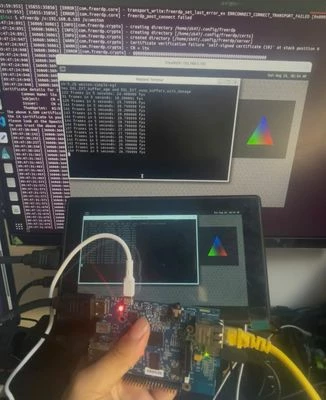
rdp.jpg

After successfully RDP to my board

Now i want to make fake HDMI information, to make it auto output. So i no need to plug in HDMI display, but still can connect through freeRDP from PC.

Can someone here ever did this, or have any ideas about how to do it under yocto build. 


Here is something i try refer this thread of arch linux : https://discuss.kde.org/t/how-to-create-a-virtual-monitor-display/2725/10

root@stm32mp1:/sys/class/drm# ls -al
drwxr-xr-x 2 root root 0 May 29 18:48 .
drwxr-xr-x 63 root root 0 May 29 18:48 ..
lrwxrwxrwx 1 root root 0 May 29 18:48 card0 -> ../../devices/platform/soc/5a001000.display-controller/drm/card0
lrwxrwxrwx 1 root root 0 May 29 18:48 card0-HDMI-A-1 -> ../../devices/platform/soc/5a001000.display-controller/drm/card0/card0-HDMI-A-1
lrwxrwxrwx 1 root root 0 May 29 19:13 card1 -> ../../devices/platform/etnaviv/drm/card1
lrwxrwxrwx 1 root root 0 May 29 19:14 renderD128 -> ../../devices/platform/etnaviv/drm/renderD128
-r--r--r-- 1 root root 4096 May 29 19:14 version
root@stm32mp1:/sys/devices/platform/soc/5a001000.display-controller/drm/card0/card0-HDMI-A-1# hexdump -C /sys/class/drm/card0-HDMI-A-1/edid | head
00000000 00 ff ff ff ff ff ff 00 30 ae 86 10 01 01 01 01 |........0.......|
00000010 22 15 01 03 81 0f 0a 78 ee e5 b5 a3 55 49 99 27 |"......x....UI.'|
00000020 13 50 54 af ef 00 45 c0 81 c0 81 80 81 80 81 80 |.PT...E.........|
00000030 95 00 95 0f d1 c0 a1 13 00 40 41 58 19 20 2c 58 |.........@AX. ,X|
00000040 36 00 9a 56 00 00 00 1c 00 00 00 fc 00 4c 45 4e |6..V.........LEN|
00000050 20 4c 31 39 35 30 77 44 0a 20 00 00 00 fd 00 32 | L1950wD. .....2|
00000060 4c 1e 51 0e 00 0a 20 20 20 20 20 20 00 00 00 ff |L.Q... ....|
00000070 00 42 33 34 33 32 38 34 35 0a 20 20 20 20 01 ce |.B3432845. ..|
00000080 02 03 21 71 4e 06 07 02 03 15 96 11 12 13 04 14 |..!qN...........|
00000090 05 1f 90 23 09 07 07 83 01 00 00 65 03 0c 00 10 |...#.......e....|

root@stm32mp1:~# mkdir /lib/firmware/edid
root@stm32mp1:~# cp /sys/devices/platform/soc/5a001000.display-controller/drm/card0/card0-HDMI-A-1/edid /lib/firmware/edid/monitor.bin

I try to create fake edid for the display which is clone of edid of real hdmi display.

I already set CONFIG_DRM_LOAD_EDID_FIRMWARE to "y" in kernel

Currently i use sd card, and have partition like this 

mmcblk0 179:0 0 29,5G 0 disk 
├─mmcblk0p1 179:1 0 256K 0 part 
├─mmcblk0p2 179:2 0 256K 0 part 
├─mmcblk0p3 179:3 0 256K 0 part 
├─mmcblk0p4 179:4 0 256K 0 part 
├─mmcblk0p5 179:5 0 4M 0 part 
├─mmcblk0p6 179:6 0 4M 0 part 
├─mmcblk0p7 179:7 0 512K 0 part 
├─mmcblk0p8 259:9 0 64M 0 part /media/zk47/bootfs
├─mmcblk0p9 259:10 0 16M 0 part /media/zk47/vendorfs
├─mmcblk0p10 259:11 0 4G 0 part /media/zk47/rootfs
└─mmcblk0p11 259:12 0 934,5M 0 part /media/zk47/userfs

So i modify /media/zk47/bootfs/mmc1_extlinux/extlinux.conf to add video, drm field

zk47@ltu:/media/zk47/bootfs$ cat mmc1_extlinux/extlinux.conf 
# Generic Distro Configuration file generated by OpenEmbedded
MENU BACKGROUND /splash_portrait.bmp
TIMEOUT 20
LABEL OpenSTLinux
	KERNEL /uImage
	FDTDIR /
	APPEND root=PARTUUID=491f6117-415d-4f53-88c9-6e0de54deac6 rootwait rw console=${console},${baudrate} video=HDMI-A-1:1920x1080@60e drm.edid_firmware=HDMI-A-1:edid/monitor.bin

But it not work. 
Best answer by Zk47

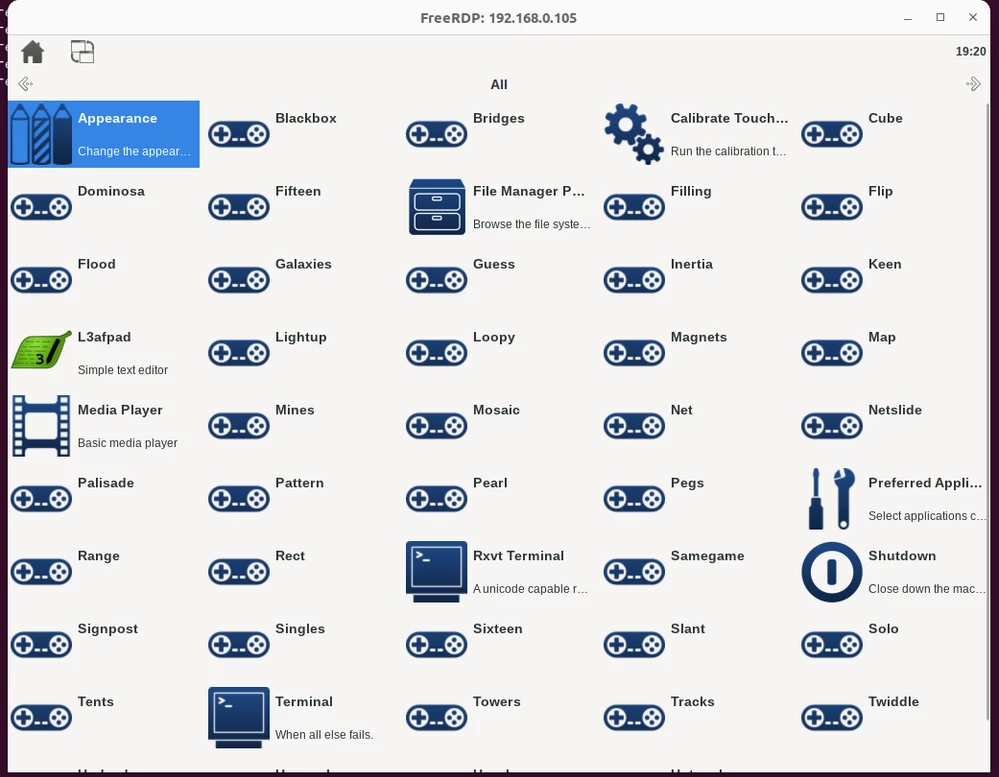
After trying some more time. I switch from Weston RDP to X11 RDP, now i got it run in first-time

image (2).png

Here what i modify to make it work 

In local.conf i need to add 

INIT_MANAGER = "systemd"

I build core-image-sato because it has X11 natively

I create core-image-sato.bbappend 

inherit extrausers

PASSWD = "\$5\$y9Aeg5ctwntRHo/g\$CAKtoTfQg7VPGfVAMGo5ZG/0GJLn3AD0JdoQ.i0dDFC"
EXTRA_USERS_PARAMS = "\
 usermod -p '${PASSWD}' root; \
 "

IMAGE_FEATURES:remove = "ssh-server-dropbear"
IMAGE_FEATURES:append = " ssh-server-openssh"
PACKAGE_EXCLUDE += "linux-firmware-addons-bcm43xx"

IMAGE_INSTALL:append = " \
 python3-jinja2 \
 dhcpcd \
 iproute2 \
 iputils \
 "

IMAGE_INSTALL:append = " xrdp xorgxrdp "


After flash you need to create key for xrdp 

mkdir -p /etc/xrdp
xrdp-keygen xrdp /etc/xrdp/rsakeys.ini

printf 'XRDP_OPTIONS=\n' > /etc/default/xrdp
printf 'SESMAN_OPTIONS=\n' > /etc/default/xrdp-sesman
systemctl daemon-reload

systemctl restart xrdp
systemctl restart xrdp-sesman

Also create session file 

cat > ~/.xsession <<'EOF'
#!/bin/sh
exec /usr/bin/sato-session
EOF
chmod +x ~/.xsession

Remember to make enable ssh from board, need to modify /etc/ssh/ssh_config change these field

#PermitRootLogin prohibit-password --> PermitRootLogin yes
#PasswordAuthentication yes --> uncomment PasswordAuthentication yes

After that remember to restart sshd.socket

systemctl restart sshd.socket

Now from PC connect through RDP using xfreerdp

xfreerdp /v:<ip of board> /u:<user> /p:<password> /dynamic-resolution /cert:ignore


1 reply

Zk47
Zk47AuthorBest answer
Associate II
August 26, 2025

After trying some more time. I switch from Weston RDP to X11 RDP, now i got it run in first-time

image (2).png

Here what i modify to make it work 

In local.conf i need to add 

INIT_MANAGER = "systemd"

I build core-image-sato because it has X11 natively

I create core-image-sato.bbappend 

inherit extrausers

PASSWD = "\$5\$y9Aeg5ctwntRHo/g\$CAKtoTfQg7VPGfVAMGo5ZG/0GJLn3AD0JdoQ.i0dDFC"
EXTRA_USERS_PARAMS = "\
 usermod -p '${PASSWD}' root; \
 "

IMAGE_FEATURES:remove = "ssh-server-dropbear"
IMAGE_FEATURES:append = " ssh-server-openssh"
PACKAGE_EXCLUDE += "linux-firmware-addons-bcm43xx"

IMAGE_INSTALL:append = " \
 python3-jinja2 \
 dhcpcd \
 iproute2 \
 iputils \
 "

IMAGE_INSTALL:append = " xrdp xorgxrdp "


After flash you need to create key for xrdp 

mkdir -p /etc/xrdp
xrdp-keygen xrdp /etc/xrdp/rsakeys.ini

printf 'XRDP_OPTIONS=\n' > /etc/default/xrdp
printf 'SESMAN_OPTIONS=\n' > /etc/default/xrdp-sesman
systemctl daemon-reload

systemctl restart xrdp
systemctl restart xrdp-sesman

Also create session file 

cat > ~/.xsession <<'EOF'
#!/bin/sh
exec /usr/bin/sato-session
EOF
chmod +x ~/.xsession

Remember to make enable ssh from board, need to modify /etc/ssh/ssh_config change these field

#PermitRootLogin prohibit-password --> PermitRootLogin yes
#PasswordAuthentication yes --> uncomment PasswordAuthentication yes

After that remember to restart sshd.socket

systemctl restart sshd.socket

Now from PC connect through RDP using xfreerdp

xfreerdp /v:<ip of board> /u:<user> /p:<password> /dynamic-resolution /cert:ignore