

FSchr.1
Associate II
December 13, 2019
Solved

Accessing the STM32MP157x-EV1, password forgotten

  • December 13, 2019
  • 6 replies
  • 3678 views

I came a step further setting up the System Workbench for STM32.

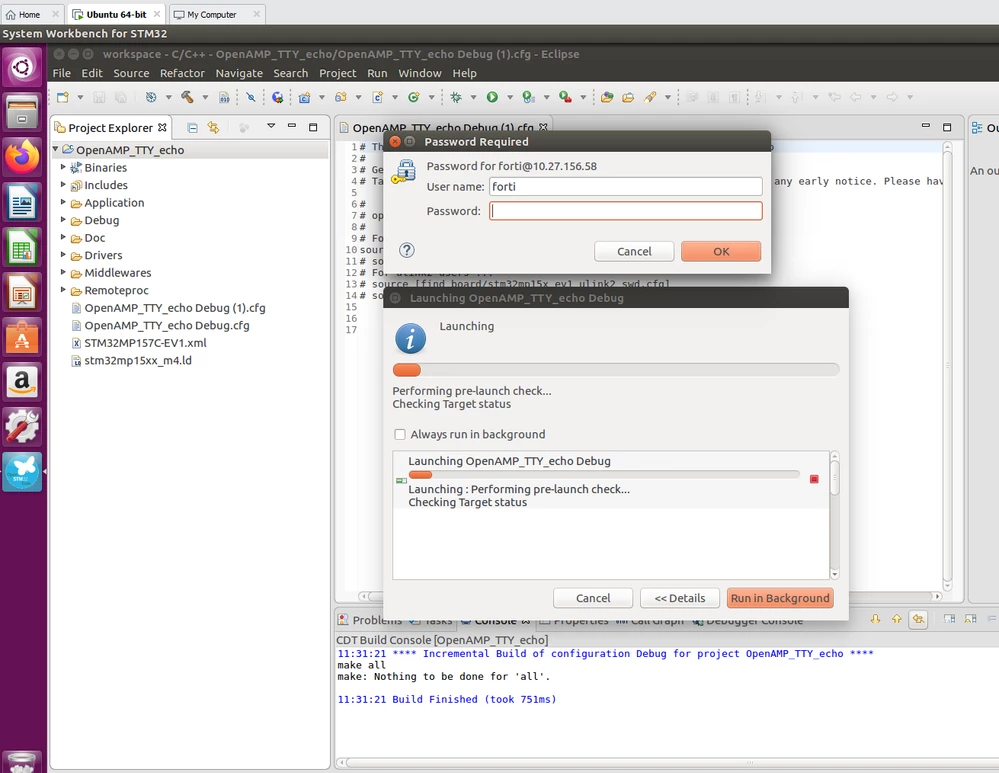
But now I am asked for a password to access to the target system but I all passwords that I can remember I had set-up before don't match.

Can somebody show me, how I can reset the password required for the situation shown below.
0690X00000BuaQpQAJ.png

This topic has been closed for replies.
Best answer by Olivier GALLIEN

Yes you need also to connect the STLINK on CN4 of the daugther board.

Olivier

6 replies

Olivier GALLIEN
Technical Moderator
December 13, 2019

​Hi @Fortunat Schrämmli​ 

You have to connect as "root", usually with empty password.

Please try and come back. If still fail I can drive you to setup the conf back working

Olivier

Olivier GALLIEN In order to give better visibility on the answered topics, please click on 'Accept as Solution' on the reply which solved your issue or answered your question.
FSchr.1
FSchr.1Author
Associate II
December 13, 2019

Hi Olivier

Thank you for your valuable response.

I can't change the User name in the "Password Required" dialog box shown above to root. The name isn't editable. Please show me, where can I set-up to connect to the root ?

Fortunat

Olivier GALLIEN
Technical Moderator
December 13, 2019

Menu Windows/ Open Perspective / Others / Remote System Explorer

open Properties of "MPU Target" and set back the default User ID to "root".

You might be prompt at first connection to set again the password. Let it empty.

Hope it help,

Olivier

Olivier GALLIEN In order to give better visibility on the answered topics, please click on 'Accept as Solution' on the reply which solved your issue or answered your question.
FSchr.1
FSchr.1Author
Associate II
December 13, 2019

Thank you Olivier

With your hint I came a step further. It seems that the object file has been downloaded to the target.

But unfortunately I get further error, you see below and I am still not at the goal.

What is the exactly needed system configuration for this demo debug session ?

In my system configuration the evaluation board is connected over Ethernet to the development PC running Ubuntu 16.04 under VM-Ware. Then I also have a RS232 connection trough UART4 port of the evaluation board.

Do I also have to connect the ST-Link V2.1 to my Linux PC ?

Is there a description how set-up the ST-Link V2.1 on the VM-Ware Ubuntu machine ?

Fortunat

0690X00000BubDNQAZ.png

Olivier GALLIEN
Olivier GALLIENBest answer
Technical Moderator
December 13, 2019

Yes you need also to connect the STLINK on CN4 of the daugther board.

Olivier

Olivier GALLIEN In order to give better visibility on the answered topics, please click on 'Accept as Solution' on the reply which solved your issue or answered your question.
Olivier GALLIEN
Technical Moderator
December 13, 2019
Olivier GALLIEN In order to give better visibility on the answered topics, please click on 'Accept as Solution' on the reply which solved your issue or answered your question.
FSchr.1
FSchr.1Author
Associate II
December 13, 2019

Hi Olivier

Thank you for your answer

It seems that I have made a step forward.

As you see below, it seems that the debugging of the Cortex M4 software is now working.

0690X00000Bubh3QAB.png

Olivier GALLIEN
Technical Moderator
December 13, 2019

I confirm :smiling_face_with_smiling_eyes:

Good debug !

Olivier

Olivier GALLIEN In order to give better visibility on the answered topics, please click on 'Accept as Solution' on the reply which solved your issue or answered your question.