Associate II
April 22, 2025
Solved

Cortex M33 not detecting in STM32MP257F-DK using ST-link

  • April 22, 2025
  • 2 replies
  • 978 views

Hi

I am trying to program the Cortex M33 of STM32MP257F-DK dev board using CubeIDE. I have generated the code in Cube IDE. The debugger failing to program as the board not responding.
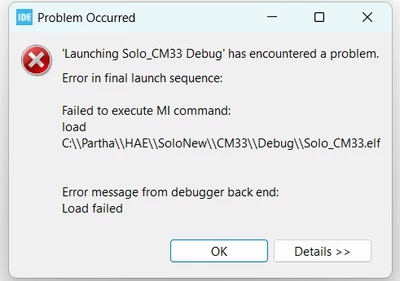
partha_sarathi1000_0-1745348328228.png

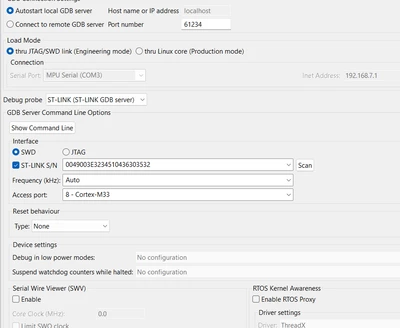
Following are my debug settings:

partha_sarathi1000_1-1745348380608.png

Again I tried using STM32 Cube Programmer, no luck.
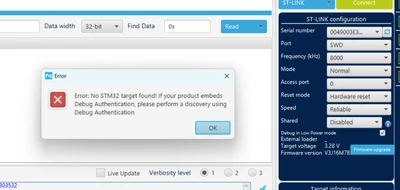
partha_sarathi1000_2-1745348434791.png

But its able to detect Cortex A35 using USB DFU mode and able to flash Linux into sd card.

But the MCU is unable to detect.

I tried boot settings in Development Mode 0011. Also tried 0001 and 0000. Same issue.

Can anybody let me know where I am going wrong?

Best answer by partha_sarathi1000

@Olivier GALLIEN 

I solved the problem by changing the Debug name from OpenAMP_TTY_echo_CM33_NonSecure CA35TDCID_m33_ns_sign_Run  to OpenAMP_TTY_echo_CM33_NonSecure CA35TDCID_m33_ns_sign_Debug.

Wasn't aware of the fact that _Debug naming convention matters in the script.

Thanks.

2 replies

Olivier GALLIEN
Technical Moderator
April 23, 2025

Hi @partha_sarathi1000 ,

It's not possible to debug the CM33 of STM32MP25 in standalone mode using the "development boot" mode. (engineering mode in CubeIDE) 

It's mandatory to use the "production mode" (flash boot mode) where OpenSTLinux running on CA35 setup the system. 

STM32CubeIDE has a complete and seamless integration of "production mode" allowing a satisfactory debug experience of the CM33 with low constraint vs CM33 standalone. 

See our Wiki for reference : 

Develop on Arm® Cortex®-M33 - stm32mpu

Olivier 


Olivier GALLIEN In order to give better visibility on the answered topics, please click on 'Accept as Solution' on the reply which solved your issue or answered your question.
Associate II
April 24, 2025

Thanks @Olivier GALLIEN 
Can it be done in Windows, or Linux environment is mandatory, as per as CM33 development is concerned.

Olivier GALLIEN
Technical Moderator
April 24, 2025

Hi @partha_sarathi1000 ,

It can be done in Windows 

Olivier 


Olivier GALLIEN In order to give better visibility on the answered topics, please click on 'Accept as Solution' on the reply which solved your issue or answered your question.