

FarukSozuer
Associate III
July 1, 2024
Solved

STM32CubeIDE Custom SDK Import

  • July 1, 2024
  • 1 reply
  • 1599 views

Hello everyone,

I want to develop a project for STM32MP1 using stm32cubeIDE Version: 1.15.1. In the yocto-related part of the topic, I successfully compiled a kernel and produced an SDK for the relevant kernel. I want to import this SDK into the cubeide environment and start with a ledBlinky application. But I couldn't import the SDK.

I have reviewed what is explained in forums and blogs, but I constantly encounter error messages. Below is the location of the .sh file of the SDK I produced.
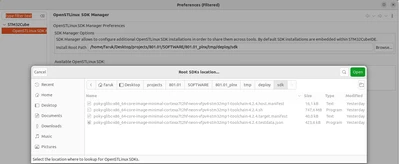
                                                Screenshot from 2024-07-01 20-27-09.png

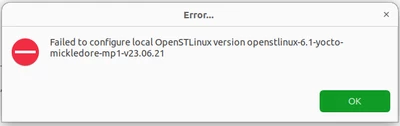
And I keep getting the following error. What I want to do is to use my own SDK for mickledore, not the SDK offered by ST.
Screenshot from 2024-07-01 20-28-17.pngSinceley

Best answer by Erwan SZYMANSKI

Hello @FarukSozuer ,
Be careful, what you are showing me on your first picture is not (really) the SDK. What you see in this folder is the necessary tools to install it on your local machine. You need to execute the script inside, choose the folder to install it, and then you will have what we call the SDK operational.

For the SDK installation part, please refer to this steps : https://wiki.st.com/stm32mpu/wiki/STM32MPU_Developer_Package#Installing_the_SDK

On this above link (the specific chapter I point on), do not take care about the Download step. In fact, the package that contains the SDK provided by ST is exactly what you see with your own one generated by your Yocto. Just see the steps after to install it.

Then refers to this wiki page for SDK configuration (but I think you are very close to it) : https://wiki.st.com/stm32mpu/wiki/How_to_install_the_Yocto_Project_SDK_in_STM32CubeIDE

I hope it will help you to go forward.

Kind regards,
Erwan.

1 reply

Erwan SZYMANSKI
Erwan SZYMANSKIBest answer
Technical Moderator
July 6, 2024

Hello @FarukSozuer ,
Be careful, what you are showing me on your first picture is not (really) the SDK. What you see in this folder is the necessary tools to install it on your local machine. You need to execute the script inside, choose the folder to install it, and then you will have what we call the SDK operational.

For the SDK installation part, please refer to this steps : https://wiki.st.com/stm32mpu/wiki/STM32MPU_Developer_Package#Installing_the_SDK

On this above link (the specific chapter I point on), do not take care about the Download step. In fact, the package that contains the SDK provided by ST is exactly what you see with your own one generated by your Yocto. Just see the steps after to install it.

Then refers to this wiki page for SDK configuration (but I think you are very close to it) : https://wiki.st.com/stm32mpu/wiki/How_to_install_the_Yocto_Project_SDK_in_STM32CubeIDE

I hope it will help you to go forward.

Kind regards,
Erwan.

In order to give better visibility on the answered topics, please click on 'Accept as Solution' on the reply which solved your issue or answered your question.
FarukSozuer
Associate III
July 7, 2024

Hello @Erwan SZYMANSKI 

Thanks for reply.  For now, I'm proceeding with the sdk offered by ST. I still couldn't import the custom sdk in the stm32cubeide environment. But I'll leave this issue aside for now. There is currently no problem in debugging and developing code with the stm32cube IDE.

Sinceley