
Associate III
January 24, 2024
Solved

STM32MP135F-DK - Netx Duo WebServer - unable program application to STM32MP135F-DK

  • January 24, 2024
  • 6 replies
  • 6458 views

Dears,

I am able to compile Nx_WebServer demo. But when I try to run/debug it will halt.

I read all notes in NetXDuo/Nx_WebServer/readme.html - the last chapter "How to use it ?"

  • Open your preferred toolchain
  • Rebuild and run DDR_Init example to initialize the DDR memory
  • Rebuild all files and load your image into target memory
  • For STM32CubeIDE, in order to keep DDR initialized, please remove “monitor reset” line in “Debug Configurations->Startup>Initialization Commands”
  • Run the application

But I end on red line - unable load image - Where could be problem ?

I am able to compile and debug another aplication ftom STM32Cube_FW_MP13_V1.0 like UART, ADC examples withou error.
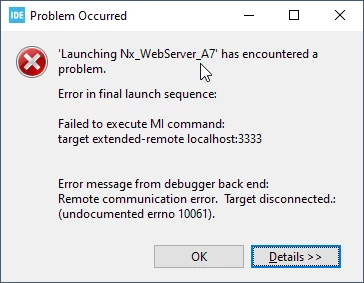
ravo_0-1706110928654.png

Error in final launch sequence:


Failed to execute MI command:

target extended-remote localhost:3333


Error message from debugger back end:

Remote communication error. Target disconnected.: (undocumented errno 10061).

Failed to execute MI command:

target extended-remote localhost:3333


Error message from debugger back end:

Remote communication error. Target disconnected.: (undocumented errno 10061).

Remote communication error. Target disconnected.: (undocumented errno 10061).


Console log:

Info : SWD DPIDR 0x6ba02477

Warn : target STM32MP135FAFx.ap1 examination failed

Warn : target STM32MP135FAFx.axi examination failed

Error: Could not initialize the APB-AP

Warn : target STM32MP135FAFx.cpu examination failed

Info : gdb port disabled

Info : gdb port disabled

Info : starting gdb server for STM32MP135FAFx.cpu on 3333

Info : Listening on port 3333 for gdb connections

Info : accepting 'gdb' connection on tcp/3333

Error: Target not examined yet

Error executing event gdb-attach on target STM32MP135FAFx.cpu:


Info : New GDB Connection: 1, Target STM32MP135FAFx.cpu, state: unknown

Error: Target STM32MP135FAFx.cpu not examined yet, refuse gdb connection 1!

Error: attempted 'gdb' connection rejected

shutdown command invoked


Best Regards

Radim

Best answer by ravo

Dear @DBELL.1 ,

thanks for your support.

And in meanwhile I browse source code again and found

line 398:

/* wait until an IP address is ready */
if(tx_semaphore_get(&Semaphore, TX_WAIT_FOREVER) != TX_SUCCESS)
{
Error_Handler();
}

When I remove waiting for this semaphore it will continue in App_Main_Thread_Entry and finish initialization of WebServer application.


So now it seems all works fine.

I will wait for your answer... if I need only these lines remove... or if there better way, some #define or etc.

Radim

6 replies

OlivierK
Technical Moderator
January 25, 2024

Dear @ravo 


I do not reproduce this error at my end in running this particular example after following the readme file.


This typical error msg usually indicates that 

1- you haven't run the DDR init example prior running the NX_webserver project

2. you haven't changed the NX_webserver/debug properties as mentioned in the readme file (please remove “monitor reset” line )


Board boot pins must be set in "Engineering boot mode" But you said you were already familiar with other HAL examples so I don't think this was your issue.


Best Regards

Olivier


In order to give better visibility on the answered topics, please click on 'Accept as Solution' on the reply which solved your issue or answered your question.
ravoAuthor
Associate III
January 26, 2024

Dear @OlivierK ,

Thanks for answer.

As I wrote earlier I have already run DDR Init, and monitor reset lin in debug prop in startup section was removed. But how to verify if it is running ok?


Maybe I do something wrong here:   

Rebuild all files and load your image into target memory

I am doing it using STM32CubeIde with Debug command, is it ok?

Regards Radim


ravoAuthor
Associate III
January 26, 2024

Small update,

I have looked that blue led is blinking (after DDR_Init - but only when it is running in DEBUG mode, when RUN then nothing...)

Then I am able to start DEBUG for NETX Duo application... But then it will show warning...

ravo_0-1706259063970.png

When I push Resume button, then it will start... 

I got info in UART that project is running. But unable to continue...

When stop and restart debug once more it will never send data to UART...

May I doing still something wrong ?

Regards

Radim


DBELL.1
ST Employee
February 12, 2024

Hello @ravo ,


It seems you have the same DHCP server problem to provide the address as the other post.
https://community.st.com/t5/stm32cubeide-mpus/nx-iperf-a7-unable-run-tcp-test-both-client-server-and-udp/td-p/634463


Did it work well now?


regards,
David

ravoAuthor
Associate III
February 13, 2024

Dear @DBELL.1 

Yes you are correct, now the application is running normally. But I have some notes:

(1) When opening http://IP@/about.html is OK as it was written in readme.html. But there should be better to retarget from http://IP@/ or usage index.html for better usage.

(2) And for last How to setup NetXDuo to use static IP address ? As I wrote in previous post. I am able to start using:

ret = nx_ip_create(&IpInstance, "NetX IP Instance 0"STATIC_IP_ADDRESS, MASK_IP_ADDRESS, &EthPool, nx_stm32_eth_driver,

pointer, 2 * DEFAULT_MEMORY_SIZE, DEFAULT_PRIORITY);

when define:

#define STATIC_IP_ADDRESS IP_ADDRESS(192,168,0,2)
#define MASK_IP_ADDRESS IP_ADDRESS(255,255,255,0)

But then NetXDuo application did not work correctly (only ping response)

What could be here wrong...


Best Regards

Radim

DBELL.1
ST Employee
February 13, 2024

Hello @ravo ,


Further in the code, in the same function, there are:
ret = nx_dhcp_create(&DHCPClient, &IpInstance, "dhcp_client");
and
ret = nx_ip_address_change_notify(&IpInstance, ip_address_change_notify_callback, NULL);

and in App_Main_Thread_Entry():
ret = nx_dhcp_start(&DHCPClient);
where the address is set.

That's why your modification shouldn't be taken into account.

regards
David

ravoAuthor
Associate III
February 13, 2024

Dear @DBELL.1 

I have also tried to comment out creation of DHCPClient and appropriate callback

318: // ret = nx_dhcp_create(&DHCPClient, &IpInstance, "dhcp_client"); in app_netxduo.c

350: // ret = nx_ip_address_change_notify(&IpInstance, ip_address_change_notify_callback, NULL);

392: // ret = nx_dhcp_start(&DHCPClient);

Note: Also commented error handler for each statement "if (ret != NX_SUCCESS) {...}"


At end of initialization code in function UINT MX_NetXDuo_Init(VOID *memory_ptr) i put these lines:

ret = nx_ip_address_get(&IpInstance, &IpAddress, &NetMask);

PRINT_IP_ADDRESS(IpAddress);
PRINT_IP_ADDRESS(NetMask);

and it will report correct IP address...

So I suppose that IP was set and should be working. But application is still not working... What must I do to use static IP instead of using DHCP client ?

Best Regards

Radim

DBELL.1
ST Employee
February 13, 2024

hello @ravo ,

This question seems to be a tricky one.
I asked some specialist people.
And I will post an answer as soon as I have it.

regards,
David

ravoAuthorBest answer
Associate III
February 13, 2024

Dear @DBELL.1 ,

thanks for your support.

And in meanwhile I browse source code again and found

line 398:

/* wait until an IP address is ready */
if(tx_semaphore_get(&Semaphore, TX_WAIT_FOREVER) != TX_SUCCESS)
{
Error_Handler();
}

When I remove waiting for this semaphore it will continue in App_Main_Thread_Entry and finish initialization of WebServer application.


So now it seems all works fine.

I will wait for your answer... if I need only these lines remove... or if there better way, some #define or etc.

Radim

DBELL.1
ST Employee
February 14, 2024

Hello @ravo ,


I didn't receive any lowlight from expert about your modification.
So I guess, it's fine and you can go with it.

regards,
David

ravoAuthor
Associate III
February 21, 2024

Dear @DBELL.1 ,

thanks for all.

Maybe there was some incompatibility with dhcpserver downloaded from https://www.dhcpserver.de/cms/download/ 

This will hang somewhere in initialization sequence.

Now with HW router with enabled DHCP or using STATIC IP address all works fine.


Regards

Radim