Associate
September 11, 2025
Solved

STM32MP157F-DK2 cubeIDE not going into debug mode

  • September 11, 2025
  • 4 replies
  • 1553 views

I am trying to get the TTY echo example running on my discovery kit. Everything seems to go fine until I get to the point of starting the debugger. When I click the debug button nothing happens. I am running the IDE in Windows 10 if that matters. I am a hardware guy and I don't have a Linux box to use.

More info: When I do the build it finishes with 0 errors and warnings but does say that the build might be incomplete.
Best answer by shivam203

Hi @jollyjoe ,

I believe there might be an issue with toolchain settings.
What you can do is:

1.Download the latest stm32cubeide from ST's official website.

2.You can download the stm32mp1 firmware package from the link I have given:

https://github.com/STMicroelectronics/STM32CubeMP1


I have also done the above mentioned steps and it worked.

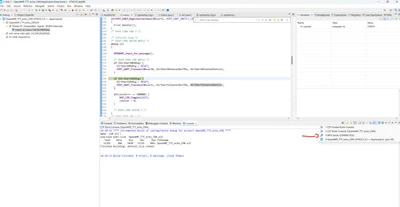
If you want to see the logs, it will come on different console.

shivam203_0-1758185061890.png

If you see you will find logs on 3. MPU SERIAL (Connected).

shivam203_0-1758185202665.png

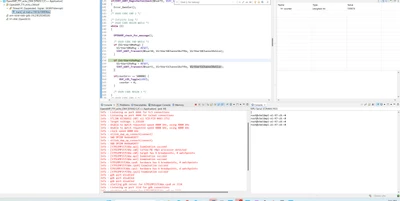
Here you can see the logs like this , I have used the commands present in readme.txt of this application:

shivam203_1-1758185374499.png


In order to give better visibility on the answered topics, please click on 'Accept as Solution' on the reply which solved your issue or answered your question.


4 replies

ST Employee
September 17, 2025

Hello @jollyjoe ,

I have run OpenAMP_TTY_echo application present on this link:
https://github.com/STMicroelectronics/STM32CubeMP1/tree/master/Projects/STM32MP157C-DK2/Applications/OpenAMP/OpenAMP_TTY_echo

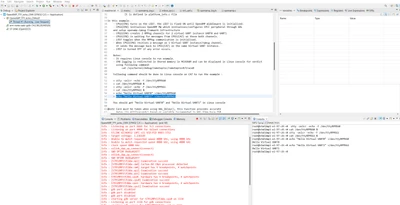
It is working as expected; logs are coming and the LED is blinking:

I am attaching the screen shot for the same.

shivam203_0-1758100233417.png

Have you opened TeraTerm or some other software to see the logs? 


More info: When I do the build it finishes with 0 errors and warnings but does say that the build might be incomplete

On this part, there are chances that there are no files included in build. 
https://github.com/STMicroelectronics/STM32CubeMP1/tree/master/Drivers/STM32MP1xx_HAL_Driver
you can check whether these files are included or not.


In order to give better visibility on the answered topics, please click on 'Accept as Solution' on the reply which solved your issue or answered your question.
jollyjoeAuthor
Associate
September 17, 2025

Shivam

I am using the console that is in the STM32CubeIDE. I removed the project from the IDE and imported it again. It appears that there are files included in the build. 

jollyjoe_0-1758115265602.png

This is after I did the build.

I am trying to follow this example: Modify, rebuild and reload a firmware - stm32mpu. This uses the same files as in your link above. I did notice that there aren't any binaries imported with the project.

shivam203Best answer
ST Employee
September 18, 2025

Hi @jollyjoe ,

I believe there might be an issue with toolchain settings.
What you can do is:

1.Download the latest stm32cubeide from ST's official website.

2.You can download the stm32mp1 firmware package from the link I have given:

https://github.com/STMicroelectronics/STM32CubeMP1


I have also done the above mentioned steps and it worked.

If you want to see the logs, it will come on different console.

shivam203_0-1758185061890.png

If you see you will find logs on 3. MPU SERIAL (Connected).

shivam203_0-1758185202665.png

Here you can see the logs like this , I have used the commands present in readme.txt of this application:

shivam203_1-1758185374499.png


In order to give better visibility on the answered topics, please click on 'Accept as Solution' on the reply which solved your issue or answered your question.


jollyjoeAuthor
Associate
September 18, 2025

Thanks Shivam,

It was the firmware package that was the culprit. I had originally downloaded it from a link on one of the "getting started" pages. Apparently that link went to an older version.

Joe