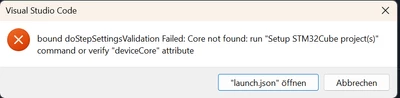
Unfortunately, it still doesn't work smoothly with two NUCLEO BOARDS H7S3L8. I always have to start board 2 first, then board 1, otherwise I keep getting this error message. However, if I start board 2 first, then board 1, it works.
Reading symbols from d:/Projekte/Test/Cube/Board2/Test/Boot/build/test.elf... Exit. cube has exited with code 0Ignoring packet error, continuing... warning: unrecognized item "timeout" in "qSupported" response
Your first error indicates that the device core cannot be found automatically. The project setup was likely incomplete. Therefore, please execute the command "STM32Cube: Setup STM32Cube project(s)" via the command palette or thanks to the menu in the STM32Cube activity bar (recommended solution):
Alternatively, you can add the "deviceCore" attribute with the value Cortex-M7 in your case.
Concerning the multiple boards connected, you need to specify the serial number using the attribute
"serverSerialNumber": "<the serial number>",
the serial number can be copied in the "STM32Cube Devices and Boards" view here:
Without the serial number attribute, the debug session cannot determine which board is the correct one.
While developing today my system suddenly stopped being able to start the debugger. I suspect this is due to VSCode updating the extension to 3.7.0. I get the same error as Paul above:
bound doStepConnectToTarget Failed: Remote replied unexpectedly to 'vMustReplyEmpty': timeout