Visitor II
December 10, 2025
Solved

Red Squiggles in VSC

  • December 10, 2025
  • 5 replies
  • 204 views

I have recently started a project in VSC using an STM32 device.  I first used STM32CubeMX to generate code, so that created most of the project.  I am using CMAKE.

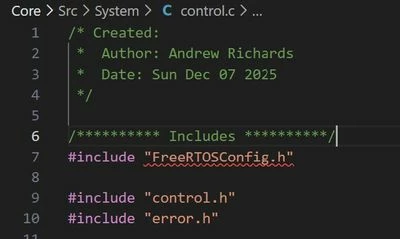
Initially there was no issue, and everything worked fine after disabling intellisense.  However, I have now become plagued by the stubborn red squiggles which refuse to disappear whatever I do.  I would prefer to continue using VSC, but will have to ditch it and move to another IDE if this problem does not go away, as I cannot work like this.  Further down the file there are many other red squiggles.  The project compiles fine, no issues there.  An example of the problem:
control.c.jpg

No matter what I do, the first #include has red squiggles under it.  If I change the order of the #includes, then it is always the first one which has the squiggles.  settings.json file:
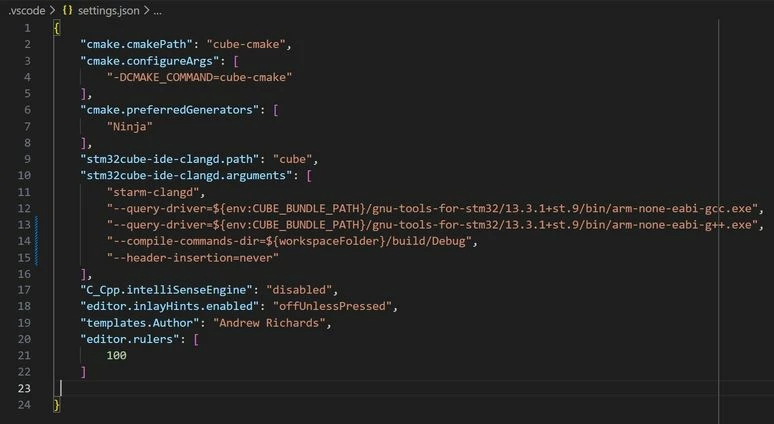
settings.json.jpg

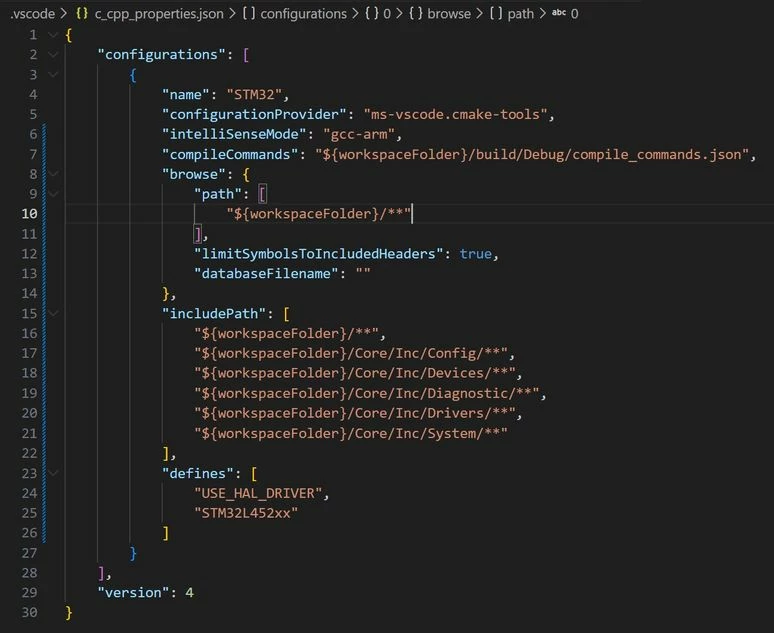
c_cpp_properties.json file:

c_cpp_properties.json.jpg

Any help would be gratefully appreciated, please.

    This topic has been closed for replies.
    Best answer by ARich.1

    I finally found a solution to eradicate this problem.  It appears that clangd can automatically look in some project folders for headers, but not all, especially ones which have not been auto-generated.  Adding the following lines to settings.json stopped the red squiggles.

    -I.jpg

    Thank you for your help, it has enabled me to learn much more than I would have done otherwise.  Unfortunately, the "Go to Definition" (F12) has stopped working (not as a result of the above additions), so I now have to find out what is causing that.

    5 replies

    Super User
    December 10, 2025

    clangd uses a hidden directory like build\Debug\.cache\clangd\index to store its database. For each indexed file you should see a corresponding .idx file. Maybe the index is not fully build yet?

    I get solid underlines for every include (semantic highlighting), no squiggles. But, don't have a recent FreeRTOS project at hand.

    hth

    KnarfB

    ARich.1Author
    Visitor II
    December 11, 2025

    Thanks.  I have just altered a line in settings.json to the following:

     
    "--compile-commands-dir=${workspaceFolder}/build/Debug"


    The red squiggles have gone away...for now.  Still worried they may come back though, so I'll take a look at the other response too.

    Graduate
    December 10, 2025

    What extensions do you have installed in VSCode?

    From the screenshots I see that you have various settings for various extensions

    • CMake Tools (by Microsoft, "settings.json")
    • ST Arm clangd (by ST, "settings.json")
    • C/C++ (by Microsoft, "c_cpp_properties.json")

    Not all of these extensions play nicely together, as they provide slightly overlapping services. If you hover over the red squiggly line then which extension is it that's reporting a problem?

    CMake Tools has the ability to copy the "compile_commands.json" file it generates to another directory. To do this, use "cmake.copyCompileCommands" setting in "settings.json", and set the value to e.g. "${workspaceFolder}". This copies the file to the workspace root, and you can then use "${workspaceFolder}" in ST Arm clangd's "--compile-commands-dir" as well.

    A tried-but-frustrating tactic is to disable all extensions, and then enable them one-by-one, configuring one extension at a time to fulfill the purposes it is supposed to. Only add more to the mix when you are sure that the current setup is working as it should. Oftentimes, the "Output" pane of VS Code, and the extension drop-down on the right-hand side are your best friends in diagnosing issues.

    ankes_0-1765397088685.png


    Super User
    December 10, 2025

    disable all extensions, and then enable them one-by-one

    You may want to create a separate profile (File > Preferences > Profile > ) for STM32 projects, based on 'None'.

    hth

    KnarfB

    Graduate
    December 11, 2025

    You haven't shared any details of your project structure, where the files are placed, how directories are organized, are you using libraries or some more exotic CMake setups. Thus it is hard to guess where this exact problem might stem from.

    Thus a few questions, if you don't mind?

    Does this missing header problem persist in every .c file, and with any header, or is it specific to this .c file and any header which is the first in this specific file?

    Are there any other problems reported in the same file? For example, at the very very beginning is there a red squiggle which says "too many errors, aborting" or something along those lines?

    When clangd is able to resolve the headers it should draw them with a solid underline, like so:

    ankes_0-1765489615541.png

    Do the other headers in every other .c file appear like this?

    In VSCode, close the file which is causing the problem. Then open "Output" pane at the bottom and change the drop-down to "STM32 Cube clangd", and clear the window's content:

    ankes_1-1765489825610.png

    After doing this open the problematic .c file. You should see output in the pane. Does it provide any error messages or clues as to what might be going wrong?


    ARich.1Author
    Visitor II
    December 12, 2025

    Sorry for the missing information, it is not intentional.  I just don't want to bombard you with loads of unnecessary stuff like I see periodically in other posts.  Here is a larger screenshot, showing the project structure so far; I am porting code into this project from elsewhere.  It shows the "Src/System" directory within my project, where control.c is saved.  A couple of questions spring to mind:  Is the word "System" reserved for other purposes and thus I shouldn't be using it for naming directories?  Is the fact that I have my include files in a separate directory called "Inc" an issue?


    Structure.jpg

    Only the first #include has red squiggles, but some red squiggles in control.c are from other header files where the #inlcude does not have red squiggles.  Further down control.c, where it cannot find things included in the header files:

    control II.c.jpg

    The problem does not persist in every file, just control.c.  This screen shot shows the start of i2c.c, which appears to include FreeRTOSConfig.h successfully with no issues:
    i2c.jpg

    The output pane shows the following when opening control.c.  I have highlighted two lines which might be of interest.  There is more to the output, but no further mention of cancelled requests or errors.

    output.jpg

    Graduate
    December 15, 2025

    Thanks for posting these additional details, and sorry for the delay in my response.


    @ARich.1 wrote:

    A couple of questions spring to mind:  Is the word "System" reserved for other purposes and thus I shouldn't be using it for naming directories?  Is the fact that I have my include files in a separate directory called "Inc" an issue?

    To answer these questions first, no. The name of the directory does not matter, and neither does it matter if you put header files in "Inc" or right next to the source files.

    Now, looking at the output pane from clangd I see a collection of "-I" switches which specify the include directories that clangd is consulting in order to find "FreeRTOSConfig.h". Is this file in one of these directories?

    If yes, then the red squiggle under the file usually means "something else" instead of a missing header file. You should hover over the line in VS Code and show what the actual error is.

    If no, then try repeating this Output pane exercise with a file which does not yield a similar error. Are the "-I" switches the same or different? If they are different then what makes them so? Are the source files included in different CMakeLists.txt files, maybe?

    ARich.1Author
    Visitor II
    December 16, 2025

    Thank you again for your help.

    I tried opening i2c.c, which is working fine, with no red squiggles.  This is the output window from STM32Cube clangd, showing that it is looking in the include directories in my project, as required.  No issues here.

    output I.jpg

    However, when I do the same thing for control.c, the following output window shows that STM32Cube clangd is not looking any of the include directories for my project, only the directories associated with stm32cubemx:

    output II.jpg

    I have just found that there are two CMakeLists.txt files:

    cmakelists.jpg

    I'm running short of time now, but will look at the two files in more detail when I can.

    ARich.1AuthorAnswer
    Visitor II
    December 23, 2025

    I finally found a solution to eradicate this problem.  It appears that clangd can automatically look in some project folders for headers, but not all, especially ones which have not been auto-generated.  Adding the following lines to settings.json stopped the red squiggles.

    -I.jpg

    Thank you for your help, it has enabled me to learn much more than I would have done otherwise.  Unfortunately, the "Go to Definition" (F12) has stopped working (not as a result of the above additions), so I now have to find out what is causing that.

    Graduate
    December 23, 2025

    @ARich.1,

    I was supposed to reply earlier but ultimately forgot about it. Glad that you found a solution that works for you.

    The clangd's output text shows that the two source files likely belong to two different CMake "targets", and the target which "control.c" belongs to does not list the problematic header (or one or more headers this one header refers to) in its "target_include_directories" section.

    The reason why compilation succeeds is somewhat obscure science because a header file listed in "target_include_directories" of one target may be marked as transitive, so that it is "inherited" by any target that uses the other one. This is exactly what happens between "STM32_Drivers" object library and the "stm32cubemx" interface library in a run-the-mill STM32 project. This transitive dependency allows "STM32_Drivers" to find the "stm32xxxx_hal_conf.h" file which usually lives in "Core/Inc" directory. In most HAL libraries the "stm32xxxx_hal.h" header tries to include it.

    I'm not sure if you tried it already, but you might be able to fix the "root cause" by adding the RTOS headers to the corresponding "target_include_directories" section. Adding them does no harm; having the same header file in multiple places doesn't cause any side-effects or problems, unlike having the same source file in multiple "target_sources" section would.