Kim KyungTack
Associate III
March 20, 2024
Solved

Build Analyzer does not work after STM32CubeIDE update.

  • March 20, 2024
  • 12 replies
  • 37201 views

Hi.


I was using STM32CubeIDE 1.14.0 until yesterday.

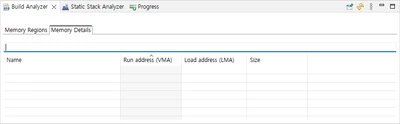
Build Analyzer worked fine in 1.14.0, but after updating to 1.15.0 using the update feature provided by CubeIDE, nothing is displayed in Build Analyzer. 

The build was successful and the <project>.map file was created, but the Build Analyzer information was not displayed, and I uninstalled and reinstalled CubeIDE, but it was the same.
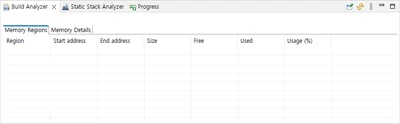
 

Build Analyzer - 1.png

Build Analyzer - 2.png


Best answer by christelle burguera

Hello Kim,


You have to click on the "Refresh" button:

BuildAnalyzer.png

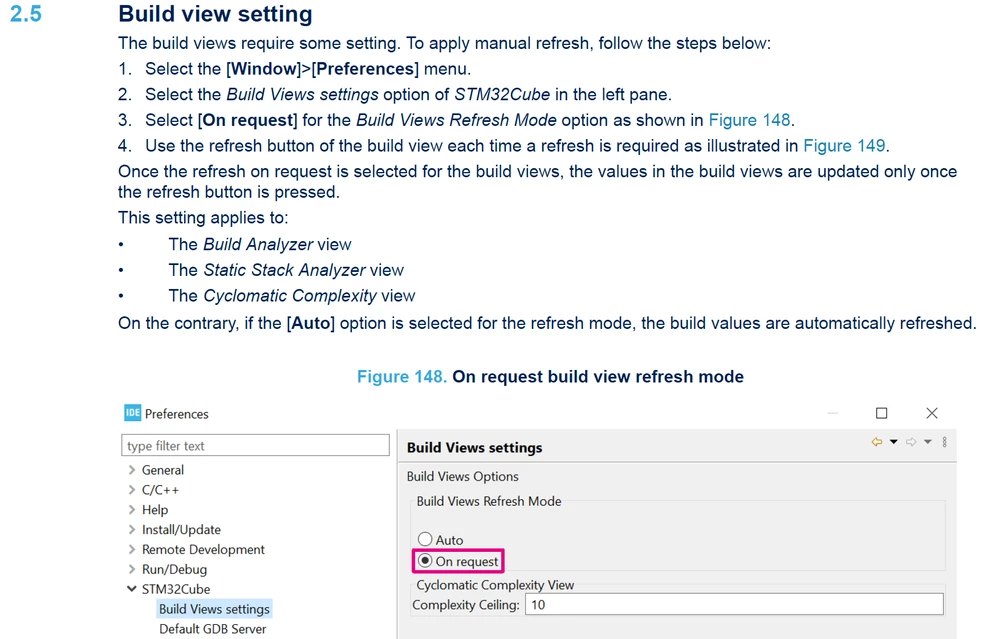
Please, refer to the User Manual, section 2.5 where this new button is explained and how you can change the behavior:

BuildAnalyzerUM.png


BR

Christelle

12 replies

christelle burguera
ST Employee
March 20, 2024

Hello Kim,


You have to click on the "Refresh" button:

BuildAnalyzer.png

Please, refer to the User Manual, section 2.5 where this new button is explained and how you can change the behavior:

BuildAnalyzerUM.png


BR

Christelle

Kim KyungTack
Associate III
March 20, 2024

Thank you!!

christelle burguera
ST Employee
March 20, 2024

welcome !

Please refer to my last comment if you want to change the behavior of this functionality.

Have a good day

Associate III
April 3, 2024

I am having the same issue after 14.1 to 15.0 on Win 11.
I have changed the setting to Auto and still blank in Build Analyzer tab after building. Have restarted IDE.

Additionally, the refresh button is disabled, does not highlight when I mouse over it and clicking it does nothing:

jlag_0-1712163914319.png

jlag_1-1712164012493.png

EDIT: My mistake. 'On Request 'does in fact enable the 'Refresh' button and the button perform the functionality correctly.

I assumed that the 'Auto' setting would load the analysis on every build, but alas it does not.


Associate III
April 6, 2024

Has anyone managed to get the 'auto' option to work, or is there an issue with the 'auto' refresh?


As section 2.5 states:

jlag_1-1712366556900.png


PR.10
Associate III
April 25, 2024

yes, see my reply


PHolt.1
Senior
April 6, 2024

Cube IDE has always had a bug in that the Build Analyser would sometimes not show - until you clicked on the .map file in the LH pane.

Visitor II
May 31, 2024

I had to change the "Build Views Refresh Mode" several times along with also attempting to change the "Complexity Ceiling". Hitting "Apply and Close" would then cause STM32Cube to either close or crash immediately in some cases.

But the last time I switched back to "Auto" and changed the "Complexity Ceiling" to 50 then hitting "Apply and Close" after e2 studio exited when I re-opened it back up all of the projects were working in the Build Analyzer again. I didn't need to hand-edit any of the project files, even though they look different compared to projects created from the newest STM32CubeIDE.

So this looks to be some issue with initializing a new workspace in the new STM32CubeIDE. I used the default new 1.15.1 workspace when installing this one, on a new PC that didn't even have the previous version workspaces.

Visitor II
August 22, 2024

I just want to concur. I'm using 1.16 and whether or not the build analyzer refreshes seems completely random. I started a new project using 1.16 and the only way to get the build analyzer to update is to try a bunch of combinations of rebuilding, restarting, reconfiguring, etc. It's been this way for a while. I really like the build analyzer when it works. Next I'll go look for a way to open this as a bug.

Senior II
November 25, 2024

The build analyzer does have a problem. If the project is not selected and you hit refresh, it won't do anything. Or maybe it tries to refresh from the project that is selected (even if that project is closed) and fails. If only one project is open then the Build Analyzer should always refresh from that project no matter if its selected or not. Or even better the build analyzer should give some warning if its not going to do anything. such as stating that no project is selected. In fact, I think the FreeRTOS warning that pops up when I regenerate is taking the focus selection off of the project which is then making it so that refresh does not work even if the project appears to be selected, without first clicking on the project again.

Whichever engineer decided to include the file with the date and time that the Build Analyzer is using, in the displayed information, made a great decision.

Anyway, if you are hitting refresh and noticing that the information is not refreshing, then select the project or some item in the project and hit refresh again. It should take after that.

PHolt.1
Senior
November 25, 2024

I find three separate issues:

1) After a build one needs to click on the .map file (which is in the Debug directory) and then the Build Analyser appears

2) The .map file does not usually appear until a second build (i.e. another control-b).

3) The values shown in the Build Analyser magically change to the correct values (I think the initial ones are old ones) after some 10-20 seconds!

Cube IDE is based on a generic 3rd party (open source?) IDE called Eclipse and - along with the "semi-random" file opening bug - ST are clearly reluctant to dive in too deep to fix stuff on it. It is a massively bloated piece of code which basically nobody understands. Written in Java ;)

BTW the email notification one gets from this ST forum contains a dud URL and I get this

PHolt1_0-1732554450174.png

but a Reload just displays the same thing.


Senior II
November 28, 2024

I've written applications using Eclipse platform. Its open source. Its backed by major players. I don't think its bloated. Its very componentized so an application builder simply doesn't include the parts they don't want.

The focus issue should be easily fixed by the developers.

Visitor II
December 31, 2024

I've now installed 1.17.0 and the build analyzer seems to work correctly. There are some tricks. You need to select the .elf file that you want to analyze in the Project Explorer. Then click the refresh button in the Build Analyzer. 

Senior II
December 31, 2024

You'll have to reselect it again each time. I think they are deleting and recreating the build folder. This breaks any notifications of change that they may have registered to retrigger the project selection. Needs a bit of work on that Eclipse plugin.

Associate
February 10, 2025

No matter whether I click the elf or the map. Refreshing the build Anal_yzer does nothing. This is with 1.17. It worked earlier on another project over the weekend but Monday morning it stopped. It wasn't cured by copious amount of swearing or coffee either.

Senior II
February 10, 2025

Is the code for this plugin available?

JCtib
Associate
June 25, 2025

Hello,


does anybody know ow to select specific .elf to view in Build Analyzer? I have projcts with multiple elfs and dont know how to chage it to my lastr build. Thx

Senior II
June 25, 2025

Id delete the other elfs. This plugin has issues with its selections.