Associate
July 16, 2024
Solved

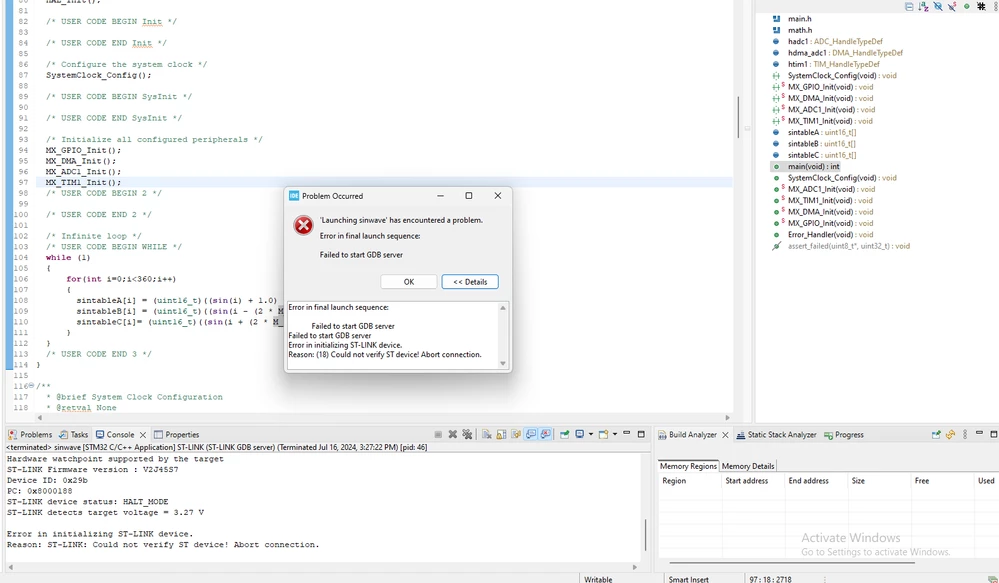
can't able to debug in bluepill in cube ide ,GDB server error
  • July 16, 2024
  • 3 replies
  • 1097 views

Screenshot 2024-07-16 152746.png

    This topic has been closed for replies.
    Best answer by mƎALLEm

    Hello,

    ST resources are only dedicated to supporting genuine ST products. We are not committed to ensuring that clones/fakes products work properly with the firmware we provide.

    We suggest to purchase a genuine products and purchase them from known and trusted distributors.

    Thank you for your understanding.

    3 replies

    Andrew Neil
    Super User
    July 16, 2024
    A complex system that works is invariably found to have evolved from a simple system that worked.A complex system designed from scratch never works and cannot be patched up to make it work.
    Associate
    July 16, 2024

    but in stm32F3 discovery, it's possible to debug

    only in BluePill (f103c8t6) i cant debug 

    Andrew Neil
    Super User
    July 16, 2024

    @Srisudarsan wrote:

    in stm32F3 discovery, it's possible to debug


    That will be a genuine STM32 chip


    @Srisudarsan wrote:

    only in BluePill (f103c8t6) i cant debug 


    That will not be a genuine STM32 chip!


    EDIT:

    See also:

    https://community.st.com/t5/stm32cubeide-mcus/can-t-connect-stm32f103c8t6/td-p/696712


    A complex system that works is invariably found to have evolved from a simple system that worked.A complex system designed from scratch never works and cannot be patched up to make it work.
    mƎALLEm
    mƎALLEmBest answer
    Technical Moderator
    April 18, 2025

    Hello,

    ST resources are only dedicated to supporting genuine ST products. We are not committed to ensuring that clones/fakes products work properly with the firmware we provide.

    We suggest to purchase a genuine products and purchase them from known and trusted distributors.

    Thank you for your understanding.

    "To give better visibility on the answered topics, please click on ""Accept as Solution"" on the reply which solved your issue or answered your question."
