
Associate III
May 7, 2025
Solved

Can't use Azure RTOS with H7

  • May 7, 2025
  • 2 replies
  • 807 views

Hi,

I am trying to do this tutorial: https://community.st.com/t5/stm32-mcus/how-to-implement-the-usb-device-composite-class-in-stm32-using/ta-p/645017 but I can't find Azure RTOS in Middleware and software Packs. I have already downloaded the packs for azure H7 and placeit here ( C:\Users\XXXXX\STM32Cube\Repository\Packs\STMicroelectronics) but nothing in CudeIDE.
Is enybody have an idea how I can do
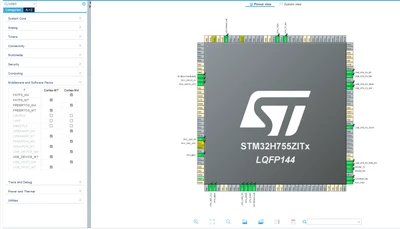
Problem_AzureRTOS_1.png

?

Thanks,
G.

Best answer by mƎALLEm

@Gwen1 wrote:

I am using CubeIDE version 1.13.2 and I can't upgrade to an other version because of the firewall.

This is a very old version of CubeIDE. Need to request to your IT team to allow you to do the updates.

2 replies

TDK
Super User
May 7, 2025

It can be found within the "Software Packs" tab.

TDK_0-1746622570792.png


TDK_1-1746622590876.png


"If you feel a post has answered your question, please click ""Accept as Solution""."
Gwen1Author
Associate III
May 7, 2025

I have only this...

Gwen1_0-1746622702912.png

And I can't open Manage software packs.

TDK
Super User
May 7, 2025

Are you using STM32CubeMX or STM32CubeIDE? And what version? Make sure it's updated.

"If you feel a post has answered your question, please click ""Accept as Solution""."
Gwen1Author
Associate III
May 7, 2025

I am using CubeIDE version 1.13.2 and I can't upgrade to an other version because of the firewall.

Is my path to the folder is correct ?
In Repository:

Gwen1_0-1746625777618.png

/Packs/STMicroelectronics

Gwen1_1-1746625822394.png

For information I manually create the path.

TDK
Super User
May 7, 2025

I'm not sure manually copying the files is having the same effect as installing them via the program.

I would guess upgrading the version would solve these issues.

"If you feel a post has answered your question, please click ""Accept as Solution""."