Associate
November 25, 2025
Solved

CMake + CubeIDE indexing issue: Compilation Database Parser error

  • November 25, 2025
  • 3 replies
  • 283 views


Hi everyone,

I’ve successfully created and imported a CMake-based project for the STM32F777NIH in STM32CubeIDE 2.0.0. The project builds and compiles without any issues.

However, the IDE cannot properly resolve headers, some macros, variables, and some struct definitions. To fix this, I enabled:

set(CMAKE_EXPORT_COMPILE_COMMANDS TRUE)

in my top-level CMakeLists.txt, which correctly generates a compile_commands.json.

In CubeIDE, I also enabled C/C++ General → Preprocessor Include Paths, Macros etc. → Providers → Compilation Database Parser, and pointed it to the generated compile_commands.json (AN5952).

But CubeIDE shows:

Invalid build parser

And the error log contains:

“Compilation database parser does not have a build command parser configured.”

So it seems CubeIDE refuses to use the compilation database to resolve include paths, even though the file exists and is valid.

Is there any known workaround to allow STM32CubeIDE to consume compile_commands.json for indexing?
Or any other reliable way to fix header/struct auto-completion and indexing issues when working with CMake-based STM32 projects?

Thanks in advance!


Edit-1:

I have also attached the .ioc file in case it helps.
Best answer by Ghofrane GSOURI

Hello @pmndt 

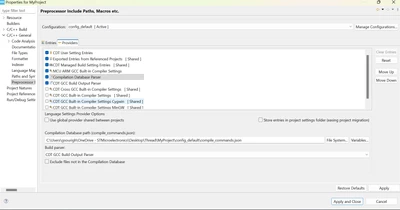
First you need to tick the option " CDT GCC Build Output Parser " as shown in the following screenshot

GhofraneGSOURI_0-1764236929214.png

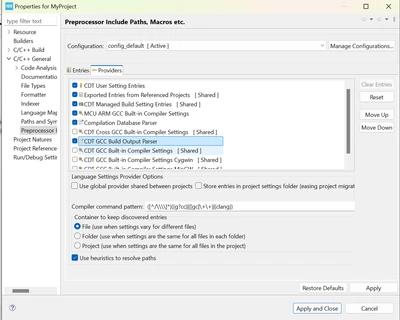
Then go back to "Compilation Database Parser" and in Build Parser tab : select "CDT GCC Build Output Parser" as shown below 

GhofraneGSOURI_1-1764237553993.png

then apply and close.

THX

Ghofrane


3 replies

Ghofrane GSOURI
Technical Moderator
November 25, 2025

Hello @pmndt 

I am currently checking this behavior. I will get back to you asap

THX

Ghofrane

To give better visibility on the answered topics, please click on Accept as Solution on the reply which solved your issue or answered your question.
Ghofrane GSOURI
Ghofrane GSOURIBest answer
Technical Moderator
November 27, 2025

Hello @pmndt 

First you need to tick the option " CDT GCC Build Output Parser " as shown in the following screenshot

GhofraneGSOURI_0-1764236929214.png

Then go back to "Compilation Database Parser" and in Build Parser tab : select "CDT GCC Build Output Parser" as shown below 

GhofraneGSOURI_1-1764237553993.png

then apply and close.

THX

Ghofrane


To give better visibility on the answered topics, please click on Accept as Solution on the reply which solved your issue or answered your question.
pmndtAuthor
Associate
November 27, 2025

Thank you very much! This solved the indexing issue.

Visitor II
March 9, 2026

Hello,

I followed your instructions, but the indexer is still not working.

Even after rebuilding the index I get no entries here:

Screenshot from 2026-03-09 15-08-05.png

And also syntax highlighting fails (macro STM32F303xE is set):

Screenshot from 2026-03-09 15-23-41.png

Any ideas?


Regards,

Norbert