OKhar.1
Associate II
December 10, 2024
Solved

"Command Shell Console" stopped opening (CubeIDE).

  • December 10, 2024
  • 4 replies
  • 1556 views

After one of the program updates, the "Command Shell Console" stopped opening.

As usual, I click on "Open console" button, then on "Command Shell Console", but nothing happens.

I rebooted the computer, restarted the program. But nothing changes - just no reaction.
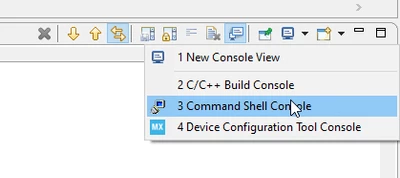
OKhar1_0-1733790502860.png


CubeIDE 1.17.0, Windows 10, Core(TM) i7-8750H, 32 GB RAM.
Best answer by Pavel A.

 No dialog appears with port selection, etc.

Aha, you probably want the serial terminal. It has been reorganized during Eclipse development.

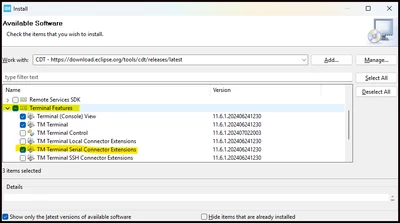
Now this thing belongs to the "Terminal features". If it is not installed you can add it via Help-> Install new software.

PavelA_3-1734054960358.png


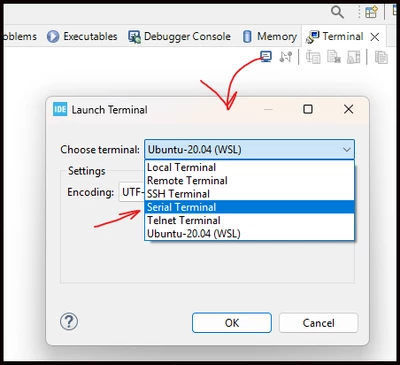
After it is installed: Select the Terminal view (Window->Show View-> Terminal)

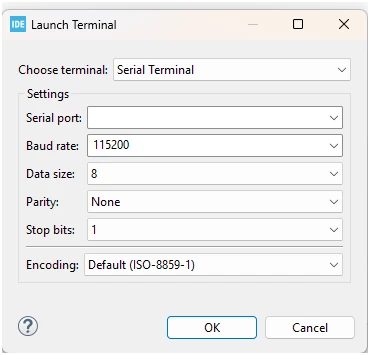
And click on the toolbar icon. This will present you selection of all terminal types, including the serial.

PavelA_1-1734054569073.png


PavelA_2-1734054586263.png


4 replies

OKhar.1
OKhar.1Author
Associate II
December 10, 2024

Please help me. I can't do development because of this bug. Debugging without the ability to log is almost impossible in many cases.

This looks like a serious bug in the CubeIDE. Or this is something happening on my computer only?

OKhar.1
OKhar.1Author
Associate II
December 12, 2024

Really, not a single answer? Technical specialists, Сube developers, where are you?

I even reinstalled the СubeIDE just now, it didn't have any effect. Everything is the same - just nothing happens when I try to open the console. No dialog appears with port selection, etc.

I checked it on another computer with the same Windows 10 and the same version of CubeIDE (1.17) - the dialog and console open, everything works. But on mine computer - no. What could be the reason? I don't want to reinstall Windows just to check if the console in Cube will work after that.

Pavel A.
Pavel A.Best answer
Super User
December 13, 2024

 No dialog appears with port selection, etc.

Aha, you probably want the serial terminal. It has been reorganized during Eclipse development.

Now this thing belongs to the "Terminal features". If it is not installed you can add it via Help-> Install new software.

PavelA_3-1734054960358.png


After it is installed: Select the Terminal view (Window->Show View-> Terminal)

And click on the toolbar icon. This will present you selection of all terminal types, including the serial.

PavelA_1-1734054569073.png


PavelA_2-1734054586263.png


OKhar.1
OKhar.1Author
Associate II
December 13, 2024

Thank you!

It works now.