thannara123
Associate III
September 4, 2024
Question

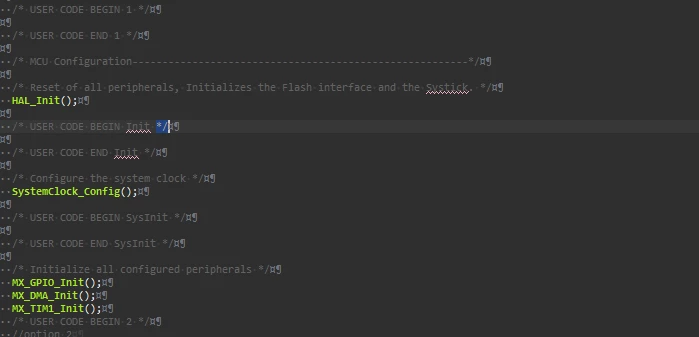
CUBE IDE shows some strange character
  • September 4, 2024
  • 3 replies
  • 1633 views

Screenshot 2024-09-04 123950.png

why the ide show these type of values how to hide it ?

3 replies

Radosław
Associate II
September 4, 2024

stm32cubeide_Jwi3uRApI3.png   

TDK
Super User
September 4, 2024

The icon that @Radosław showed is a toggle button in the toolbar. Click it to toggle whitespace.

TDK_0-1725458947728.png


"If you feel a post has answered your question, please click ""Accept as Solution""."
Andrew Neil
Super User
September 4, 2024

@thannara123 and if you can't see it on a toolbar, it's under the 'Window' menu:

AndrewNeil_0-1725459607573.png


As the name suggests, it's showing you all the whitespace characters - CR, LF, Space, and TAB.


Note that this is a standard Eclipse feature - not specific to CubeIDE - and common to most IDEs and Programmer's Editors.

https://mcuoneclipse.com/2012/09/30/white-space-or-not-thats-the-question/

A complex system that works is invariably found to have evolved from a simple system that worked.A complex system designed from scratch never works and cannot be patched up to make it work.
Associate II
September 4, 2024

You can configure it in Window>Preferences>Editors>Text Editors then click on the link configure visibility. And select/deselected what you want your IDE to show or not.