Uloff.4
Associate II
October 1, 2024
Question

CubeIDE 1.16.1 arm-none-eabi-gdb-version Error

  • October 1, 2024
  • 7 replies
  • 3331 views

I am using CubeIDE version 1.16.1 to program and flash a STM32F433 MCU.
I am using a SEGGER J-Link flasher.
When I try to run the application I get the following error:
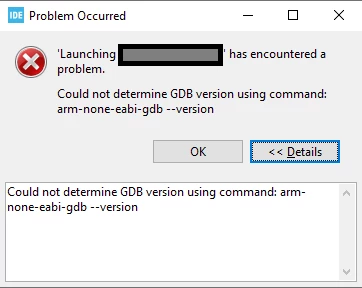

error_cube.PNG

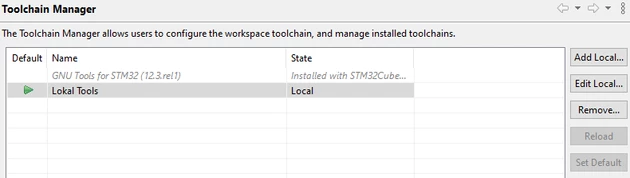
I have tried to manually set the workspace toolchain to local in the toolchain manager.
When I open the toolchain manager, I get an error that it has failed to fetch the toolchain list, in addition to four repositories that it cannot read:
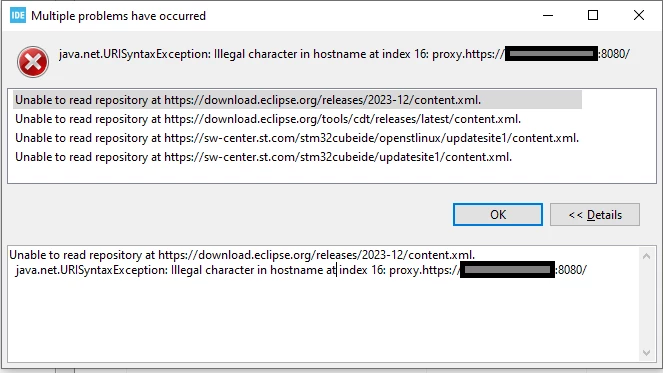
 

error.PNG

Ignoring the message and setting the local toolchain as it follows 
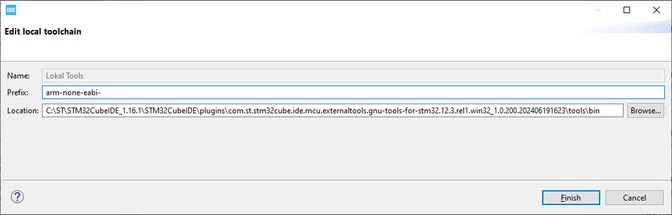
Uloff4_2-1727783147363.png

Uloff4_3-1727783374271.png


I get the same error when running the code on the MCU:


error_cube.PNG

What should I try to do to fix the error?

    7 replies

    Ghofrane GSOURI
    Technical Moderator
    October 1, 2024

    Hello @Uloff.4 

    First let me thank you for posting.

    To ensure that CubeIDE can communicate with the SEGGER J-Link and program your STM32F433 MCU correctly, you should verify the J-Link configuration in CubeIDE.

    1- Go to Run -> Debug Configurations.
    2- In the Debug Configurations window, under GDB SEGGER J-Link Debugging, check if your J-Link device is selected in the Target tab.
    3-Make sure the correct device is selected in the Target tab and that the settings match your hardware setup.

    GhofraneGSOURI_0-1727791468930.png

    Also Clear Cache:
    Sometimes, cache issues can cause problems. Try clearing the cache in CubeIDE by going to File -> Restart 

    GhofraneGSOURI_1-1727791580666.png

    I will be waiting for your feedback.

    THX

    Ghofrane

    To give better visibility on the answered topics, please click on Accept as Solution on the reply which solved your issue or answered your question.
    Uloff.4
    Uloff.4Author
    Associate II
    October 2, 2024

    Hello Ghofrane

    I tried rebooting as you mentioned, but it made no difference.

    Here my debugger settings:

    Uloff4_1-1727848116099.png


    *my MCU STM32F446

    Ghofrane GSOURI
    Technical Moderator
    October 2, 2024

    Hello again @Uloff.4 

    1- First let's  try to use the SWD (Serial Wire Debug) interface for debugging purposes. Segger J-Link devices support both SWD and JTAG (Joint Test Action Group) interfaces for debugging ARM Cortex-based microcontrollers but using SWD with a Segger J-Link offers a reliable and efficient way to debug your target device.

    2- Click on "Show command line," copy the command, open your command prompt, paste it there. Before proceeding, ensure that your J-Link is connected and your board is ready. Finally, share the log, please.

    THX

    Ghofrane


    To give better visibility on the answered topics, please click on Accept as Solution on the reply which solved your issue or answered your question.
    Uloff.4
    Uloff.4Author
    Associate II
    October 3, 2024

    Using SWD with the SEGGER gives the same error.

    I cant figure out where i open my command promt.
    Thanks for your help

    Uloff.4
    Uloff.4Author
    Associate II
    October 10, 2024

    Hello Ghofrane 

    I have installed the Arm GNU Toolchain for Windows:
    gcc-arm-none-eabi-10.3-2021.10-win32.exe
    I have added the path to the environment variables (admin+user) as follows:

    Uloff4_0-1728541838036.png

    Now I can call the function from the cmd line (user), but when I ask for the version number nothing happens, it gives no response and stays there:

    Uloff4_1-1728541965231.png

    When I try to run the code in STM32CubeIDE (user) I get the same errors:

    Uloff4_2-1728542124724.png

    I tried then to run the command via admin cmd and got the following:

    Uloff4_1-1728545970645.png

    Here are the user permissions for the file:

    Uloff4_0-1728545837241.png

    Thank you for your help.


    Ghofrane GSOURI
    Technical Moderator
    October 10, 2024

    Hello @Uloff.4 

    The error message you are encountering indicates an issue with IDE's ability to access or read the repository at https://download.eclipse.org/tools/cdt/releases/latest/content.xml. This problem could be due to various reasons, such as network issues.

    1- Check Network Connection:
    Ensure that your internet connection is stable and that there are no network issues preventing STM32CubeIDE from accessing external repositories.
    2- Proxy Settings:
    If you are behind a corporate firewall or using a proxy server, configure the proxy settings in STM32CubeIDE to allow it to access external repositories.

    3- Firewall/Antivirus:
    Check if any firewall or antivirus software on your system is blocking STM32CubeIDE from accessing external repositories. Temporarily disabling them can help identify if they are causing the issue.

    4- Test with Full Path:
    Try running the arm-none-eabi-gdb command with the full path to the executable to see if it provides the version information. For example, C:\path\to\arm-none-eabi-gdb.exe --version.

    THX

    Ghofrane


    To give better visibility on the answered topics, please click on Accept as Solution on the reply which solved your issue or answered your question.
    Uloff.4
    Uloff.4Author
    Associate II
    October 11, 2024

    Hello @Ghofrane GSOURI 

    When I click on the link you mentioned, it says "not found".
    https://download.eclipse.org/tools/cdt/releases/latest/content.xml

    Uloff4_0-1728628857196.png

    I have proxy settings setup in STM32Cube IDE and I can prove they work in the settings with the check connection button:

    Uloff4_1-1728629048407.png

    As seen the admin account is able to use GDB, so i tried to launch STM32IDE as admin and tried to launch debug with the SEGGER J-link. Then i got the following error:

    Uloff4_3-1728630829180.png


    Uloff.4
    Uloff.4Author
    Associate II
    October 11, 2024

    Hello @Ghofrane GSOURI 

    here is my log where i login in as normal user and try to run debugging:

    2024-10-11 15:16:03,461 [INFO] Activator:177 - !SESSION log4j initialized
    2024-10-11 15:16:22,357 [INFO] LogOutputStream:77 - [STDOUT_REDIRECT] 
    2024-10-11 15:16:24,907 [ERROR] ConfigurationRetriever:142 - IOException on connection: Connect timed out
    2024-10-11 15:16:25,049 [INFO] ApplicationProperties:184 - Using Application install path: C:\ST\STM32CubeIDE_1.16.1\STM32CubeIDE\plugins\com.st.stm32cube.common.mx_6.12.1.202409122256
    2024-10-11 15:16:25,064 [INFO] DbMcusXml:78 - Set database path to: C:\ST\STM32CubeIDE_1.16.1\STM32CubeIDE\plugins\com.st.stm32cube.common.mx_6.12.1.202409122256\\db\/mcu/
    2024-10-11 15:16:25,065 [INFO] ApiDb:274 - Set plugin database path to: C:\ST\STM32CubeIDE_1.16.1\STM32CubeIDE\plugins\com.st.stm32cube.common.mx_6.12.1.202409122256\\db\/plugins/boardmanager/
    2024-10-11 15:16:25,065 [WARN] ApiDb:259 - Overriding images path with different value: => C:\ST\STM32CubeIDE_1.16.1\STM32CubeIDE\plugins\com.st.stm32cube.common.mx_6.12.1.202409122256\\db\/plugins/mcufinder/images/
    2024-10-11 15:16:25,072 [INFO] ApiDb:250 - Set database path to: C:\Users\USER\.stmcufinder\plugins\mcufinder//mcu/
    2024-10-11 15:16:25,073 [INFO] DbMcusAds:125 - Set database path to: C:\Users\USER\.stmcufinder\plugins\mcufinder//mcu/
    2024-10-11 15:16:25,076 [INFO] CrossReferenceDbSqlite:203 - Set database path to: C:\Users\USER\.stmcufinder\plugins\mcufinder//mcu/cs/
    2024-10-11 15:16:25,160 [INFO] RulesReader:64 - Compatibility file has been processed (297 Rules)
    2024-10-11 15:16:25,233 [INFO] DbMcusXml:78 - Set database path to: C:\ST\STM32CubeIDE_1.16.1\STM32CubeIDE\plugins\com.st.stm32cube.common.mx_6.12.1.202409122256\\db\/mcu/
    2024-10-11 15:16:25,233 [INFO] ApiDb:274 - Set plugin database path to: C:\ST\STM32CubeIDE_1.16.1\STM32CubeIDE\plugins\com.st.stm32cube.common.mx_6.12.1.202409122256\\db\/plugins/boardmanager/
    2024-10-11 15:16:25,233 [INFO] ApiDb:261 - Set plugin images path to: C:\ST\STM32CubeIDE_1.16.1\STM32CubeIDE\plugins\com.st.stm32cube.common.mx_6.12.1.202409122256\\db\/plugins/mcufinder/images/
    2024-10-11 15:16:25,233 [WARN] DbFile:41 - Overriding database path with different value: C:\Users\USER\.stmcufinder\plugins\mcufinder/ => C:\Users\USER\.stmcufinder\plugins\mcufinder
    2024-10-11 15:16:25,233 [INFO] ApiDb:250 - Set database path to: C:\Users\USER\.stmcufinder\plugins\mcufinder//mcu/
    2024-10-11 15:16:25,233 [WARN] DbFile:41 - Overriding database path with different value: C:\Users\USER\.stmcufinder\plugins\mcufinder/ => C:\Users\USER\.stmcufinder\plugins\mcufinder
    2024-10-11 15:16:25,233 [INFO] DbMcusAds:125 - Set database path to: C:\Users\USER\.stmcufinder\plugins\mcufinder//mcu/
    2024-10-11 15:16:25,233 [WARN] DbFile:41 - Overriding database path with different value: C:\Users\USER\.stmcufinder\plugins\mcufinder/ => C:\Users\USER\.stmcufinder\plugins\mcufinder
    2024-10-11 15:16:25,233 [WARN] DbFile:41 - Overriding database path with different value: C:\Users\USER\.stmcufinder\plugins\mcufinder/ => C:\Users\USER\.stmcufinder\plugins\mcufinder
    2024-10-11 15:16:25,233 [INFO] CrossReferenceDbSqlite:203 - Set database path to: C:\Users\USER\.stmcufinder\plugins\mcufinder//mcu/cs/
    2024-10-11 15:16:25,299 [INFO] MainPanel:268 - HeapMemory: 367001600
    2024-10-11 15:16:25,383 [INFO] DbMcusXml:78 - Set database path to: C:\ST\STM32CubeIDE_1.16.1\STM32CubeIDE\plugins\com.st.stm32cube.common.mx_6.12.1.202409122256\\db\/mcu/
    2024-10-11 15:16:25,383 [INFO] ApiDb:274 - Set plugin database path to: C:\ST\STM32CubeIDE_1.16.1\STM32CubeIDE\plugins\com.st.stm32cube.common.mx_6.12.1.202409122256\\db\/plugins/boardmanager/
    2024-10-11 15:16:25,384 [INFO] ApiDb:261 - Set plugin images path to: C:\ST\STM32CubeIDE_1.16.1\STM32CubeIDE\plugins\com.st.stm32cube.common.mx_6.12.1.202409122256\\db\/plugins/mcufinder/images/
    2024-10-11 15:16:25,384 [WARN] DbFile:41 - Overriding database path with different value: C:\Users\USER\.stmcufinder\plugins\mcufinder/ => C:\Users\USER\.stmcufinder\plugins\mcufinder
    2024-10-11 15:16:25,384 [INFO] ApiDb:250 - Set database path to: C:\Users\USER\.stmcufinder\plugins\mcufinder//mcu/
    2024-10-11 15:16:25,384 [WARN] DbFile:41 - Overriding database path with different value: C:\Users\USER\.stmcufinder\plugins\mcufinder/ => C:\Users\USER\.stmcufinder\plugins\mcufinder
    2024-10-11 15:16:25,384 [INFO] DbMcusAds:125 - Set database path to: C:\Users\USER\.stmcufinder\plugins\mcufinder//mcu/
    2024-10-11 15:16:25,384 [WARN] DbFile:41 - Overriding database path with different value: C:\Users\USER\.stmcufinder\plugins\mcufinder/ => C:\Users\USER\.stmcufinder\plugins\mcufinder
    2024-10-11 15:16:25,384 [WARN] DbFile:41 - Overriding database path with different value: C:\Users\USER\.stmcufinder\plugins\mcufinder/ => C:\Users\USER\.stmcufinder\plugins\mcufinder
    2024-10-11 15:16:25,384 [INFO] CrossReferenceDbSqlite:203 - Set database path to: C:\Users\USER\.stmcufinder\plugins\mcufinder//mcu/cs/
    2024-10-11 15:16:25,398 [INFO] ApplicationProperties:184 - Using Application install path: C:\ST\STM32CubeIDE_1.16.1\STM32CubeIDE\plugins\com.st.stm32cube.common.mx_6.12.1.202409122256
    2024-10-11 15:16:25,399 [INFO] PluginManage:196 - Search for loadable plugins [exclusion list=, ]
    2024-10-11 15:16:25,400 [INFO] PluginManage:310 - Check plugin analytics
    2024-10-11 15:16:25,507 [INFO] AnalyticsPlugin:253 - Accepted Software Licenses: 
    2024-10-11 15:16:25,507 [INFO] AnalyticsPlugin:255 - Accepted CMSIS Pack Licenses: 
    2024-10-11 15:16:25,507 [INFO] AnalyticsPlugin:257 - Accepted Firmware Licenses: FW.F4.1.27.0,FW.H7.1.11.0,FW.F4.1.28.0
    2024-10-11 15:16:25,510 [INFO] PluginManage:359 - Loaded plugin analytics (category:tool,tabindex:-1)
    2024-10-11 15:16:25,510 [INFO] PluginManage:310 - Check plugin cadmodel
    2024-10-11 15:16:25,527 [INFO] CADModel:105 - Init CAD model plugin
    2024-10-11 15:16:25,527 [INFO] PluginManage:359 - Loaded plugin cadmodel (category:power,tabindex:5)
    2024-10-11 15:16:25,527 [INFO] PluginManage:310 - Check plugin clock
    ...
    
    ...
    2024-10-11 15:16:26,884 [INFO] PluginManager:220 - loadIPPluginJar : add stm32_wpan
    2024-10-11 15:16:26,892 [INFO] IPUIPlugin:80 - create IPUIPlugin
    2024-10-11 15:16:26,892 [INFO] PluginManager:220 - loadIPPluginJar : add tim
    2024-10-11 15:16:26,902 [INFO] IPUIPlugin:80 - create IPUIPlugin
    2024-10-11 15:16:26,902 [INFO] PluginManager:220 - loadIPPluginJar : add touchsensing
    2024-10-11 15:16:26,908 [ERROR] ConfigurationRetriever:142 - IOException on connection: Connect timed out
    2024-10-11 15:16:26,910 [INFO] IPUIPlugin:80 - create IPUIPlugin
    2024-10-11 15:16:26,910 [INFO] PluginManager:220 - loadIPPluginJar : add tracer_emb
    2024-10-11 15:16:26,919 [INFO] IPUIPlugin:80 - create IPUIPlugin
    2024-10-11 15:16:26,919 [INFO] PluginManager:220 - loadIPPluginJar : add ts
    2024-10-11 15:16:26,927 [INFO] IPUIPlugin:80 - create IPUIPlugin
    2024-10-11 15:16:26,927 [INFO] PluginManager:220 - loadIPPluginJar : add tsc
    2024-10-11 15:16:26,935 [INFO] IPUIPlugin:80 - create IPUIPlugin
    2024-10-11 15:16:26,935 [INFO] PluginManager:220 - loadIPPluginJar : add ucpd
    2024-10-11 15:16:26,943 [INFO] IPUIPlugin:80 - create IPUIPlugin
    2024-10-11 15:16:26,944 [INFO] PluginManager:220 - loadIPPluginJar : add usart
    2024-10-11 15:16:26,952 [INFO] IPUIPlugin:80 - create IPUIPlugin
    2024-10-11 15:16:26,952 [INFO] PluginManager:220 - loadIPPluginJar : add usbx
    2024-10-11 15:16:27,061 [INFO] CADModel:165 - CPN selected for project level
    2024-10-11 15:16:27,061 [INFO] CADModel:114 - Register for checkConnection events
    2024-10-11 15:16:27,061 [FATAL] Updater:334 - Updater called before beeing initialized
    2024-10-11 15:16:27,061 [ERROR] CADModel:125 - Updater not yet initialized, retry later 
    2024-10-11 15:16:27,152 [INFO] CADModel:165 - CPN selected for project level
    2024-10-11 15:16:27,152 [INFO] CADModel:114 - Register for checkConnection events
    2024-10-11 15:16:27,152 [FATAL] Updater:334 - Updater called before beeing initialized
    2024-10-11 15:16:27,152 [ERROR] CADModel:125 - Updater not yet initialized, retry later 
    2024-10-11 15:16:27,155 [FATAL] Updater:334 - Updater called before beeing initialized
    2024-10-11 15:16:27,231 [FATAL] Updater:334 - Updater called before beeing initialized
    2024-10-11 15:16:27,236 [INFO] DbMcusAds:53 - JSON generation date=Fri Sep 20 15:04:23 CEST 2024 (1726837463113)
    2024-10-11 15:16:27,236 [FATAL] Updater:334 - Updater called before beeing initialized
    2024-10-11 15:16:27,300 [WARN] DetailPanel:346 - Failed to get advertising image, set to default
    2024-10-11 15:16:27,361 [FATAL] Updater:334 - Updater called before beeing initialized
    2024-10-11 15:16:27,362 [FATAL] Updater:334 - Updater called before beeing initialized
    2024-10-11 15:16:27,362 [FATAL] Updater:334 - Updater called before beeing initialized
    2024-10-11 15:16:27,362 [WARN] DetailPanel:346 - Failed to get advertising image, set to default
    2024-10-11 15:16:27,362 [FATAL] Updater:334 - Updater called before beeing initialized
    2024-10-11 15:16:27,398 [ERROR] Updater:1164 - MainUpdater not yet initialized. External WinMGr cannot be set.
    2024-10-11 15:16:27,402 [INFO] Updater:1100 - Updater Version found : 6.12.1
    2024-10-11 15:16:27,416 [INFO] ApplicationProperties:184 - Using Application install path: C:\ST\STM32CubeIDE_1.16.1\STM32CubeIDE\plugins\com.st.stm32cube.common.mx_6.12.1.202409122256
    2024-10-11 15:16:28,909 [ERROR] ConfigurationRetriever:142 - IOException on connection: Connect timed out
    2024-10-11 15:16:29,081 [INFO] ThirdPartyUpdaterWithRetryManager:70 - Updater plugin not ready yet. [2/15]
    2024-10-11 15:16:30,511 [ERROR] ConfigurationRetriever:142 - IOException on connection: Connect timed out
    2024-10-11 15:16:31,593 [WARN] CheckConnectionManager:291 - Warning during Server Connection : timeout Connect to sw-center.st.com:443 [sw-center.st.com/23.53.40.64, sw-center.st.com/23.53.40.26] failed: Connect timed out
    2024-10-11 15:16:32,084 [FATAL] Updater:334 - Updater called before beeing initialized
    2024-10-11 15:16:32,084 [ERROR] IntegrityCheckThread:130 - Cannot retrieve database content from updater: error 21
    2024-10-11 15:16:32,084 [INFO] ThirdParty:978 - Integrity check success = false
    2024-10-11 15:16:32,084 [INFO] IntegrityCheckThread:100 - exiting critical section [integrity check]
    2024-10-11 15:16:32,084 [INFO] IntegrityCheckThread:103 - End integrity checks thread
    2024-10-11 15:16:35,514 [ERROR] ConfigurationRetriever:142 - IOException on connection: Connect timed out
    2024-10-11 15:16:35,606 [WARN] CheckConnectionManager:291 - Warning during Server Connection : timeout Connect to sw-center.st.com:443 [sw-center.st.com/23.53.40.64, sw-center.st.com/23.53.40.26] failed: Connect timed out
    2024-10-11 15:16:35,610 [INFO] MainUpdater:2873 - connection check result : 22
    2024-10-11 15:16:35,611 [INFO] MainUpdater:290 - Updater Check For Update Now.
    2024-10-11 15:16:35,611 [INFO] MicroXplorer:498 - Change Database Version : DB.6.0.121
    2024-10-11 15:16:35,617 [INFO] McuFinderGlobals:63 - Set McuFinder mode to 2 (CubeIDE integrated)
    2024-10-11 15:16:35,618 [INFO] UserAuth:417 - Internet connection configuration mode: 2
    2024-10-11 15:16:35,625 [INFO] UserAuth:417 - Internet connection configuration mode: 2
    2024-10-11 15:16:35,766 [INFO] CheckServerUpdateThread:120 - End of CheckServer Thread
    2024-10-11 15:16:40,517 [ERROR] ConfigurationRetriever:142 - IOException on connection: Connect timed out
    2024-10-11 15:16:48,697 [ERROR] ConfigurationRetriever:142 - IOException on connection: Connect timed out
    2024-10-11 15:16:50,698 [ERROR] ConfigurationRetriever:142 - IOException on connection: Connect timed out
    2024-10-11 15:16:52,699 [ERROR] ConfigurationRetriever:142 - IOException on connection: Connect timed out
    2024-10-11 15:17:13,545 [WARN] CheckConnectionManager:291 - Warning during Server Connection : timeout Connect to sw-center.st.com:443 [sw-center.st.com/23.48.23.46, sw-center.st.com/23.48.23.61] failed: Connect timed out
    2024-10-11 15:17:15,550 [WARN] CheckConnectionManager:291 - Warning during Server Connection : timeout Connect to sw-center.st.com:443 [sw-center.st.com/23.48.23.46, sw-center.st.com/23.48.23.61] failed: Connect timed out
    2024-10-11 15:17:15,551 [INFO] MainUpdater:2873 - connection check result : 22
    2024-10-11 15:17:17,560 [WARN] CheckConnectionManager:291 - Warning during Server Connection : timeout Connect to sw-center.st.com:443 [sw-center.st.com/23.48.23.46, sw-center.st.com/23.48.23.61] failed: Connect timed out
    2024-10-11 15:17:19,564 [WARN] CheckConnectionManager:291 - Warning during Server Connection : timeout Connect to sw-center.st.com:443 [sw-center.st.com/23.48.23.46, sw-center.st.com/23.48.23.61] failed: Connect timed out
    2024-10-11 15:17:19,566 [INFO] MainUpdater:2873 - connection check result : 22
    2024-10-11 15:17:32,433 [WARN] CheckConnectionManager:291 - Warning during Server Connection : timeout Connect to sw-center.st.com:443 [sw-center.st.com/23.53.40.26, sw-center.st.com/23.53.40.64] failed: Connect timed out
    2024-10-11 15:17:34,438 [WARN] CheckConnectionManager:291 - Warning during Server Connection : timeout Connect to sw-center.st.com:443 [sw-center.st.com/23.53.40.26, sw-center.st.com/23.53.40.64] failed: Connect timed out
    2024-10-11 15:17:34,439 [INFO] MainUpdater:2873 - connection check result : 22
    2024-10-11 15:17:36,446 [WARN] CheckConnectionManager:291 - Warning during Server Connection : timeout Connect to sw-center.st.com:443 [sw-center.st.com/23.53.40.26, sw-center.st.com/23.53.40.64] failed: Connect timed out
    2024-10-11 15:17:38,449 [WARN] CheckConnectionManager:291 - Warning during Server Connection : timeout Connect to sw-center.st.com:443 [sw-center.st.com/23.53.40.26, sw-center.st.com/23.53.40.64] failed: Connect timed out
    2024-10-11 15:17:38,450 [INFO] MainUpdater:2873 - connection check result : 22
    2024-10-11 15:17:40,471 [WARN] CheckConnectionManager:291 - Warning during Server Connection : timeout Connect to sw-center.st.com:443 [sw-center.st.com/23.53.40.26, sw-center.st.com/23.53.40.64] failed: Connect timed out
    2024-10-11 15:17:42,478 [WARN] CheckConnectionManager:291 - Warning during Server Connection : timeout Connect to sw-center.st.com:443 [sw-center.st.com/23.53.40.26, sw-center.st.com/23.53.40.64] failed: Connect timed out
    2024-10-11 15:17:42,480 [INFO] MainUpdater:2873 - connection check result : 22
    2024-10-11 15:17:44,484 [WARN] CheckConnectionManager:291 - Warning during Server Connection : timeout Connect to sw-center.st.com:443 [sw-center.st.com/23.53.40.26, sw-center.st.com/23.53.40.64] failed: Connect timed out
    2024-10-11 15:17:46,496 [WARN] CheckConnectionManager:291 - Warning during Server Connection : timeout Connect to sw-center.st.com:443 [sw-center.st.com/23.53.40.26, sw-center.st.com/23.53.40.64] failed: Connect timed out
    2024-10-11 15:17:46,497 [INFO] MainUpdater:2873 - connection check result : 22
    2024-10-11 15:18:22,292 [WARN] CheckConnectionManager:291 - Warning during Server Connection : timeout Connect to sw-center.st.com:443 [sw-center.st.com/23.213.161.27, sw-center.st.com/23.213.161.22] failed: Connect timed out
    2024-10-11 15:18:24,296 [WARN] CheckConnectionManager:291 - Warning during Server Connection : timeout Connect to sw-center.st.com:443 [sw-center.st.com/23.213.161.27, sw-center.st.com/23.213.161.22] failed: Connect timed out
    2024-10-11 15:18:24,298 [INFO] MainUpdater:2873 - connection check result : 22
    2024-10-11 15:18:26,303 [WARN] CheckConnectionManager:291 - Warning during Server Connection : timeout Connect to sw-center.st.com:443 [sw-center.st.com/23.213.161.27, sw-center.st.com/23.213.161.22] failed: Connect timed out
    2024-10-11 15:18:28,306 [WARN] CheckConnectionManager:291 - Warning during Server Connection : timeout Connect to sw-center.st.com:443 [sw-center.st.com/23.213.161.27, sw-center.st.com/23.213.161.22] failed: Connect timed out
    2024-10-11 15:18:28,308 [INFO] MainUpdater:2873 - connection check result : 22
    2024-10-11 15:18:35,777 [WARN] CheckConnectionManager:291 - Warning during Server Connection : timeout Connect to sw-center.st.com:443 [sw-center.st.com/23.213.161.27, sw-center.st.com/23.213.161.22] failed: Connect timed out
    2024-10-11 15:18:37,782 [WARN] CheckConnectionManager:291 - Warning during Server Connection : timeout Connect to sw-center.st.com:443 [sw-center.st.com/23.213.161.27, sw-center.st.com/23.213.161.22] failed: Connect timed out
    2024-10-11 15:18:37,784 [INFO] MainUpdater:2873 - connection check result : 22
    2024-10-11 15:18:39,788 [WARN] CheckConnectionManager:291 - Warning during Server Connection : timeout Connect to sw-center.st.com:443 [sw-center.st.com/23.213.161.27, sw-center.st.com/23.213.161.22] failed: Connect timed out
    2024-10-11 15:18:41,791 [WARN] CheckConnectionManager:291 - Warning during Server Connection : timeout Connect to sw-center.st.com:443 [sw-center.st.com/23.213.161.27, sw-center.st.com/23.213.161.22] failed: Connect timed out
    2024-10-11 15:18:41,793 [INFO] MainUpdater:2873 - connection check result : 22


    Uloff.4
    Uloff.4Author
    Associate II
    November 22, 2024

    Hi,
    Could you understand anything from my log?
    I also wanted to ask if you could give me all the URLs I need to allow the STM32 Cube IDE to run properly?

    Thanks for your help.

    Hawkeye
    Associate II
    November 22, 2024

    I had the same problem. I had to reinstall the ide. My guess is another update coming soon.

    SKled.1
    Senior
    May 14, 2025

    I just had the error, too. Despite compiling working just fine, when going to debugging, with a previously working, and unchanged (according to git) debug configuration, the thing claims, "arm-none-eabi-gdb --version" to not work.

    The only thing that helped was to close the IDE, delete the ".metadata" (might be hidden on your system depending on explorer settings, if on Windows) folder, restart the IDE, and the you have to re-import the project(s) in the workspace.
    Via menu: File -> Import... -> General/Existing Projects into Workspace.
    Select the proper root directory, and it will serch through the folder and list the projects it finds. Check the boxes of those you want to import.
    Then, also with the File -> Import menu, this time, the "Run/Debug" folder -> "Launch Configurations", you'll have to import your debug configurations again.
    I recommend keeping all those in a subfolder in your workspace or project folder.

    Then, I also had to open the toolchain manager and "add local" the toolchain I was using, giving it the proper name handle (like "GCC13.3" or so) which your project is set up to use...

    Therafter, building again and debugging worked.
    I have no idea what put the IDE data that is in .metadata in this weird state... but this happens sometimes.