Associate II
March 18, 2025
Solved

CubeIDE 1.18 cannot detect ST-Link anymore

  • March 18, 2025
  • 12 replies
  • 2505 views

Hi,

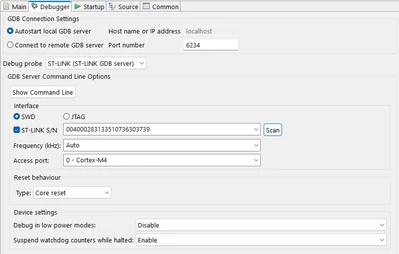
starting with Update 1.18  (update from 1.17) sth. broke and i cannot debug anymore.
I tried a nucleo Board with integrated St-Link and an ST-Link V3. All Screenshots were done with the v3 St-Link
I reinstalled CubeIDE already from the complete download-package, but still the same problem

i always get
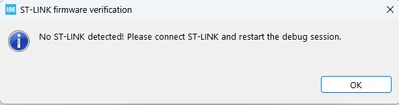
funky_0-1742308417257.png

But the update works ( so my st-link is found)
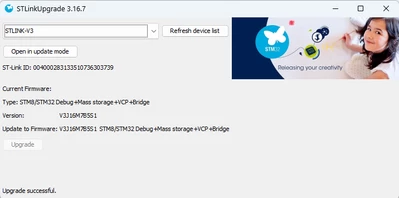
funky_1-1742308536498.png

funky_2-1742308587232.png

I can flash my image via st-link utility without problems.

but cannot get debug to work with 1.18.

With v1.17 i had no problems at all and debugging worked flawlessly.

So what can i do to fix this?

i tried with stlink-v3 and v2.1

and i use Windows 11 Enterprise
Regards

Best answer by AScha.3

Hi,

just because i have IDE 1.18 (on my MxLinux PC) also, no problems with st-link xxx whatever -

it might be something on Win as anti-virus or something about the "rights" you or part of new program has (or not.).

So try to disable all firewall, anti-virus and check rights... 

12 replies

funkyAuthor
Associate II
March 24, 2025

yes, checked settings again, looking fine

current state:
i reboot and my stm32cubeprogrammer looks like this:

funky_0-1742819175350.png

as soon as i click sth the connection to st-link is lost is lost

funky_2-1742819240616.png

CubeIDE with gdb autostart...no st-link detected message box
CubeIDE, switch debugger to "connect to remote gdb" and start my gbd via commandline and it works 

C:\ST\STM32CubeIDE_1.18.0\STM32CubeIDE\plugins\com.st.stm32cube.ide.mcu.externaltools.stlink-gdb-server.win32_2.2.100.202501151542\tools\bin\ST-LINK_gdbserver.exe -p 61634 -l 1 -d -z 61265 -i 004000283133510736303739 -cp C:\ST\STM32CubeIDE_1.18.0\STM32CubeIDE\plugins\com.st.stm32cube.ide.mcu.externaltools.cubeprogrammer.win32_2.2.100.202412061334\tools\bin -m 0 -g --frequency 24000


STMicroelectronics ST-LINK GDB server. Version 7.10.0
Copyright (c) 2025, STMicroelectronics. All rights reserved.

Starting server with the following options:
 Persistent Mode : Disabled
 Logging Level : 1
 Listen Port Number : 61634
 Status Refresh Delay : 15s
 Verbose Mode : Disabled
 SWD Debug : Enabled

Waiting for debugger connection...
Debugger connected
Waiting for debugger connection...
Debugger connected
Waiting for debugger connection...
 -------------------------------------------------------------------
 STM32CubeProgrammer v2.19.0
 -------------------------------------------------------------------


Log output file: C:\###\STM32CubeProgrammer_a22220.log
ST-LINK SN : 004000283133510736303739
ST-LINK FW : V3J15M7B5S1
Board : STLINK-V3SET
Voltage : 3.27V
SWD freq : 8000 KHz
Connect mode: Normal
Reset mode : Software reset
Device ID : 0x413
Revision ID : Rev Y
Device name : STM32F405xx/F407xx/F415xx/F417xx
Flash size : 1 MBytes
Device type : MCU
Device CPU : Cortex-M4
BL Version : 0x31
Opening and parsing file: ST-LINK_GDB_server_a22220.srec
Memory Programming ...
 File : ST-LINK_GDB_server_a22220.srec
 Size : 621.88 KB
 Address : 0x08000000

Erasing memory corresponding to sector 0:
Erasing internal memory sectors [0 1]

Erasing memory corresponding to sector 0:
Erasing internal memory sectors [5 9]
Download in Progress:

File download complete
Time elapsed during download operation: 00:00:10.625


at least i can debug somehow but it is not nice but i don't know what causes this and wasted days for this :(

funkyAuthor
Associate II
May 5, 2025

ok the problem still persists. i reinstalled everything again and the st drivers are still f*** up :((((