
Gaston
Associate III
November 12, 2025
Question

CubeIDE 1.19.0: Failed to enable Live Expression. Connection failed

  • November 12, 2025
  • 2 replies
  • 326 views

This does not happen in CubeIDE 1.15.1 and the solution suggested in this post does not work either.
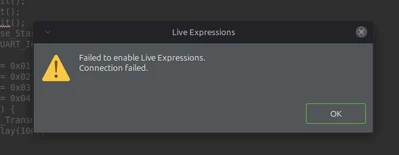
Gaston_0-1762950848155.png

How can I fix this issue?

Thanks in advance,
Gaston

2 replies

Andrew Neil
Super User
November 12, 2025

It says, "Connection failed" - can you do anything else in the debugger?

A complex system that works is invariably found to have evolved from a simple system that worked.A complex system designed from scratch never works and cannot be patched up to make it work.
Technical Moderator
November 12, 2025

Hello @Gaston 

Could you please share your Debug configuration, or your Log file?

KR, Souhaib

To give better visibility on the answered topics, please click on Accept as Solution on the reply which solved your issue or answered your question.
Gaston
GastonAuthor
Associate III
November 13, 2025

Where is the Log file?

Here's the Output Console

STMicroelectronics ST-LINK GDB server. Version 7.11.0
Copyright (c) 2025, STMicroelectronics. All rights reserved.

Starting server with the following options:
 Persistent Mode : Disabled
 Logging Level : 1
 Listen Port Number : 61234
 Status Refresh Delay : 15s
 Verbose Mode : Disabled
 SWD Debug : Enabled
 InitWhile : Enabled

Waiting for debugger connection...
Debugger connected
Waiting for debugger connection...
Debugger connected
Waiting for debugger connection...
 -------------------------------------------------------------------
 STM32CubeProgrammer v2.20.0 
 -------------------------------------------------------------------


Log output file: /tmp/STM32CubeProgrammer_RyEdAC.log
ST-LINK SN : 52FF70064980515749250487
ST-LINK FW : V2J46S7
Board : --
Voltage : 3,19V
SWD freq : 4000 KHz
Connect mode: Under Reset
Reset mode : Hardware reset
Device ID : 0x443
Revision ID : Rev Z
Device name : STM32C01x
Flash size : 16 KBytes
Device type : MCU
Device CPU : Cortex-M0+
BL Version : 0x51


Opening and parsing file: ST-LINK_GDB_server_xCzbYs.srec


Memory Programming ...
 File : ST-LINK_GDB_server_xCzbYs.srec
 Size : 12.82 KB 
 Address : 0x08000000


Erasing memory corresponding to segment 0:
Erasing internal memory sectors [0 6]
Download in Progress:


File download complete
Time elapsed during download operation: 00:00:00.480

and the Debug Configuration

Gaston_3-1763039213184.png

Gaston_4-1763039271387.png

Gaston

Technical Moderator
November 13, 2025

Just check "Log to file" in debug configuration so you can find your log. 

Could you try to test with OpenOCD and check if the issue persists?

To give better visibility on the answered topics, please click on Accept as Solution on the reply which solved your issue or answered your question.