
Associate II
October 2, 2024
Solved

CubeIDE not loading source code for makefile project while debugging

  • October 2, 2024
  • 3 replies
  • 1624 views

Hi All,

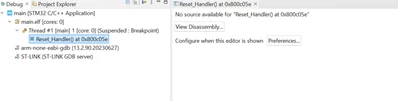
I have a Makefile based project that I imported to CubeIDE. I am able to build it smooth, however when i am trying to launch a debug window I am not able to see the source code and it only shows 2 buttons saying "View Disassembly" and Preferences tab.

Unlike the one's shown online I am not getting an option to load the source file by browsing my file system. What am I doing wrong and how to load this??

The below is my debugger view (I put a breakpoint at Reset_Handler hence the halt)
gkowshik_0-1727861635969.png


Please help me with the problem as it's very hard to debug with the assembly view. please note the view is not loading when the function is entering C files too, i.e., from Reset Handler the PC jumps to SystemInit which here is a C file but even for that I am not able to see the load.

Thanks
Best answer by Andrew Neil

@gkowshik wrote:

Did you build with debug info? - Do you mean my optimization level? Yes, I had -O0 and added 


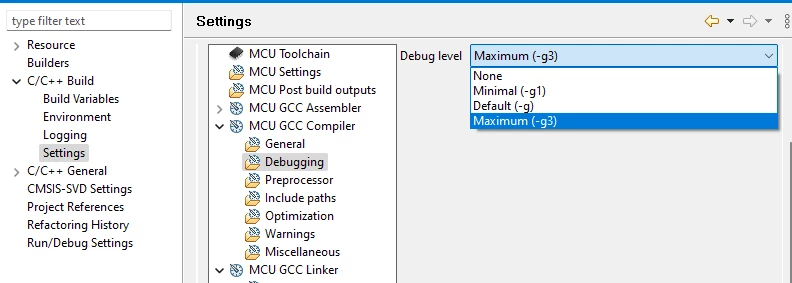
No. You need a -g to include debug info in the ELF file:

https://gcc.gnu.org/onlinedocs/gcc/Debugging-Options.html#:~:text=Level%203%20includes%20extra%20information%2C%20such%20as%20all%20the%20macro%20definitions%20present%20in%20the%20program 


Default for CubeIDE is -g3:

AndrewNeil_0-1727865097015.png


3 replies

Andrew Neil
Super User
October 2, 2024

What version of GCC do you use to build?

Did you build with debug info?

What version of CubeIDE do you use to debug?


@gkowshik wrote:

when i am trying to launch a debug window I am not able to see the source code


Show how you do the launch

A complex system that works is invariably found to have evolved from a simple system that worked.A complex system designed from scratch never works and cannot be patched up to make it work.
gkowshikAuthor
Associate II
October 2, 2024

What version of GCC do you use to build? - gcc version 10.3.1 20210621 (release) (15:10.3-2021.07-4)

Did you build with debug info? - Do you mean my optimization level? Yes, I had -O0 and added 

What version of CubeIDE do you use to debug? - I am using the latest version i.e., 1.16.1

Show how you do the launch

I created a new debug configuration by going to Run -> Debug Configurations

gkowshik_0-1727864353421.png

gkowshik_1-1727864373445.png

gkowshik_2-1727864386443.png


And to launch I simply clicked Debug As -> STM32 C/C++ Application and it was able to launch it.


Andrew Neil
Andrew NeilBest answer
Super User
October 2, 2024

@gkowshik wrote:

Did you build with debug info? - Do you mean my optimization level? Yes, I had -O0 and added 


No. You need a -g to include debug info in the ELF file:

https://gcc.gnu.org/onlinedocs/gcc/Debugging-Options.html#:~:text=Level%203%20includes%20extra%20information%2C%20such%20as%20all%20the%20macro%20definitions%20present%20in%20the%20program 


Default for CubeIDE is -g3:

AndrewNeil_0-1727865097015.png


A complex system that works is invariably found to have evolved from a simple system that worked.A complex system designed from scratch never works and cannot be patched up to make it work.
gkowshikAuthor
Associate II
October 2, 2024

Hi,

Thanks for pointing it out. I have now included it in my makefile. Here's my makefile for your reference, however I am still not being able to reference the source code while loading the elf in the IDE.


TARGET=main
EXECUTABLE=main.elf
BINARYOUT=main.bin
MAPFILE=main.map # Define the map file name
# STLINK=~/Downloads/stlink
LIBPATH=STM32L1xx_StdPeriph_Lib/

CC=arm-none-eabi-gcc
LD=arm-none-eabi-gcc
AR=arm-none-eabi-ar
AS=arm-none-eabi-as
CP=arm-none-eabi-objcopy
OD=arm-none-eabi-objdump

BIN=$(CP) -O ihex 

DEFS = -DUSE_STDPERIPH_DRIVER -DSTM32L1XX -DHSE_VALUE=8000000 -DSTM32L1XX_MD
STARTUP = $(LIBPATH)/Libraries/CMSIS/Device/ST/STM32L1xx/Source/Templates/gcc_ride7/startup_stm32l1xx_md.s

MCU = cortex-m3
MCFLAGS = -mcpu=$(MCU) -mthumb -mlittle-endian -mfloat-abi=soft -std=gnu11 -g3
ASMFLAGS = -mcpu=$(MCU) -mthumb -mlittle-endian -mfloat-abi=soft -g3
STM32_INCLUDES = -I$(LIBPATH)/Libraries/CMSIS/Device/ST/STM32L1xx/Include/ \
	-I$(LIBPATH)/Libraries/CMSIS/Include/ \
	-I$(LIBPATH)/Libraries/STM32L1xx_StdPeriph_Driver/inc/ \
	-I./inc/ \
	-I./inc/BLE/

OPTIMIZE = -O0

# Separate CFLAGS (for compilation) and LDFLAGS (for linking)
CFLAGS	= $(MCFLAGS) $(OPTIMIZE) $(DEFS) -I. -I./ $(STM32_INCLUDES)
LDFLAGS = -Wl,-T,stm32_flash.ld -Wl,-Map=$(MAPFILE)

src=./src/main.c \
	./src/millis.c \
	./src/usart.c \
	./src/spi.c \
	./src/debug.c \
	./src/stm32l1xx_it.c \
	./src/system_stm32l1xx.c \
	./src/BLE/io_support.c \
	./src/BLE/acilib.c \
	./src/BLE/aci_queue.c \
	./src/BLE/aci_setup.c \
	./src/BLE/hal_aci_tl.c \
	./src/BLE/lib_aci.c \
	$(LIBPATH)/Libraries/STM32L1xx_StdPeriph_Driver/src/stm32l1xx_gpio.c \
	$(LIBPATH)/Libraries/STM32L1xx_StdPeriph_Driver/src/stm32l1xx_spi.c \
	$(LIBPATH)/Libraries/STM32L1xx_StdPeriph_Driver/src/misc.c \
	$(LIBPATH)/Libraries/STM32L1xx_StdPeriph_Driver/src/stm32l1xx_dbgmcu.c \
	$(LIBPATH)/Libraries/STM32L1xx_StdPeriph_Driver/src/stm32l1xx_dma.c \
	$(LIBPATH)/Libraries/STM32L1xx_StdPeriph_Driver/src/stm32l1xx_exti.c \
	$(LIBPATH)/Libraries/STM32L1xx_StdPeriph_Driver/src/stm32l1xx_flash.c \
	$(LIBPATH)/Libraries/STM32L1xx_StdPeriph_Driver/src/stm32l1xx_i2c.c \
	$(LIBPATH)/Libraries/STM32L1xx_StdPeriph_Driver/src/stm32l1xx_iwdg.c \
	$(LIBPATH)/Libraries/STM32L1xx_StdPeriph_Driver/src/stm32l1xx_pwr.c \
	$(LIBPATH)/Libraries/STM32L1xx_StdPeriph_Driver/src/stm32l1xx_rcc.c \
	$(LIBPATH)/Libraries/STM32L1xx_StdPeriph_Driver/src/stm32l1xx_rtc.c \
	$(LIBPATH)/Libraries/STM32L1xx_StdPeriph_Driver/src/stm32l1xx_sdio.c \
	$(LIBPATH)/Libraries/STM32L1xx_StdPeriph_Driver/src/stm32l1xx_syscfg.c \
	$(LIBPATH)/Libraries/STM32L1xx_StdPeriph_Driver/src/stm32l1xx_tim.c \
	$(LIBPATH)/Libraries/STM32L1xx_StdPeriph_Driver/src/stm32l1xx_usart.c \
	$(LIBPATH)/Libraries/STM32L1xx_StdPeriph_Driver/src/stm32l1xx_wwdg.c 

# Object files
OBJDIR = .
OBJ = $(SRC:%.c=$(OBJDIR)/%.o)
STARTUP_OBJ = $(STARTUP:%.s=$(OBJDIR)/%.o)

all: $(TARGET)

$(TARGET): $(EXECUTABLE)
	$(CP) -O ihex $(EXECUTABLE) $(TARGET).hex
	$(CP) -O binary $(EXECUTABLE) $(BINARYOUT)

$(EXECUTABLE): $(OBJ) $(STARTUP_OBJ)
	$(CC) $(CFLAGS) $(OBJ) $(STARTUP_OBJ) $(LDFLAGS) -lm -lc -lnosys -o $(EXECUTABLE)

$(OBJDIR)/%.o: %.c
	$(CC) $(CFLAGS) -c $< -o $@

$(OBJDIR)/%.o: %.s
	$(AS) $(ASMFLAGS) -c $< -o $@

clean:
	rm -f $(OBJDIR)/src/*.o \
	 $(OBJDIR)/src/BLE/*.o \
	 $(OBJDIR)/STM32L1xx_StdPeriph_Lib/Libraries/STM32L1xx_StdPeriph_Driver/src/*.o \
	 $(TARGET) \
	 $(EXECUTABLE) \
	 $(BINARYOUT) \
	 $(TARGET).hex \
	 $(MAPFILE) # Remove the map file


gkowshikAuthor
Associate II
October 2, 2024

@unknown Thanks for the reply. There seems to be a mismatch in the cross referencing of the file path as my PC has WSL enabled and I need to add the mapping translations for the file path in the debug configuration. 

After giving the file paths and the mainly enabling "-g3" to the makefile I am able to get the debug views correctly. 

Thanks alot for your help, I will close this.

gkowshik_0-1727874201073.png