

StevenG
Associate III
October 14, 2025
Question

Defining enum type compiles ok, but STM32CubeIDE flags syntax error

  • October 14, 2025
  • 5 replies
  • 957 views

Defining the underlying type of an enumeration has been a difficult task until C23 added the feature.  Previously different compilers used different methods and results could vary unexpectedly.


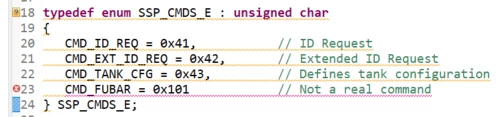
As seen in the image below, STM32CubeIDE v 1.19.0 can recognize this C23 feature and flag mistakes, such as the out-of-range value 0x101 for the 8-bit enum.
StevenG_0-1760451686376.png

As seen in the gcc output below, the mistake is caught by gcc:

StevenG_1-1760451743024.png

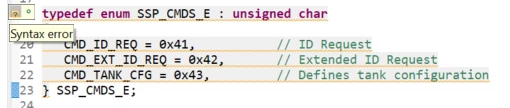
This is all as it should be.  The problem is when I remove the fake out-of-range command, gcc works as expected but STM32CubeIDE flags a syntax error:
StevenG_2-1760451874411.png

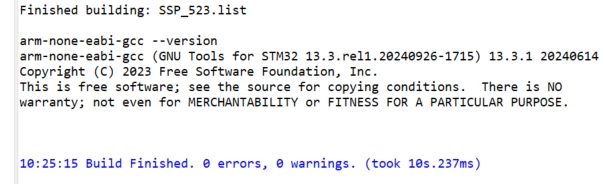
The build finished with no errors or warnings so gcc 13 understands at least this part of the C23 standard.
StevenG_3-1760452017611.png

Is there a configuration within STM32CubeIDE to prevent displaying a Syntax error for code the compiler understands?


PS

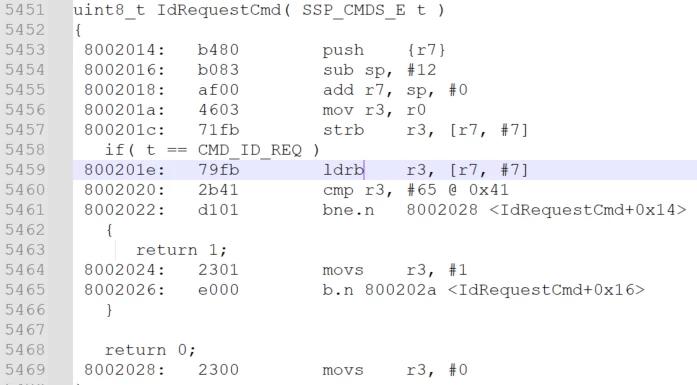
  I checked the generated assembly and it appears that the correct 8-bit code (ldrb) is being generated:
StevenG_4-1760452219105.png


5 replies

Ghofrane GSOURI
Technical Moderator
October 14, 2025

Hello @StevenG 

First let me thank you for posting.

As shown in the screenshot below ,  STM32CubeIDE 1.19.10 supports the following C language standards:

  • ISO C90 / ANSI C89
  • ISO 9899:199409
  • ISO C99
  • ISO C11
  • ISO C17
  • ISO C18
  • GNU extensions for each of the above (e.g., GNU99, GNU11, GNU17, GNU18)

GhofraneGSOURI_0-1760518814408.png

C23 is not listed: The latest standard available is C18 (ISO C18 or GNU18).

The enum underlying type syntax (enum E : unsigned char { ... }) will not be supported by the current toolchain and will result in a syntax error.

THX

Ghofrane

To give better visibility on the answered topics, please click on Accept as Solution on the reply which solved your issue or answered your question.
StevenG
StevenGAuthor
Associate III
October 15, 2025

Note that the current toolchain does support the syntax, it appears it's just STM32CubeIDE's syntax highlighter that does not.


Is there any plan to update the syntax highlighter or a way to adjust how the syntax highlighter works?

Andrew Neil
Super User
October 15, 2025
A complex system that works is invariably found to have evolved from a simple system that worked.A complex system designed from scratch never works and cannot be patched up to make it work.
StevenG
StevenGAuthor
Associate III
October 15, 2025

Correct.  The gcc compiler/linker did the right thing as the assembly showed (which is why I included that image).


The problem lies within either Eclipse's or STM32CubeIDE's syntax highlighter. 


My question was if there was a switch somewhere within STM32CubeIDE to tell the syntax highlighter what standard to follow.

Andrew Neil
Super User
October 15, 2025

@StevenG wrote:

My question was if there was a switch somewhere within STM32CubeIDE to tell the syntax highlighter what standard to follow.


I haven't found one.

You can turn off the error highlighting completely:

https://stackoverflow.com/questions/802410/why-does-eclipse-cdt-say-syntax-error-but-compilation-no-problem#:~:text=Alternatively%20you%20can%20turn%20off,for%20C/C%2B%2B%20Indexer%20Markers.

A complex system that works is invariably found to have evolved from a simple system that worked.A complex system designed from scratch never works and cannot be patched up to make it work.
Andrew Neil
Super User
October 16, 2025

Does this help: https://stackoverflow.com/a/50128081 ?

It's not entirely clear (to me) what this actually does - is it telling Eclipse to use the GCC preprocessor/parser instead of its own built-in one?

The Eclipse online help seems no more informative:

AndrewNeil_0-1760605870873.png


A complex system that works is invariably found to have evolved from a simple system that worked.A complex system designed from scratch never works and cannot be patched up to make it work.
bramble
Senior
October 16, 2025

Not sure if I'm missing something here, but there is a syntax error in your "corrected" version isn't there? You have a comma after 0x43, which is not strictly correct as it's the last item in the enum.

Associate II
October 17, 2025

A trailing , is ok in an enum list (but not required).

A.D.
Associate III
October 20, 2025

OK so we all agree that it has nothing to do with the selected toolchain, but is the Eclipse Language Server. But does anyone know a solution how to teach the Eclipse code highlighter the new C standard?

bramble
Senior
October 20, 2025

I wouldn't!  Although a comma in that case is digested by the toolchain, it is syntactically incorrect. This is rather like JSON which some lazy coders scatter with commas at the end of a list only to find that some JSON parsers don't mind and others fall over in a heap.

So rather than modifying the tool to mask a trivially fixed coding error, why not fix that error? 

Bear in mind that compilers evolve forever and the next version may indeed choke on that comma.

I think that the language settings in Eclipse can be edited if you really want to modify the tool to mask this issue.

Andrew Neil
Super User
October 20, 2025
A complex system that works is invariably found to have evolved from a simple system that worked.A complex system designed from scratch never works and cannot be patched up to make it work.