
Associate III
September 26, 2024
Solved

Don't see \core nor main.c in project on STM32Cube

  • September 26, 2024
  • 1 reply
  • 7363 views

Hello,

I am a beginner with STM32IDECube.
I have just installed Version: 1.16.1 Build: 22882_20240916_0822 (UTC) which seems to work.
I am developing a program with the STM32F107 processor as a target.
Everything works so far except that now I want to integrate my little test program (just for blinking e LED)  written in C into the project with a view, of course, to compiling it and then downloading it into the component alongside FeeRTOS and the configurations that I have made with STM32Cube for which I have generated the code.


My problem is:


1) I do not see anywhere, neither in STM32Cube nor in my directories on my disk, a file in which this basic code could have been generated ?

2) I don't see anywhere, neither in STM32Cube nor in my directories on my disk, a "\Core" directory where this could be ?
3) I don't see anywhere, neither in STM32Cube nor in my directories on my disk, a "main.c" file in which I could, possibly and if that's what needs to be done, integrate my code ?

See attached a screen capture of the only thing I see on STM32Cube.

- What's going on ?
- How could I move forward ?

Thanks,
--
MDe / Belgium
 

Best answer by mƎALLEm

@MDe wrote:

You still do not explain me why, at some point, we need to install a second application, STM32CubeMX and generate code through it, for it to work ?


I didn't tell you at any time you "should" install STM32CubeMX.

There are two possibilities:

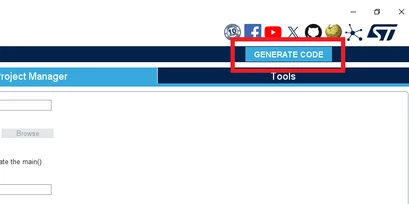
1- You start from CubeMx (the standalone) tool and configure your peripherals and generate your code from there. In this case you need to generate the code with this button:

SofLit_0-1727338758225.png

2- Start from CubeIDE tool (as stated in UM2609 / section 2.1.2 Creating a new STM32 project) and use the integrated CubeMx in CubeIDE. In this case you need to generate the code with this button:

SofLit_0-1727359343229.png

Hope it's clear now.

1 reply

mƎALLEm
Technical Moderator
September 26, 2024

Hello @MDe and welcome to the community.

You didn’t tell how you did proceed to generate your project and what tools you used for this. 

"To give better visibility on the answered topics, please click on ""Accept as Solution"" on the reply which solved your issue or answered your question."
MDeAuthor
Associate III
September 26, 2024

Hello SofLit,

Thank you for your quick response.
But I don't see what you're talking about?

I installed STM32CubeIDE in its latest version 1.16.1 on my PC. No problem except that, at startup, Eclipse behind does not know how to access certain directories. All I did is start STM32Cube as Administrator and the problem is solved.

I then simply created a new project by clicking on "Start New STM32 project" and I chosed my processor from the list, namely "STM32F107-VCT6".

I then validated the use of FreeRTOS, added a Task and configured the Clock in the "Clock and Configuration" tab

I generated the code and it is generated without error or warning.

At this stage, I want to add my code which simply flashes an LED which is on my Printed Circuit Board.

And that's where I don't see what to do further :
- Where is the code already generated ?
- How do I insert my code in my project ?

I'm probably missing something.

Thanks in advance,

--

Mde / Belgium


mƎALLEm
Technical Moderator
September 26, 2024

Hello,

To be efficient could you please attach your project compressed in .7z format?

"To give better visibility on the answered topics, please click on ""Accept as Solution"" on the reply which solved your issue or answered your question."
