
Enable SWO on CubeIDE 1.12.1 - Board used Nucleo-H755ZI
Hello,
I went through all the SWO related topics, and it was a bit confusing for me to get it running, so I summarized the steps to have it working on a Nucleo H755.
In my project I have the main clock set at 400MHz, Timer2 running at 1Hz and Debug set as "Trace Asyncronous Sw"
In my main.c I have added just this:
 /* USER CODE BEGIN 2 */
#define SWO_BASE (0x5C003000UL)
#define SWTF_BASE (0x5C004000UL)

 uint32_t SWOSpeed = 2000000; // [Hz] we have 2 Mbps SWO speed in ST-Link SWV viewer
 uint32_t SWOPrescaler = (SystemCoreClock / SWOSpeed) - 1; /* divider value */

 //enable debug clocks
 DBGMCU->CR = 0x00700000; //enable debug clocks

 //UNLOCK FUNNEL
 //SWTF->LAR unlock
 *((__IO uint32_t *)(SWTF_BASE + 0xFB0)) = 0xC5ACCE55; //unlock SWTF

 //SWO->LAR unlock
 *((uint32_t *)(SWO_BASE + 0xFB0)) = 0xC5ACCE55; //unlock SWO

 //SWO divider setting
 //This divider value (0x000000C7) corresponds to 400Mhz core clock
 //SWO->CODR = PRESCALER[12:0]
 *((__IO uint32_t *)(SWO_BASE + 0x010)) = SWOPrescaler; //clock divider

 //SWO set the protocol
 //SWO->SPPR = PPROT[1:0] = NRZ
 *((__IO uint32_t *)(SWO_BASE + 0x0F0)) = 0x00000002; //set to NRZ

 //Enable ITM input of SWO trace funnel, slave 0
 //SWTF->CTRL bit 0 ENSO = Enable
 *((__IO uint32_t *)(SWTF_BASE + 0x000)) |= 0x00000001; //enable

 LL_TIM_EnableCounter(TIM2); //Used for LED toggle

 /* USER CODE END 2 */

 /* Infinite loop */
 /* USER CODE BEGIN WHILE */
 while (1)
 {
	 if (LL_TIM_IsActiveFlag_UPDATE(TIM2)) {
		 LL_TIM_ClearFlag_UPDATE(TIM2);
		 LL_GPIO_TogglePin(LD1_GPIO_Port,LD1_Pin);
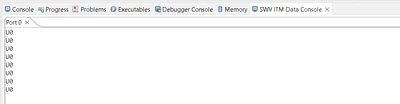
		 ITM_SendChar(0x55);
		 ITM_SendChar('0');
		 ITM_SendChar('\n');
	 }
 /* USER CODE END WHILE */

 /* USER CODE BEGIN 3 */
 }
Once you compile and run the debug, activate the SWO and limit the frequency at 2MHz (otherwise it will run at 12)
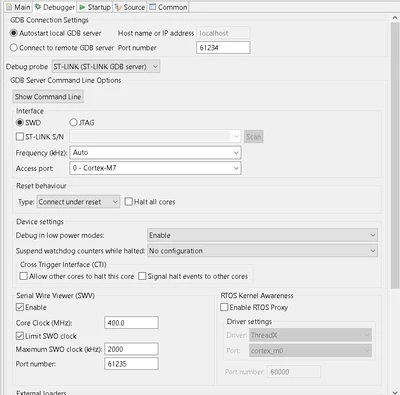
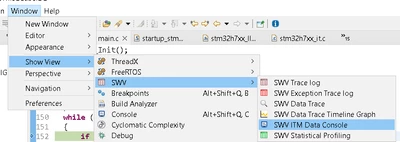
After the program is loaded and the execution stops at the beginning of the main, add the toolbar for the SWV ITM Data Console:
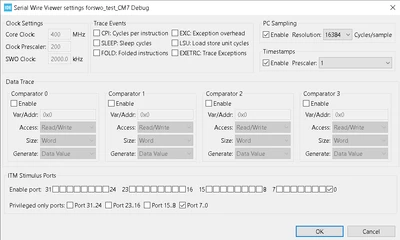
and add the port 0 on the settings:
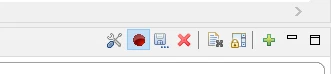
then press the "Start Trace" button before resuming the code execution:
At this point you will see the output:
and this is what the pin is doing:

Hope this will help developers that stumbled on the same problem.
P.S. The ST-Link V3 can work also at 12MHz, as I set-up in the project in attach. You will need to remove the tick "Limit SWO clock" in the debugger configuration and change to 12000 the variable SWOSpeed into the main.c.