
SKled.1
Senior
March 24, 2023
Solved

How to change the Repository directory (location)?

  • March 24, 2023
  • 5 replies
  • 8418 views

By default, in Windows, STM32CubeIDE downloads all firmware dev packages for all MCUs used into a Repository folder under the User folder for the user installing it, e.g.: C:\Users\User Name\STM32Cube\Repository.

I don't want it there, actually not even on that drive at all.

How do I change that Repository path?
This topic has been closed for replies.
Best answer by Wijeden RHIMI

Hi @Community member​ ,

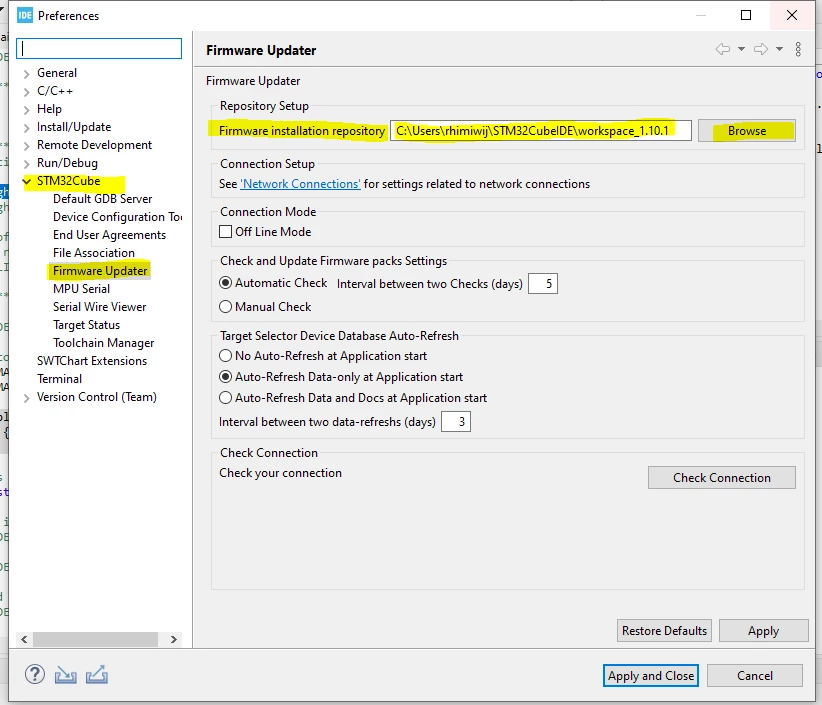
Under Window --> preferences , then try to do the same thing as shown in the screenshot bellow:

 0693W00000aJle0QAC.png 

Don't hesitate to ask more questions.

Thanks,

Wijeden,

5 replies

Bob S
Super User
March 24, 2023

I haven't tried this, and I don't run CubeMX from inside IDE, but....

In standalone CubeMX go to Help->Updater Settings. There is a field for repository folder. Try that.

Wijeden RHIMI
Wijeden RHIMIBest answer
ST Employee
March 27, 2023

Hi @Community member​ ,

Under Window --> preferences , then try to do the same thing as shown in the screenshot bellow:

 0693W00000aJle0QAC.png 

Don't hesitate to ask more questions.

Thanks,

Wijeden,

SKled.1
SKled.1Author
Senior
March 29, 2023

Ah, thanks. It's under Window here, not Project.

Wijeden RHIMI
ST Employee
March 29, 2023

Hi @SKled.1

Yes yes under window sorry :)

Does this solution solve your issue ?

Wijeden,

SKled.1
SKled.1Author
Senior
March 29, 2023

Yep ;)