

matt-crc
Senior III
March 30, 2025
Solved

How to check pre-processor output for macro expansion

  • March 30, 2025
  • 2 replies
  • 767 views

Is there a way to see how CubeIDE is expanding/pre-processing this code?

typedef struct {
	int16_t x;
	int16_t y;
	int16_t z;
} TouchPoint;

#define TS_Point(_x, _y, _z) { .x = _x, .y = _y, .z = _z }

TouchPoint Touch_FT6236_GetPoint(uint8_t n) {
	Touch_FT6236_ReadData();
	if ((touches == 0) || (n > 1)) {
		return ((TouchPoint)TS_Point(0, 0, 0));
	} else {
		return ((TouchPoint)TS_Point(touchX[n], touchY[n], 1));
	}
}

 Its compiling, but I'm getting weird values.
Best answer by Andrew Neil

@matt-crc wrote:

Is there a way to see how CubeIDE is expanding/pre-processing this code?.


Note that CubeIDE itself does do the expanding/processing - it's done by the preprocessor during compilation.

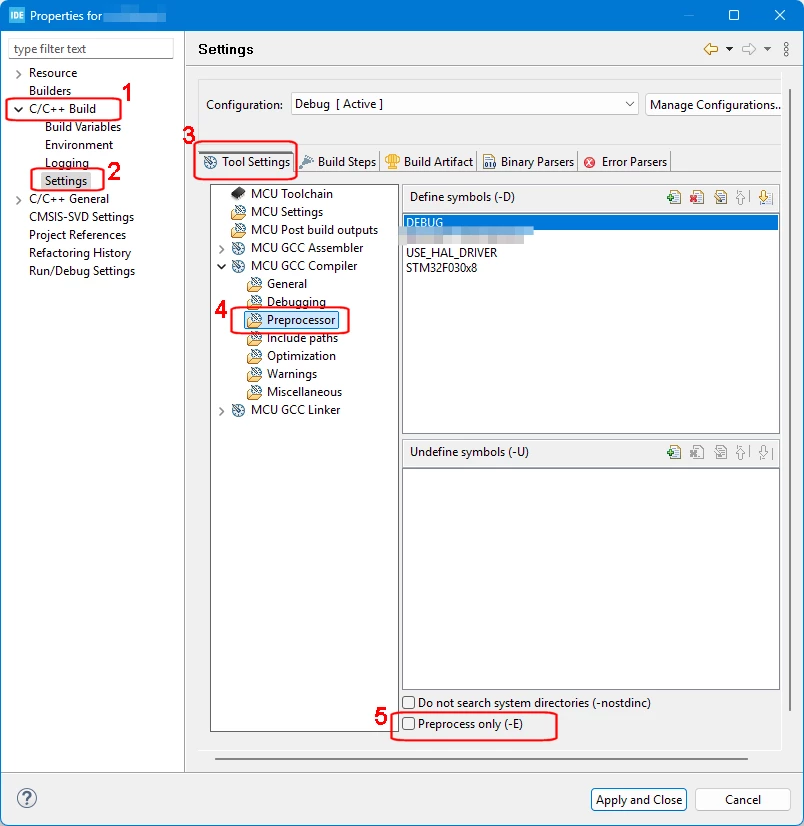
But the option you require is here:

AndrewNeil_1-1743413692593.png


@matt-crc wrote:

I'm getting weird values.


So what are you expecting to get?

And what do you actually get?


2 replies

mbarg.1
Senior III
March 31, 2025

Best - according to my experience - use MENU Window->Show View->Include Browser

Andrew Neil
Super User
March 31, 2025

@mbarg.1 wrote:

use MENU Window->Show View->Include Browser


That doesn't show preprocessor output - does it?

A complex system that works is invariably found to have evolved from a simple system that worked.A complex system designed from scratch never works and cannot be patched up to make it work.
Andrew Neil
Andrew NeilBest answer
Super User
March 31, 2025

@matt-crc wrote:

Is there a way to see how CubeIDE is expanding/pre-processing this code?.


Note that CubeIDE itself does do the expanding/processing - it's done by the preprocessor during compilation.

But the option you require is here:

AndrewNeil_1-1743413692593.png


@matt-crc wrote:

I'm getting weird values.


So what are you expecting to get?

And what do you actually get?


A complex system that works is invariably found to have evolved from a simple system that worked.A complex system designed from scratch never works and cannot be patched up to make it work.
matt-crc
matt-crcAuthor
Senior III
March 31, 2025

@Andrew Neil 

I originally tried that, but didn't find the pre-processor output.... Eventually, i figured out that the *.o object files contained the expanded C code.  (not obvious)

@mbarg.1 

I think that option only displays the include hierarchy.

Andrew Neil
Super User
March 31, 2025

@matt-crc wrote:

I originally tried that, but didn't find the pre-processor output.... Eventually, i figured out that the *.o object files contained the expanded C code.  (not obvious)


The standard command line tells the compile to call its output file .o

So, when the generated output is the preprocessor output, it goes into the .o file.

Indeed, it makes sense once you know - but it's not obvious before you've found out!

There's also the -save-temps option to do the compile and keep the preprocessor output:

https://gcc.gnu.org/onlinedocs/gcc/Developer-Options.html#index-save-temps


@matt-crc wrote:

@mbarg.1 

I think that option only displays the include hierarchy.


It also shows call/caller hierarchy

But, indeed, not preprocessor output.

A complex system that works is invariably found to have evolved from a simple system that worked.A complex system designed from scratch never works and cannot be patched up to make it work.