
Associate III
September 7, 2024
Question

How to correctly setup a project to build and debug

  • September 7, 2024
  • 2 replies
  • 1025 views

Hi, I am new to STM32 and I have been trying to follow the getting started page and this tutorial. I am having trouble building the project as the option is greyed in Project>Build Project.
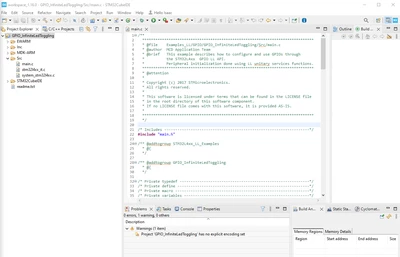
isaacseeto_0-1725668453344.png


I saw in another post (https://community.st.com/t5/stm32cubeide-mcus/the-build-button-is-greyed/td-p/74154), that this could be a result of incorrect project importing but I don't understand how to correct this as I have followed the guide (https://wiki.st.com/stm32mcu/wiki/STM32StepByStep:Step1_Tools_installation).

For reference, I was trying to follow this tutorial as well (https://www.youtube.com/watch?v=BVC7KaUNCS8).

Thank you.

2 replies

Pavel A.
Super User
September 7, 2024

Indeed the first time with CubeIDE may be hard.

From your description, it can be indeed a failed import, or the project files can be corrupted or missing.

For best results, since you are on a Windows PC, try to ask remote assistance from somebody you know,  using the Windows Quick Assist tool.

PavelA_0-1725712054686.png


TDK
Super User
September 7, 2024

You can load examples directly using the Example Selector when starting a new project. Might work better.

TDK_0-1725713869288.png


"If you feel a post has answered your question, please click ""Accept as Solution""."