
Associate
May 15, 2025
Solved

How to import assembly file and compile them in STM32CudeIDE ?

  • May 15, 2025
  • 4 replies
  • 1013 views


How to import assembly files and compile them in STM32CudeIDE ?
When I create a .s source file in a project, I cannot even save the file, and STM32CudeIDE only reports an error:

Save failed

AST is empty
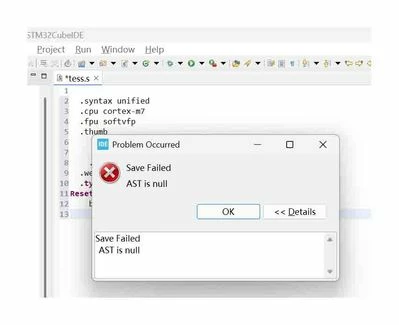
ide-bug.jpg

Best answer by nori

After installing multiple different versions of the IDE, I solved the problem by creating a new workspace. Thank you very much!

4 replies

Andrew Neil
Super User
May 15, 2025

Can you create any other files?

This worked for me:

  1. select a Source folder in your project
  2. right-click and choose New > File
  3. name it <whatever>.s
  4. edit as required
  5. save
  6. build
A complex system that works is invariably found to have evolved from a simple system that worked.A complex system designed from scratch never works and cannot be patched up to make it work.
noriAuthor
Associate
May 15, 2025

Thank you for your reply.
Yes, I can. If I edit and input the C code into the new file, it will work properly. However, when entering ASM code, an error will be reported.
I tried to modify startup_stm32h750vbtx.s in the Startup folder for testing purposes, and then saved it, but the same error occurred.
I speculate that STM32CudeIDE treats the. s assembly file as C code and attempts to establish a syntax tree to provide editing assistance This may be a bug in STM32CudeIDE.

ide-bug2.jpg

Andrew Neil
Super User
May 15, 2025

Mine (v1.13.0) recognises .s files fine, and will create, edit, and build them correctly.

There must be an issue in your installation.


A complex system that works is invariably found to have evolved from a simple system that worked.A complex system designed from scratch never works and cannot be patched up to make it work.
Tesla DeLorean
Guru
May 15, 2025

"AST is null" is from Eclipse

@STTwo-32 

Tips, Buy me a coffee, or three.. PayPal VenmoUp vote any posts that you find helpful, it shows what's working..
Pavel A.
Super User
May 15, 2025

Have you installed some Eclipse add-on from eclipse store?

Edit the assembly file in any other editor. 


noriAuthorBest answer
Associate
May 15, 2025

After installing multiple different versions of the IDE, I solved the problem by creating a new workspace. Thank you very much!