Solved
How to integrate and build the Adafruit Gamepad QT seesaw C++ library for the Nucleo-G071RB
The goal is to test the Adafruit Gamepad QT with the Nucleo-G071RB board. This requires using the Adafruit seesaw C++ library of source files, which transmits analog joystick signals using the I2C protocol.
I used the code example I2C_TwoBoards_ComPolling (C-code) as a starting point an...
- Added both the Adafruit seesaw and BusIO libraries (C++ code) to the project,
- Updated the Project Include paths,
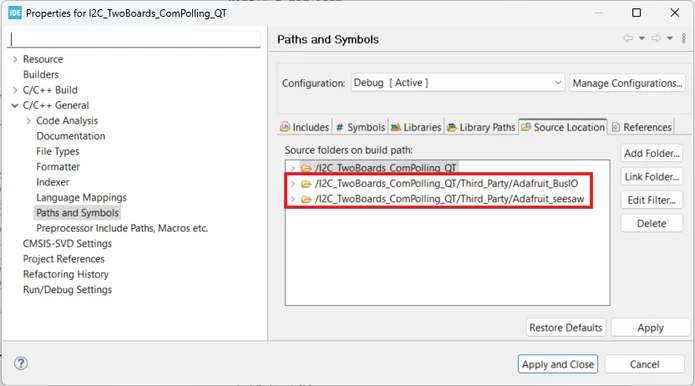
- Added the library paths to the Project Source Locations (Figure 1), and
- Renamed the main.c file to main.cpp.
Problem: the project does not built the Adafruit libraries, the compiler just ignores them.
What is the solution for this? How do I build the entire project, including the Adafruit libraries? Thank you!!!
Figure 1.